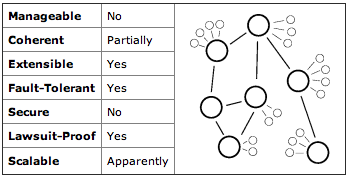
Distributed Systems Topologies


The primary challenge is finding customers. It is difficult to convince any company to risk sending their software and data out to untrusted third parties. There are no good technical measures for protecting intellectual property on untrusted computers. In addition, scavenged cycles are an awkward mode of computation and potential customers have to port their code before they can even try it out. A company’s primary value proposition is price, but you’re competing with the ever-decreasing cost of computer time. And the market is mostly $200,000+ enterprise sales. It always takes 12–18 months to close a contract at that scale, that’s a long time wait for a cash-poor startup.
A couple of things have changed in the past ten years for the better. Cloud computing is now mainstream, there’s no need to explain the concept. And distributed computing has improved with paradigms like MapReduce. Computers have gotten faster, although that doesn’t specifically favor scavenged computing. Unfortunately bandwidth has not gotten significantly cheaper so data transfer is still a barrier.
Fate has not been kind to this market in the last ten years: see my 2007 retrospective. Since then United Devices merged with Univa and is still operating, although presumably never worth anything like the $45M in venture investment it raised. Data Synapse got bought by TIBC for a rumored $28M, more than zero but not the $200m+ value of a real success.
I’m glad people keep trying to make this business work, but it’s a tough road. In the meantime free projects like BOINC are having some success providing low cost computation for public research projects. And of course the botnets are owning the Internet.
On Nov 2 Ken and I had Main Cabin Select tickets from JFK to SFO. That morning I called and paid extra for first class upgrades (score!). Then two hours before departure, the flight was cancelled. The scene at JFK was chaos because Virgin has just that week changed its online reservation system and it wasn’t working. The staff didn’t know how to use it, the system didn’t work, customers were sitting on the floor waiting for things to get straightened out.
Rebooking us was beyond the JFK staff’s ability to cope. The nice woman at the desk kept saying “we have this flight, do you want it?” and then spending ten minutes trying to book it, only to find some other agent had grabbed the seats while she was typing. She finally rebooked us on a different airline. Only they booked it wrong, twice, and I spent 90 stressful minutes going between terminals three times trying to get the flight booked correctly.
I will say the agent we talked to was pleasant and professional. She just was unequipped to make their own software work. And then they were so stressed and rushed they kept screwing up the booking on a different airline. Poor service is de rigeur for airlines but Virgin America claims to be something different. Sadly it wasn’t last month.

Related, a few weeks back Matt Cuts tweeted that Googlebot is executing some Javascript when indexing. (See this analysis and my earlier comments) It’s worth noting that the Googlebot indexer is almost certainly an entirely different system from the preview image generator. I suspect the index building crawl still runs very little Javascript code and almost certainly doesn’t render pixels; speed is important for freshness.
(A remaining puzzle: why the image tiles from Open Street Map aren’t in that preview. They’re also loaded in Javascript. They may have loaded too slowly, or maybe the preview generator doesn’t load content from external domains?)
Tech companies give employees stock (or options) on hiring. The weird thing about that compensation is that the stock grant is generally fixed at the time of hire, before the company really knows anything about the new person. The resulting compensation is never really fair. Sometimes a great hire ends up not working out and ends up with more stock than they deserve. More often, an undervalued hire ends up doing great and it’s a shame he or she doesn’t have more stock. At Google my impression was most employees’ stock grants were entirely uncorrelated with their impact at the company; grant size had way more to do with hire date.
Companies can try to fix inequitable compensation by rewarding good employees with more stock. But those grants always come much later when the strike price is higher and are generally much smaller than the initial grant. So extra stock after being hired seldom really works out. It’s much easier to give a good employee a cash raise. The corollary to this is as a new hire, if you can afford to you should negotiate for more stock vs. more cash. Because while you can always get more cash later if you do well, you can seldom get more stock.
Another ugly aspect of the Zynga story is the use of “Google chef situation” as a metaphor for an employee getting too much stock. That refers specifically to Charlie Ayers, Google’s chef 1999–2006, who reportedly made a giant pile of money from his stock options. To anyone who suggests he doesn’t deserve that compensation: fuck off. Charlie worked incredibly hard at Google and did a great job growing a kitchen from one meal a day for 40 people to three squares for 10,000+ people. That kitchen had a huge impact on the success of the company; Google got an extra 200 hours’ work a year out of employees because we wanted to eat at work rather than go out. Charlie personally was responsible for the kitchen’s success. I assume “chef situation” is some sort of class distinction, that chefs don’t deserve as much compensation as the hallowed engineers. That’s disgusting.
Eleven Madison is operating at a very high standard right now. If you live in New York or are going to visit make the effort to go: you need to reserve weeks in advance. They received four stars in the NYT two years ago and just recently got 3 stars and 5 forks in the NY Michelin guide. I had dinner there a year ago right after they switched to the current tasting menu and it was very good but not transcendent. In the past year they’ve found their stride and it is now as good as dining gets, anywhere in the world. Go.
Our meal consisted of some twelve amuse bouche followed by a four course tasting menu meal. The menu is deliberately abstract, just a list of main themes like “Lamb” or “Apple” that are elaborated based on the staff’s reading of the diner’s desires. An open mind is useful but they’re not playing any games, no need to fear some unwelcome surprises. The cooking leans towards traditional, not molecular gastronomy trickery, and excels by being very well executed.
Langoustine: Marinated with Grapes, Fennel, and Marcona Almonds
White Truffle: Tortelli with Fontina Val d’Aosta and Chestnuts
Guinea Fowl: Roasted with Pear, Salsify, and Foie Gras
Apple: Ice Cream with Toffee Cake, Walnuts, and Caramel
Foie Gras: Terrine with Plum, Bitter Almond, and Umeboshi
Lobster: Poached with White Truffles, Autumn Mushrooms, and Spinach
Guinea Fowl: Roasted with Pear, Salsify, and Foie Gras
Blue Cheese: With Pear, Chestnut Honey, and Bitter Greens
1995 Meursault Les Meix Chavoux (Domaine Roulot)
1996 Corton-Bressandes (Domaine P. Dubreuil-Fontaine Père & Fils)
Sadly I have no record of the various amuse, they were extraordinary in their variety and complexity. The main courses were nicely paced and undiluted, each enjoyable and complete without being overwhelming, Often at a fine meal like this by the time you get to the poultry you’re tired and just want to stop eating; Eleven Madison avoided fatigue.
But food is only half of fine dining, the room and service is the other half. And it’s extraordinary. Terrifically personal and friendly service, not too formal, but very professional. I’d gotten the reservation by gushing on about having been to Humm’s restaurant in San Francisco and was impressed the staff all knew my story. We even got a little visit to the kitchen, always fun, amazing to see as many cooks in the kitchen as there were diners in the room. All working precisely, neatly, for our pleasure.
Chef Humm is buying the restaurant from Danny Meyer, along with his General Manager Will Guidara. That’s probably good news, but I’m a bit concerned that they are also taking on food and beverage at a nearby hotel. The best chefs always expand their empires, it’s natural for his career, but I fear the risk of diluting his excellence. Did you know Wolfgang Puck used to do something other than frozen pizzas? They are also publishing a cookbook due Nov 11 (see video). We saw a pre-release copy. It looked beautiful and entirely impractical for the home cook, more of a monument to his art like Keller’s French Laundry Cookbook.
Some bad software forces you to choose your time zone off a map, making it impossible to select UTC. A handy trick is to choose Reykjavik, Iceland time. Since 1968 Reykjavik hasn’t changed clocks for daylight savings and is identical to UTC. That could theoretically change in the future.
The positioning of Klout is gross, turning ordinary social interactions into some sort of game with a competitive score. Of course there are meaningless achievements. But what’s most loathsome is the primary purpose of Klout is to offer “Perks” (aka “ads”) to you based on your Klout score. Yes, I can get a free sample of Axe Hold and Touch hair gel because I’m such a bro on the Internets! Even worse, you have otherwise-sensible people seriously suggesting we use Klout to decide if people’s comments have value. It’s like a high school popularity contest for the Internet. Yuck.
As with most social media you and I aren’t the customers of Klout, we are the product. Only with Klout you can’t opt out of being packaged and sold. There’s a Klout page for me with my name, my Twitter icon, a score, details about my social network. Klout refuses to remove it despite my persistent requests, because “your Tweets are publicly visible on your profile page”. Which is true (and an important principle I agree with) but ignores the sheer ugliness of creating scores and profiles for people who do not want them. I’m not the only one offended by this.
My weblog is an old school blog, a public diary of things that personally interest me. I mostly write as a way to summarize what I’m learning about something new like living in Paris or flying airplanes. Sometimes I post to influence others with an opinion about Klout or Facebook or SOAP or the like. On rare occasions I troll. But even though this blog is mostly written to satisfy myself, I do write it for an audience. It takes me most of an hour to write these short messages. (See my secret work blog and defunct game blog for much less edited stuff.)
I love the old school blog format. I’ve got a big list of RSS feeds for other blogs like mine; some recently active favorites include Justin Watt, Jason Kottke, and Rafe Colburn. The list is much longer with less active people Mike Migurski or Andy Baio; I love it when a blog post pops up after six months of silence. I regret that “blogging” for most of the world now means crappy journalism; pro-blogs with 20+ posts a day salted with ad targeting keywords is tiresome.
The ease of Twitter’s short format has definitely sucked some of the energy out of personal blogging. But as Anil says, if you didn’t blog it, it didn’t happen. Go ahead, write something, it’s not hard! Even if no one but yourself ever reads it it’s worth your time. For hosted blogs these days I like WordPress.com. I keep meaning to check back on how Blogger is doing, too.
Only if you’re reading this blog post there’s not much point in going to the actual exhibit. Because the links above (and the exhibit’s site) are way more effective than seeing digital interactive art hanging dead on walls of a museum. I’m really glad that MoMA has this exhibit and Paolo Antonelli curated it very shrewdly. It’s great to see this work taken seriously and shown to MoMA’s audience. It’s just a shame the art carries over so poorly in a museum.
Passage is staged as a screen stuck to the wall with a joystick. You can play it yourself! But Passage requires a few minutes reading to understand and a few more minutes to play and no one was engaging that way in the museum. At best someone would pick up the joystick, fiddle a few seconds, then put it down again and wander on. The Tentacles art looked great, but the interaction required taking your phone out, getting on the MoMA WiFi, installing a custom app, then trying to figure out how to operate it. I actually went through all that trouble only to find the interaction server wasn’t working. The WiFi failed soon after. I felt really bad for MyBlockNYC, that exhibit had completely failed displaying an empty browser window with, I kid you not, Evony and Wizard 101 toolbars on it. One enterprising visitor later figured out how to bring up a weather website on the giant screen while other patrons raptly looked on at this exhibit of Art. (I resisted the urge to add 4chan to MoMA’s exhibit, although it honestly belongs there.)
Interactive exhibit tech is hard and it’s mean to pick on stuff that crashes. But then there’s the projects that didn’t exhibit well at all. Migurski’s brilliant Walking Papers is reduced to some printouts and a paragraph of text, I fear no one looking got the point at all. And the Square exhibit is particularly baffling: a credit card dongle stuck to a wall on top of a crayon drawing of an iPhone. Really?
For a contrasting approach to digital exhibition, IBM did a nice job with the design of the Think exhibit at Lincoln Center. Beautiful giant LED display at human scale, you could walk right up to it. And an interactive video room that while a bit too Hypercardy for me was genuinely beautiful and engaging. The content itself wasn’t so interesting, but the presentation was good.
I guess the real challenge here is how to collect and curate digital art with the imprimatur of a Legitimate Musuem. Video art and conceptual art have similar display challenges, it’s hard to make them compelling in a gallery. I think it’s a mistake to relocate online art to a museum; what works is art designed for the museum space. For the rest we need some other institution to help us curate and critique what’s going on in the Internet.
PS: the most effective interactive art display may well have been the ad for donations.
Les Halles (Financial District). Atavistic French brasserie. Very basic menu, great if you want steak frites and not so much otherwise. Reasonable preparation, nice room, surprisingly inexpensive. I wish I had a place like this in San Francisco.
Dos Toros (Village). A taqueria serving SF-style burritos, in New York! Considered the best burrito option among many SF expats. I thought it was good; honestly as good as most of the places in SF. Nice spicy sauce, good carnitas, good cheese. Too salty, and the staff of four rolled sloppy burritos in twice the time a single person in SF can do. But it was good.
reBar (DUMBO). Didn’t eat, just drinks, but liked it. Comfortable place to meet after work, nice beer selection, cool art in the building.
Wolfgang’s Steakhouse (Tribeca). Ken wanted a New York steakhouse, this was pretty great. Really amazing quality steak, both the filet and the ribeye, although the portions are comically oversized. Better quality of beef than Ruth’s Chris, for what it’s worth. Good salads, OK service, kind of noisy room.
Bar Boulud (UWS). Part of Daniel Boulud’s empire, the Bar is a more casual cafe kind of place. Serious brunch menu, including very well made omelets (a lost skill in most of the US). Also a lovely charcuterie selection, many delicious meats. Great place for a smart lunch.
Chez Josephine (Hell’s Kitchen). 11pm dinner after theater, French, with nice live piano music. And a wonderfully welcome very gay staff. The food was, frankly, mixed quality; both our entrees were fairly dull meat+sauce, but the salads were nice. Really enjoyed the room and the service, though, a nice post-theater meal.
Highpoint (Chelsea). We were in the mood for a boozy brunch in Chelsea, Highpoint was perfect. Great breakfast bar, terrific Bloody Marys and an interesting list of other cocktails. The eggs benedict were nice. The food is quite inexpensive, too, good value.
Roosevelt Island is this wacky bit of Manhattan borough, an island in the East River. There’s not much out there, condos and hospitals. The reason to visit is the open space, nice long walks on both sides of the island and great views of the Upper East Side. Also grass, parks, even barbecue grills for anyone’s enjoyment. It will be particularly nice to visit in 2013 when the southern park is fully open. It looks like they are preserving the creepy hospital ruins there as part of the park, a nice touch of gothic drama in an otherwise bucolic place. (Roosevelt Island is also a popular video game setting; several GTA4 missions start at that hospital.) The Tramway is strongly recommended; it’s a short ride but the view as you go sailing into midtown between the buildings is terrific.
The High Line is New York’s most famous new park, a nicely landscaped mile or two of abandoned railroad track. Having a park up above the city streets makes all the difference, a nice quiet remove. They also did a stunning job on the design with many great places to sit and watch other people. There’s too damn many people, actually, and the linear park design makes it hard to get any space. So it’s more of a people watching place than an open area.
Shake Shack (Flatiron). World famous burgers for a reason. They are very delicious thanks mostly to the large amounts of fat and salt in the burger. Eat them quick; I imagine in 10 minutes they’re disgusting. But on a nice day in Madison Park they’re awesome.
Sushi Yasuda (Midtown). Very widely recommended. It was good, but nothing particularly exciting or unusual. Much like the nigiri you can get anywhere, just very high quality. I’m told sometimes you get unusual things like toro from 4 different parts of the world. We got some great toro but it was unidentified. Yasuda has moved back to Japan, I wonder if the current staff is simplifying?
Pegu Club (SoHo). A nice bar with serious cocktails. Great drink list, nice room, silly uncomfortable furniture. I’ll go again but sit at the bar.
Emporio (Nolita). Italian picked at the last minute because Torrisi was awkward. Nice place, comfortable and quiet at lunch. The pasta was tasty but a bit overcooked.
Bar Pitti (Village). Another casual Italian, but very hectic. We had two courses and a bottle of wine and were out the door in 45 minutes, with crazy brusque service. But the boar pasta was just fantastic and it’s a good place, if I lived here it’d be one of my neighborhood joints.
Egg (Williamsburg). Lovely American breakfast / lunch place. Really excellent pork sausage, good duck hash, tasty comfort food prepared well. Sticking with the Williamsburg theme, the hipster service was comically incompetent but charming and friendly.
Spitzer’s (Lower East Side). Nice little corner bar with wide open windows on a good weather day. Plenty of beers on tap, also a good grilled cheese sandwich. The fries looked good. NY doesn’t have nearly as many pub-type places as we have on the west coast, this one was nice.
Craft (Flatiron). Our first and, so far, best meal in NY. Perfectly cooked bits of delicious meat. My short ribs were excellent, as was my ballotine of suckling pig, a sort of charcuterie. All very simple, but also very solid. Good service, nice room. I may go back.
Le Gigot (West Village). A solid little French restaurant, of the sort you can find everywhere in Paris and almost nowhere in San Francisco. Nice salad, slightly odd cassoulet. The meats were all cooked perfectly but the broth was a bit weird, too dark and tasting of Kitchen Bouquet. Still, I liked the place.
Thalassa (Tribeca). Somewhat upscale Greek. It was OK, but not great. Very simple and spare cooking, which is appropriate: grilled fish with a bit of olive oil, grilled shrimp with a bit of olive oil. Interesting fish, good quality, but neither were cooked quite right. Execution is everything in this kind of place and it fell just a bit short.
Mercer Kitchen (SoHo). I have a fond spot in my heart for this American classic restaurant, one of the best cocktails I’ve ever had was a French 75 here some 10 years ago. Sunday brunch was uninteresting. Too crowded, boring menu, indifferent hamburgers (!) and omelettes. Resting on a reputation.
Soho Sushi (SoHo). Delivery sushi at a friend’s. Pretty good, really, but with delivery it’s hard to be sure what you’re really getting. Some of the rolls were ill advised.
Pigalle (Times Square). A solid little French brasserie, of the sort you find everywhere in Paris but almost nowhere in San Francisco. Not quite as solid as Le Gigot. I’ve been three times now and it’s reliable, spacious, and the cooking is adequate. Lunch was uninspired.
John’s Pizzeria (West Village). Glad I got the NY pizza out of the way. Entirely adequate, uninteresting, I can get as good a pizza in San Francisco only delivered to my house with my wine and my television. (Or in Zürich, or in Paris, or.. pizza is a commodity.) The best thing about John’s is it’s near Grom; save room for gelato.
Where I really want to dine are 11 Madison, Le Bernardin, and Per Se. Sadly they are all very hot tables and three weeks was not advanced enough booking.
#!/bin/bash set -euWhy? Safety. -e means bash will exit if any of the commands it runs returns an unhandled error. -u means unset environment variables are errors. It’s a little safety net for shell scripting.
What does the iPad do? The iPad is a computer with a revolutionary new user interface. It’s ideally situated for the cockpit: easy to use one handed, even balanced on your knee. There’s a variety of excellent aviation software for the iPad. It’s also a nice companion for Internet while travelling and for entertaining passengers.
Electronic Flight Bag plus more. The key aviation software I use is ForeFlight. It contains most everything you need for flight planning in the US: VFR and IFR charts, NACO terminal procedures, flight planning, official weather briefings via DUATS, supplementary weather (radar, METARs, etc), flight plan filing, A/FD, even fuel prices at airports. See their demo video for more. ForeFlight is very complete: I planned and flew an 8 day trip from California to Florida and back entirely using ForeFlight. ForeFlight costs $75 / year for full chart updates for the entire US. An extra $75 for a pro subscription gets you georeferenced approach plates so you can see your actual position via GPS. There are alternatives to ForeFlight with some different strengths: WingX is the best known.
Other aviation software. Pilot Wizz and E6BPro are both good calculator/converter apps; Pilot Wizz has a great weight and balance screen. Mr. Sun is a handy little sunset calculator. SkyCharts is a simple alternative for chart display with good enroute display. Jeppesen Mobile TC lets you use Jepp charts, but the app is very limited. OffMaps v1 is a good way to cache street maps for viewing while airborne. MotionX is a nice app for recording GPS tracks to look at your flight later on Google Maps. X-Plane is a fun simulator. I also use a bunch of web pages regularly when planning flights: Fly2Lunch, 100LL, etc.
iPad hardware. You have two choices when buying an iPad: how much storage and whether to get 3G. ForeFlight itself takes 6GB for full charts. Double that for updates and a 16GB model is barely sufficient. I suggest buying at least 32GB, more if you want to bring video and music along. 3G is a toss-up. If you get the WiFi only model then it will have no builtin GPS, but see below about external GPS. I like the 3G because it gives you the chance of having Internet access in the middle of nowhere if there’s no WiFi. Verizon vs. AT&T is a push, but the AT&T model will work better in Europe. (The original iPad 1 isn’t missing anything essential, although the extra CPU speed on the iPad 2 is nice. If money is tight, consider a used iPad 1).
GPS. The iPad with 3G has an assisted GPS receiver built in. In my experience it’s not useful in the air; some pilots say it works for them but it doesn’t work reliably for me. For about $100 you can buy an external GPS. I have a Bad Elf GPS (Amazon) and its performance is excellent, even when the antenna is sitting in the back seat. I’ve also heard good things about the GNS 5870 (Amazon) and XGPS150 (Amazon) as wireless options. Note that GPS is not necessary to get a lot of value out of the iPad. But if you want a backup GPS in the cockpit or you want to display your position on charts for situational awareness, get an external GPS.
Things to avoid. If the iPad overheats it shuts down, a potential crisis if you’re flying an approach. Keeping it out of the sun seems to be sufficient although it’s worth noting Apple says the iPad only operates to 10,000′. The iPad2 has magnets in the tablet itself and in the case that can swing your magnetic compass from at least 10″ away, possibly including when sitting on your glareshield. Do not use the iPad as a substitute for an IFR GPS or for any other required equipment. It is neither accurate nor reliable enough to trust your life to it. That goes double for the apps that emulate an attitude indicator. And of course don’t get distracted: if something goes wrong put the toy down and fly the plane.
Accessories. People seem to like this clip for knee mounting, also this aluminum case. The iPad battery is rated for 10 hours, so charging in flight may not be necessary. Cigarette lighter chargers work well. Remember that planes are often 28V and the iPad wants to draw 10W. The iPad fits very nicely inside the best flight bag in the world.
Alternates: iPhones, Android. For most purposes the iPhone works identically to the iPad; ForeFlight is great on the iPhone too. The big difference is screen size: the phone is too small for plates and working with charts takes a lot of squinting. For alternate tablets I’m hopeful that Android will catch on and offer some competition for Apple, but so far the iPad stands alone. Android requires totally different software; ForeFlight does not have an Android version, but WingX does.
Conclusion. The iPad is great for pilots and can replace most of the flight planning you currently do with paper charts and computers. There’s a lot of options: my bottom line recommendation is a 32GB + 3G iPad ($730) with ForeFlight ($75/year). If you want a GPS backup, spend $100 on a Bad Elf GPS.
No huge surprises: the biggest GA airports are near LA, Phoenix, Daytona Beach, and Minneapolis. A lot of these ops are probably training related; every single touch-and-go practice landing gets logged. I was surprised my little home airport of San Carlos is #71 at 350 ops / day. I have a hard time believing that number is really correct, that’s roughly 30 ops / hour of daylight.
In Vancouver, on the fine dining end we were impressed by West which is still excellent despite the changes over the years. The most inventive cooking we had was at L’Abattoir, really precise and interesting food in a trendy, slightly too noisy room. For more old school we enjoyed dinner at Hy’s Encore, classic steakhouse with terrific service and very good food. Also enjoyed a more casual lunch at Joe Fortes, seafood in a businessman’s bar and grill setting. The awkward middle ground was Le Crocodile, the service and room were not up to the promise (and expense) of the classic French menu. Not that we suffered, mind you, and the wine list is excellent. Regrettably we didn’t get to Vij’s despite many strong recommendations.
Portland treated us well on two quick overnights. Jake’s Famous Crawfish was great; it can be hit or miss but we had a hit that night with fantastic crab claw dish with mushrooms and artichokes. And an interesting evening at the Gilt Club, a sort of hipster late night restaurant / bar. The menu was a bit odd but the cocktail selection was fantastic. I had the BLT, “House Roma tomato vodka, basil & lemon olive oil and fresh lemon - up with bacon salt.” It was amazing.
Weeks before the flight we got the plane documented for international flight. Proof of insurance, a radio operator permit for the pilot, a radio station license for the plane ($160), a customs decal ($30). Plus the usual plane documents for any flight. Nothing difficult but it requires a couple hours figuring out government web sites, then possibly weeks before the documents are shipped (ours came in a week). No one ever asked to see anything but the customs decal.
The Canadian border is pretty easy. When you arrive, they want a phone call 2 – 48 hours before the flight saying when you’re coming. Then on the ground you call again from the customs box. In theory they may come inspect you and your documents, but for us they just gave us an arrival number over the phone. There’s no specific border requirement when leaving.
The US border is more complicated. The big requirement is filing a passenger manifest with eAPIS for both your departure and your arrival. The web site is awkward (and broken in Chrome), so expect to spend some time. Fortunately you can file days in advance. The eAPIS filing gives you permission to leave the country via email; I also called the local customs office and they seemed confused that I was asking them. You do need to notify customs at your arrival airport 1 – 24 hours before you come back in, mostly so there’s someone there to meet you. We arrived right on time and were done in 10 minutes at the plane: radioactivity check (!), passport check, customs decal check. Pretty easy.
Flights across the border need to be on a flight plan, both for the US and the Canadians. We went IFR so that was natural; if you go VFR you need a flight plan with a specific squawk code. Canada does charge for ATC services, apparently the bill is in the mail.
My primary takeaway from the conference is there are a lot of options for open source geo and it’s still difficult to know which to use. So many choices. For now I’m keeping my head down and learning GDAL, PostGIS, Mapnik, Tilestache, and Polymaps. PostGIS is the big one, a set of spatial extensions to the Postgres database. The book PostGIS in Action is a big help. Also one small takeaway: a whole lot of people are using Node.js for real stuff, not just the fashionable web kids in the Mission.
I met or heard some very impressive people and companies. Development Seed is building a lot of great mapmaking software, including the TileMill tool I played with recently. Stewart Long of Public Laboratory is doing inspirational work with citizen aerial mapping. Vizzuality got a lot of buzz as a Spanish company doing beautiful map design. Michael Byrne gave an exciting talk about the work he’s doing inside FCC to make data available. And Brian Timoney gave a strong talk on how far government agencies have to go in publishing data effectively.
The rest of this post is a link dump of some of the people and things I saw at the conference. I’m no “curator,” just a typist, sorry for the lack of organization.
The solution seems to have been flushing Safari’s cookies. Or maybe its cache or history. One way or the other, the iPad App Store had the wrong idea about my login. And now I have to log in to everything again.
If you’re the type of guy who reads directions, you already have that odd directory in your PATH. Because brew install python told you to do that. You can see it again, go run brew info python. See? This is all well documented, too. I’m not the kind of guy to read directions. Years of using Debian has conditioned me that the package manager will install things cleanly and for the very few things that need intervention I’ll get a little console warning in bright colors. Homebrew’s not like that, many packages print caveats and you’re expected to read them. (In the same vein, if you’re doing geo-hacking and use gdal, you might want to check brew info gdal and whether your PYTHONPATH includes /usr/local/lib/python. Also see these notes on building numpy on Lion.)
I opened a github issue suggesting brew doctor diagnose this missing Python path. I’d just write the patch, but the hurdle of doing Ruby and github right is a little high for me right now.
Designing is where TileMill really shines, a beautiful browser-hosted GUI for making maps. You style the map in Carto, a simple CSS-like language (here’s my style file). The development environment includes a live view of generated tiles and a great little editor. Really a joy to use, especially considering all the complex Mapnik stuff going on behind the scenes. TileMill is capable of more complex design than I used, like labels and interaction, but it’s also deliberately simplified compared to using the underlying tools directly.
Publication is simple. You can create single PNG or PDF images like this. Or you can generate an MBTiles file, a bundle of all the pregenerated tiles for a web map. Hosting a map at web scale yourself is a bit complicated. But you can upload your tiles to the inexpensive TileStream hosting service or just copy it to the free iPad app for personal use.
I’ve been learning about open source geo for a year now and it’s easy to get overwhelmed. TileMill is impressive in how it combines so many powerful tools into an easy to use product. Great work by Development Seed, the company behind TileMill. They’re supporting a lot of interesting humanitarian projects with great mapmaking tools.
Map data has become much more accessible to journeymen hackers; I did most of this work without using or, honestly, understanding most traditional GIS tools like GRASS and the various ESRI products. A lot of my hacks have been motivated by Polymaps and how easy it is to make maps in Javascript with data overlays.
I just launched an update on my Wind History project at windhistory.com. The big new feature is month filtering. You can now choose to look at prevailing winds for a specific month or animate a map of the shifting winds over the year. Try it out in the Bay Area, you can clearly see how the winds change in the winter. The rotating Kansas winds are interesting, too.
I also snuck in a couple of minor changes. The main map page now uses the geolocation API to initially position the map near where you are. And I improved the station page a bit, adding some much-needed tick marks on the radial axis.
Microsoft provides the images for Virtual PC, but they work in the free VirtualBox VM as well. Here are detailed notes on getting Vista with IE7 running on a Mac running Lion. The idea should be the same for other systems.
A few caveats.. I’m no VirtualBox expert, there’s probably cleaner ways to configure the virtual machine so it runs better. I never could get the Windows XP system to boot. Also the virtual Windows boxes are still subject to Windows Activation, so you’ll need to rebuild your machine from scratch every 30–90 days.
By the way, there are other ways to try a site on many browsers. A service like browsershots or BrowserLab is great for a quick check. But if you want a full interactive experience, a VM is a good way to go.
Fortunately there’s a fix. Long story short: you set your MacOS browser to a little program that tells Chrome to open a new window. Tabs still work like normal in Chrome, but external links now always create windows and, as a side effect, avoid the horrible Space switching.
That little program is in AppleScript, an ancient, opaque language. (Compiled scripts? Really?) Here’s the nut:
on open location theURL
tell application "/Applications/Google Chrome.app"
make new window
activate
set URL of active tab of first window to theURL
end tell
end open location
It’s a bit promiscuous with the windows if you’re used to the new tab behavior. The ideal thing may be to re-use an existing window if one is visible in the space, otherwise open a new Window. It’s a bit of a mystery why Chrome lacks a new window preference.
The most popular airports are San Carlos and Santa Fe, no doubt because I use them as examples. Folks are also notably interested in Snyder, TX (from an AOPA discussion); Camp Bondsteel (in Kosovo) and the NAS Whidbey Island and neighboring Oak Harbor in Washington.
The nice thing about a static site like this is it takes no maintenance. But I’m playing with some new features now. Geolocation API to move the map to where you are, fancier wind rose diagrams, and static HTML for dumb ol’ Googlebot.
The new developers absolutely nailed what made the original Deus Ex so great: gameplay options. You can sneak through levels avoiding the bad guys entirely, or go in guns-a-blazin and murder everyone, or hack your way through security, or find the hidden air ducts. It’s amazingly fun and they really got the gameplay right. The story’s quite good, too, with some good characters. Also some beautiful set design despite some limited graphics capabilities.
The game is a success in almost every way. The one failure is the boss fights, they’re awful. Weirdly, they were made by a third party. There’s various ways to cheap you way through them, best to just kill the boss quickly and move back to the fun game. And there’s a whole lot of fun in the game. May end up being the best game of the year.We have a traditional understanding of journalism with the exception of TechCrunch, which is different but is transparent about it.
The new CrunchFund is the big drama of the blogosphere today. If you’ve followed Arrington’s career it won’t surprise you, of course he thinks he can be the editor of a major tech publication while also investing in tech companies. He did it for years, with varying levels of disclosure quality. It’s part of the package along with the shoddy editing, the ignorance of basic concepts like off the record, the crazy personal vendettas. Arrington’s a blogger. A very effective, powerful blogger. He’s not a journalist. (Not that he disagrees: NYT, TechCrunch comments).
The frustrating thing is there is some actual good journalism at TechCrunch. I feel bad for the good reporters there: apparently they feel bad, too. I’d like to call out MG Siegler (aka parislemon) in particular for regularly writing well researched stories with insight and accuracy.
Maybe a real news outfit will hire the good folks out of TechCrunch. Both the Wall Street Journal and the New York Times have excellent blog-style tech coverage with proper journalistic methods and ethics. They should hire everyone away from the AOL clown car as soon as their acquisition lockups expire.
If there’s one downside to Lightroom it’s that it’s a bit confusing to learn this new way of doing things. I still don’t really understand what all it can do. But it does a good job easing new users in and the basic things you need to do are easy and, well, basic. Import photos. Mark the good ones. Edit them a bit. Export them to Flickr. All easy to do.
I have special love for Lightroom today because I just migrated all my stuff over to my Mac and it couldn’t have been easier. My Windows serial number activated the Mac copy, no fuss. All of Lightroom’s metadata about everything I’ve ever done in the .lrcat catalog. My edits, tags, titles, all in this one single file. It’s portable. I simply copied the catalog and my image files to the Mac, told Lightroom where the photos had moved, and I was done. Stress free and transparent.
Lightroom’s not cheap, often $300 retail. But it goes on sale occasionally; right now it’s available for $145 on Amazon, as good a price as you’re likely to see. There’s also a generous free trial program. There’s also a good third party geocoding plugin.
The iMac is basically a laptop bolted to a giant LCD monitor, with efficient mobile CPU and GPU keeping heat and power down. The biggest constant power draw is the LCD backlight; the automatic dimming helps quite a bit. Here’s some numbers (top end 27″ iMac: 3.4GHz i7 quad CPU and AMD 6970M GPU).
As efficient as the iMac is, it’s still worth the trouble to let it automatically sleep when you’re not using it. I’ve yet to have a Windows desktop where sleep mode actually worked; totally solid on the Mac, of course.

I just set up @somebitsLinks, a copy of my linkblog on Twitter. Tweets are a good medium for linkblogs, I hope some folks appreciate being able to see what I write there. Try it out, tell me what you think!
The Twitter feed is implemented by sending the Pinboard RSS to Twitter via dlvr.it, a third party product. It’s a nice service, has a variety of options for filtering and routing stuff from A to B. I’m hopeful it’ll have Google+ support as soon as Google gets its act together. They support Facebook now but that seems spammy. The one drawback is dlvr.it rewrites and shortens my links before they get to Twitter, doubly annoying now that Twitter in turn rewrites and shortens the links again. Sorry about that.
Do RAM errors matter? Sure! For example, at Black Hat Artem Dinaburg introduced bit squatting, where you register domain names one bit off of popular names and wait for random errors to send traffic your way. He reports getting close to 100 hits a day off of just 31 domain names. Sam Pullara reports he’s able to duplicate the attack.
More generally, RAM errors cause random data corruption. They are entirely preventable with error correcting RAM. Indeed, the early PCs all had parity memory (error detection, not correction). ECC adds a little access time overhead and some expense for the extra RAM and ECC logic. But isn’t it worth it?
The fix was rebooting while holding down Cmd-Option-P-R. That resets the PRAM (aka NVRAM or BIOS settings). After that the system booted fine. It doesn’t look like anything else important is in the PRAM, although I’ve probably screwed up the Boot Camp boot chain.
Macs have a bunch of magic keys at startup. I’d have thought holding down Option for Startup Manager would have been the right fix, but it didn’t seem to do anything. Apple’s support entry on this problem is unhelpful (step 1: Start up to MacOS. Um, that’s the problem). I wish Boot Camp were more transparent; there’s a bunch of conflicting and confusing information about how the Apple boot chain works.
I like my Air so much I went out and bought an iMac. I needed a monitor anyway; why not pay a bit extra to have a computer bolted onto it? So easy to set up. Plug in my Time Machine backup drive, say “import everything”, and I’m done. All the sensible settings were carried over. All my apps. All my weird stuff, like the Canon printer drivers and my personal Homebrew install and the odd hacks that use undocumented APIs. The only thing that didn’t just work on the new machine was Xcode; it was all there but for some reason my PATH didn’t pick it up.
I realize Macs have been able to do this trick for awhile, but it still seems like a miracle. The new App Store should make it even easier by streamlining licensing. If I understand right, if you buy an app on the App Store once you get the right to install it forever on any of your machines. I hope I have that right; that’s how the iOS store works and it’s how all my Mac apps so far have worked. That’s a pretty user friendly policy, also easy to understand. I wonder how it works in offices?
Chrome stores your web history in one giant file per month: 100 MB in two weeks for me! That file is constantly changing. Arguably history should be backed up, it’s valuable user data, but I’d rather not if it’s this inefficient. Unfortunately there’s no easy way to exclude just the history database; the filename changes every month and the directory it is in has other useful stuff.
My entire Dropbox repository is being backed up whether I change anything or not. I’m not the first to see this problem but it’s not clear what’s going on. (My guess: v1.1.40 and Lion.) My solution was to simply stop backing up Dropbox (why bother?). A related issue is Dropbox maintains databases in .dropbox that can also get unwieldy.
Under the hood Time Machine is pretty simple; it’s mostly doing the same hard link trick that rsnapshot uses with some help finding changed files from the filesystem. The GUI and easy setup is the magic, the sort of product Apple is uniquely good at building.
After years of using Windows and trolling my Apple-loving friends I finally bought a Mac. I love it. I last used MacOS five year ago (and before then, in 1993), so I’m coming to Lion with fresh eyes. This blog post is long for me and comes in three parts: the good parts of the Mac, the bad parts, and a list of software I find useful.
The other nice surprise is how handy it is to have Unix at hand. For years I’ve worked with two machines: Windows in front of me shelling in to Linux boxes for real work. It never really worked fluidly. With the Mac I can edit Python code and run it sensibly right on the same machine without weird filename collisions, network file system oddities, or Cygwin atrocities. I can augment my system with shell scripts. I can use most good old Unix software. I’m surprised how much this affects my daily work.
One pleasure of learning MacOS is finding all the grace notes. Preview and Quick Look are both lovely ways to just look at a file’s contents. There’s a real builtin dictionary with a handy Wikipedia client. There are buttons on the keyboard that pause my music or turn the volume up and they actually work. System sleep restores reliably. Windows claims to do most of these things but they never seem to work right.
MacOS also has some surprisingly sophisticated stuff. Time Machine is a terrific backup tool. The new Lion document model is brilliant; finally I don’t have to press some stupid “save” button. There’s automatic typo correction which makes me look smarter without being annoying. And Apple has figured out how to build systems around SSDs, a significant speed upgrade.
One other pleasant thing about the Mac ecosystem is the third party application market. Macs have a long tradition of solid, well designed software that is not free. I love that the three most popular text editors for MacOS all cost $40+. It’s great that Skitch, Alfred, and Reeder are beautiful apps that charge enough to support the developer’s lifestyle. The jury is still out on the Mac App Store, but given the success of the iOS market I’m optimistic we’ll see more independent developers making a living making beautiful apps.
Installing software is poorly managed. Download a .pkg file, mount it as a virtual drive, then drag the app to the Application folder, then unmount the package. How awkward! Some stuff comes with an installer script, but then there’s no standard uninstaller. Mac fanboys say “just drag the app out” but that only works for self-contained apps, not printer drivers or packet sniffers or anything that installs in several places at once. I’m amazed this doesn’t cause more problems.
There are too many keyboard shortcuts. The Home and End keys are broken. And there are way too many modifier keys: do we really need four? Windows generally gets by with two. (Hilarious example: Ctrl-Shift-Q is “play macro” in SublimeText. Cmd-Shift-Q is “force quit”. Ask me how I know.)
There are too many preferences to customize display. Why do I have a choice of two graphical animations for minimizing windows to the Dock? Can’t Apple pick one? Third party apps can be really bad, with 50+ display preferences. Good designers picks one good design, they don’t leave it up to individual users to cobble together their own. This opinion may be controversial.
The split between applications and windows is confusing. Some apps like Preview stay running even with no windows open, others like Font Book close when you close the last window. Lion has decided it’s OK to quit applications automatically if there are no windows. Chrome has a special hack to stop you quitting accidentally, there’s also a general solution. It’s just strange. I do like having a unified application menu bar, though.
iTunes is a fucking disaster. The UI works like the poorly managed work of summer interns and ignores the standard MacOS UI conventions. And it hangs when importing music; is it really single threaded?! The database is a joke, poorly managing data and regularly corrupting itself. The sync model with iOS devices is confusing and broken. iTunes is the gateway to Apple’s flagship consumer devices, it’s astonishing it’s been this bad for so long. Fire is the only way to be sure.
Chrome, the web browser. The best browser choice and since most of us spend 90% of our time in a web browser it’s worth picking the right one. Chrome benefits greatly from AdBlock and a hyperlink underline fix.
Alfred, a fantastic search UI and app launcher. It’s a replacement for the Spotlight UI (and the abandoned QuickSilver). I use it some 30 times a day already and have only started to learn what all it can do.
Growl, a desktop notifier. This little UI shim belongs as part of MacOS, it’s amazing it’s not integrated yet. Fortunately a lot of third party software supports it.
MenuMeters, a system monitor. Handy for tracking bandwidth and CPU usage. Apparently animating in the menu bar is a no-no these days but I find it useful.
Dropbox and Cyberduck for accessing remote files. Dropbox is a marvel, particularly good for sharing files with your iPad. I’m not wild about Cyberduck but it does a decent job with SFTP and is free. If I did a lot more of this kind of file sharing I’d look into Transmit.
Adium, a multi-protocol instant messenger. Now that iChat supports several protocols it’s less necessary, but it’s nice that Adium does IRC too.
Twitter, an interface for Twitter. I like having it open instead of visiting the site a couple of times a day.
Reeder, an interface for Google Reader. I love the iPad app and so far am liking the Mac app as well. Google’s web interface is good too but the native app feels cleaner and faster.
Skitch, a screenshot tool. Makes life easier when taking a lot of screenshots and the integrated web upload is handy.
Sublime Text 2, a text editor. I’m still evaluating this, the other contenders are TextMate, BBEdit, and TextWrangler. I like Sublime because it’s simple, just a text editor and not an IDE-wannabe. Also it’s under active development; I’m not about to drop $60 on a text editor that hasn’t even bothered to work right on Lion.
iTerm2, a terminal emulator. I don’t really know why this is so much better than Terminal but everyone else seems to love it, so I use it instead.
Homebrew, a Unix package manager. Makes it relatively easy to download and compile the random Unix programs MacOS is missing. Alternatives are MacPorts and Fink, the experts I trust all say Homebrew is better. I sure miss Apt and the robust Debian software library.

Most of the cities we visited were nice. Bergen’s great (do the Norway in a Nutshell tour), Trondheim’s pleasant, Bodø is tiny, Andennes is sad, and Tromsø is surprisingly sophisticated for being so far north. Oslo’s a lovely big city, the Aker Brygge is an example of urban redevelopment working successfully and the Vigeland sculptures in Frogner Park are terrific. But while we enjoyed all these places none were really exciting, nothing so great I have to go back. I was particularly missing a good cultural museum that explains Norway’s history; being under Danish rule for so many centuries seems to have limited the historical imagination.
I can’t talk about Norway without remarking on how terribly expensive it is. We’re used to high European prices but between Norway’s robust oil economy and its insulation from the eurozone financial crisis it’s way out of hand. Crappy paper cup of coffee? $5. Pint of beer? $12. Main course at a decent restaurant? $50. Pretty much everything cost double what it does in San Francisco and some 50% more than most of Europe, making it hard to recommend Norway as a tourist destination right now.
This post seems negative. Truthfully, Norway was a bit boring and the cuisine was a bit disappointing. But it is a beautiful country, the people are friendly, it’s sophisticated and comfortable. I’d gladly live there (at least in the summer) and I’d be happy to go back as a tourist.
I’m loving my new Mac but I’m coming to the conclusion MacOS is not suitable for an omnivorous gamer. Blizzard and Valve have both committed to the Mac but most PC games never make it over and the few that do are often low quality ports that come out months late. And graphics libraries are a mess. Of course DirectX is a non-starter, but even OpenGL and OpenCL support are years behind.

The only town of any note is Tórshavn, you’ll want to stay there for a short visit. We had a fine stay at the Hotel Torshavn but if I were doing it again I’d stay at the Hotel Føroyar; a bit out of town but beautiful and also home to a terrific restaurant. There’s not much to do in Tórshavn but there’s almost no services elsewhere; we could barely find a place serving lunch in the rest of the country!
I’m not sure what sustains the Faroes as a country. Fishing is the big industry and there’s some hope of oil. Their wool and knitting are also famous (see the Faroe Knitting blog). There’s a little tourism, particularly campers and hikers but I imagine that only works for a couple of months a year. The joy is visiting some place remote and beautiful. After our quick visit I started thinking how pleasant it would be to spend a month with some good books and an Internet connection.
Reykjavik is a small town but quite pleasant, particularly the cafe area in the middle of town. The Hotel Borg was quite nice and we had a fine, world class dinner at Sjavarkjallarinn. The new concert hall is a stunning piece of architecture. I could take or leave the Blue Lagoon, but it’s a nice way to wash off the jet-lag if you arrive too early for your hotel room to be available.
A real highlight for us was renting a plane and going on a sightseeing flight over the Þingvellir. Fun to put BISR and BIRK in the logbook, also a great way to get a sense of the land. The flying was easy; TF-GUS was a familiar 172SP and with an instructor handling the radios and navigation, we could just fly. I’d like to do more plane renting on trips; not nearly as complicated as I feared.Ken and I just had a nice overnight stay at Wine and Roses, a hotel / restaurant / spa on the northwest side of town. Very pleasant place. Our room was spacious and comfortable with a nice outdoor patio. Dinner was great, the place is often billed as the finest restaurant in Lodi. Pricy food but wine was inexpensive, and while the service was a bit irregular it was also professional and friendly. We didn’t try the spa, but the pool looked good.
One Lodi place we didn’t get to try is the Woodlon Diner, an unassuming little truck stop diner with a trained chef. Recommended by a friend, we tried to go but all eight tables were full. Note that Google Maps has the wrong location; it’s actually just north of the airport.
Breivik’s document is rational, well researched, coherent. At 1500 pages it rambles a bit, you can get a sense of the ground he’s covering via the table of contents (Scribd, Pastebin). He writes a history of the conflict between Islam and Christianity, a detailed rejection of various European modern philosophy, a curated collection of essays about the “threat” of Islam spreading in Europe. And then a detailed, apparently accurate manual about how to become a one man killing machine complete with armor, weapons, bombs, pharmaceutical enhancements. Tragically, all this research actually worked for Breivik and he was able to murder 70+ defenseless people on summer holiday.

Each Christian must now make their own personal decision on all of this. You can either choose to learn how to rise up in the power of your Lord and Saviour and learn how to become a true warrior in the Lord, or you can continue to keep your head in the sand and oppressor after oppressor keep beating you down.
Breivik here sounds exactly like a violent jihadi. Later in his manifesto he addresses this criticism:
By propagating and defending Christendom we simply mean that we want to halt the cultural Marxist/multiculturalist attacks and systematic deconstruction on our Christian cultures and the Church itself and to reverse the de-Christianisation of Europe. ... Western Europe has grown weak and decadent and will be completely annihilated culturally unless we succeed to implement a second European renaissance and reverse the damage done.
Reading this screed helped me better understand the violent Muslim equivalent, the rhetoric around a new caliphate and the establishment of pure Islamic states governed by Sharia. Those Middle Eastern concepts sounded foreign to me but Breivik’s similar ideas are comfortably English and Christian and European. And just as hideous.
A lot has been written about the emergence of the hashbang convention
for web applications, URLs like https://twitter.com/#!/nelson
that use # anchors to do fancy Javascript things. But most
people I’ve talked to don’t know the real purpose of the #!
convention, making Google’s life easier.

Googlebot is essentially blind to Javascript content. It (mostly) treats web pages as static text and refuses to execute any code on the page. That means that Google is incapable of indexing pages that rely on Javascript to render correctly. Not just fancy AJAX web apps, either. Google can’t index web pages that render pages client-side, or customize the display in Javascript, or do much of anything dynamically. My recent wind history project is essentially invisible to Google, for example.
Enter the hashbang convention, well documented by Google. The #! part is incidental; the spec is all about how site designers need to create a whole second set of statically generated HTML pages just for Googlebot, all behind URLs that include _escaped_fragment_ in their paths. There’s a 1:1 mapping between the #! URLs for humans and the _escaped_fragment_ URL for robots. My Twitter page at https://twitter.com/#!/nelson, for example, also exists at http://twitter.com?_escaped_fragment_=/nelson. A special page just for bots, which Google dutifully translates to #! URLs for humans. It’s all a big, gross, well-intentioned hack to work around a fundamental limitation in Google’s indexing technology.
I don’t quite understand why Google hasn’t tackled this core problem and figured out a way to run Javascript while indexing. It seems bad that Google can’t see the web the way users see it. Google has an amazing Javascript engine, of course, and more than enough skilled engineers to apply it to web indexing. It may be a scaling problem; running code for a page would probably increase their indexing workload by 10x to 100x. Or it may simply be that Google feels with its market power they can require every modern web site in the world to build a special version just for them. Hopefully I’m too pessimistic and Google is working on indexing Javscript content already.
The Eye-Fi
guys have a new trick, uploading photos from a digital camera
wirelessly to your iOS or Android device and from there, to the
Internet. The core tech is an SD card with a wifi network magically
shoehorned into it.
I had a lot of fun on my recent trip posting photos via Twitter. It was like sending postcards, some 92 images with bits of text day to day. Only problem is they’re crappy camphone images. Now I’m home and have a stack of 500 good photos taken with a real camera but without the enthusiasm of immediacy to edit and upload them. If only I had a way to upload photos from my real camera during my trip! Well I did, via the Eye-Fi, but I only found out about it when I got home.
The magic is direct mode. The Eye-Fi SD card not only can join wireless networks, it can form its own ad hoc wifi network solely to beam photos to other devices. The Android and iOS apps are smart enough to find this little private network and get your data. It’s a total hack but a clever one. Makes me wonder a bit what the point of Bluetooth ever was.
I should note that Eye-Fi has had the ability to upload photos to the Internet for a lot longer. The problem is with only your digital camera as a user interface, you had no good way to choose and edit the photos before uploading. The iPhone (or better, iPad) is a perfect solution. Also this route lets you upload via any 3G network your device has.
As a user the Facebook Connect experience is great. I see a familiar blue button, I click it, and I’m done. No creating an account, no coming up with a new username and password, no entering specific data. And it’s not just a login, many Facebook integrated sites give me a better experience with access to my Facebook social network. For site owners the advantage of Facebook connect is clear: good user experience, less code to manage, and access to Facebook data.
The problem is that Facebook is creating a monopoly. That’s a huge risk to every other company on the Internet. It’s bad for users too, we’re losing the ability to use pseudonyms online. And while Facebook’s technical execution is excellent the company has demonstrated over and over again its willigness to act unethically towards their users. We don’t want them controlling user identity.
There is a terrific technical alternative to Facebook Connect: OpenID. The tech works well and it’s open, letting users and companies choose their identity provider. But despite some four years’ headstart it’s never succeeded in being adopted widely like Facebook Connect has. And while I like competing login systems like Sign in with Twitter, identity is too important on the Internet to let any proprietary solution dominate. Our ecosystem needs a productive open standard. I still think OpenID is sufficient, but I’m in a dwindling minority.
Before the Internet we had casual social information sharing. Christmas letters, alumni class notes, outright gossip. But online social networks make it way easier and more fulfilling, you can learn as little or as much about someone as you want.
The best thing has been meeting someone I haven’t talked to in fifteen years, finding we have a lot in common, then making a point of finding them online while standing there with them. So we can stay in touch. Social media really works to keep a community together.
The hardest part of signing up for a new site these days is picking a unique user name. It’s annoying to have to remember different names. And it’s really obnoxious when my janked up UserName is also used as my display name. The right way to do logins right now on the Web is use email address as the login name and let the user choose their own display name which does not need to be unique. That’s not ideal (email addresses can change) but it works pretty well. If you absolutely have to not use email as the login name, please at least let my login name have a space in it.
While I’m delivering the news, here’s something for you ignorant American backwoods motherfuckers. Some people’s names have “special characters” in them. Like François Rabelais or Björk Guðmundsdóttir or 艾未未. It’s 2011; the only software that can’t handle Unicode properly is Perl. (As if you needed another reason not to use Perl.) Stop limiting your code; there are only two languages that can even be written in ASCII.
I’m most proud of the map view, wind roses on top of a slippy map of OpenStreetMap tiles. I originally loaded pre-generated images on top of the base map but each PNG was some 2kb and that’s a lot of HTTP requests. Each station only needs 12 bytes of data, so I rewrote the site to render the diagrams in Javascript in the browser all driven by a single 200k JSON database. It’s a very cool technique and works great.
Naïvely drawing 2500 SVG diagrams on the map is slow and cluttered. Mike came to my rescue and wrote a tiler for me so that I only render SVG when the location is visible. I also replaced the wind roses with simple circles when zoomed out too far. It’d be better to declutter by only drawing the most important weather stations at high zoom levels; I fear many people never realize they can zoom in on the map.
The station page is equally important, a detailed wind diagram for every location. It’s pretty aggressively Javascripted, I have a single template HTML page that gets filled with JSON data. I really like this client-heavy development style, it’s very productive and scalable. The drawback is my site is largely invisible to search engines. I’ll probably go back and pre-generate station HTML for all the pages just to cater to Googlebot.
The station page is pretty simple: I had to cut a lot of planned features to meet my deadline. I’ve got code in development for filtering by month with animated transitions to show winds shifting over a year. Also plans for fancier histograms of wind speed, more airport data, etc. Lots to do here still, will be fun.
I’m really excited by the ability to build complex visualizations entirely in Javascript. Browsers are really capable software hosts now. Between SVG, Canvas, and WebGL we have three beautiful rendering options. It was particularly liberating to decide not to care about MSIE before 9.0; what a terrible tax Microsoft has placed on developers.
Two thirds of people with accounts at both Sony and Gawker reused their passwords.Passwords are a broken mechanism of authentication. They are weak, dangerous, and difficult for naïve users to use correctly. It’s time to end passwords.
Starting June 13, Makk, 48, faces possible deportation if he remains in the country illegally when his current visa expires. If he leaves, he would not be readmitted, the couple would be all but permanently separated and Wells, who has severe health complications from AIDS, would be left without his spouse and sole caregiver.They are legally married (in Massachusetts) but thanks to a federal law passed and signed by the Democrats their marriage has no status for immigration. The Australian in the story isn’t even a second class citizen: he’s no kind of citizen at all.“We’re at the end of our rope,” said Wells, 55. “Ever since we met, all we’ve tried to do is be together. The focal point of our lives, everything we’ve done, is just so we could be together.”
I’m fascinated by how it works. I’m going to quote their “About” page in full, because I’m guessing it won’t be online much longer.
Silk Road is an anonymous marketplace where you can buy and sell without revealing who you are. We protect your identity through every step of the process, from connecting to this site, to purchasing your items, to finally receiving them.I’m particularly struck by their statement they provide a BitCoin laundering service. I’d noticed BitCoins didn’t seem particularly anonymous, here’s proof that someone with a vested interest in real payment anonymity agrees.Connecting to the site: Silk Road uses the Tor network to anonymize all traffic to and from the site so no one can find out who we are or who you are from your internet traffic. All traffic is encrypted and relayed through Tor nodes accross the globe, each one not knowing the origin or destination of the traffic. To learn more about the Tor network, visit torproject.org.
Purchasing your items: The currency used to buy stuff on Silk Road is called Bitcoin. Bitcoin uses encryption and a system of peer-to-peer double checking to create a completely digital currency. No personal information is associated with your bitcoins at all, making them ideal for anonymous transactions. Additionally, Silk Road employs a built-in tumbler that mixes all incoming bitcoins through a series of dummy transactions before they ever leave. Click here for instructions on how to get Bitcoins, or visit Bitcoin.org to learn more.
Delivery: Absolutely none of your personal information is ever required here. However, an address WILL be needed to accept delivery of any physical goods. Even so, it is stored encrypted, and is deleted as soon as your transaction is complete, so there is no record of it. And, because Silk Road is a Tor Hidden Service, the address remains encrypted within the Tor network when it is transfered.
For more details about improving your anonymity and making purchases, please read our buyers guide.
You can do this in Google Chrome too.
The steps up above are awfully manual but work fine. There’s probably a way to automate this installation in Chrome; I know there’s a discovery protocol for websites to automatically add suggested searches.
It’s time to have a grownup talk about hot sauce. If you go

to a generic American restaurant and ask for hot sauce, you will be
brought Tabasco. And it’s a terrible choice, the worst kind of hot sauce.
Tabasco is a Louisiana hot sauce. Like its cajun brothers the primary flavour in Tabasco is vinegar. There’s chile, too, but it’s secondary. Vinegar sauces have their place, particularly in barbeque and cajun cooking. But Tabasco is the worst of the Louisana options: the vinegar is some industrial product with a one dimensional acid taste and the chile barely adds any flavour. If you want a Louisana style hot sauce try Crystal, Lousiana brand Hot Sauce, or Wintzell’s sauce (made by Panola). They all have much better flavour: interesting vinegar and decent chile.
Vinegar is a poor seasoning for most American food, particularly anything with eggs and any of the Mexican-derived food we get in California. American restaurants should generally offer Mexican hot sauce. Mexican sauces are made primarily with chiles and water. There may be a little vinegar and spice for flavour but the acidity doesn’t dominate. There’s a zillion options for Mexican hot sauce but a few good common options are Tapatío, Melinda’s, and Cholula.
I also want to give a shout out to Sriracha, the modern, Vietnamese-American hot sauce whose thickness, sweetness, and intense garlic flavour give an interesting third option. I find its seasoning too strong to use as a general condiment but it’s a delicious alternative to ketchup or mustard for flavouring sandwiches.
Summary: you probably want Mexican hot sauce, not a vinegar sauce. If you want Louisana hot sauce, avoid Tabasco.
I used to think “cyberwarfare” was an inflated threat. But in the past couple of years my thinking has reversed. Stuxnet was a big deal, presumably a deliberate act of cyberwarfare by the US and Israel against Iran. China’s hacking of Google was also a big deal; aimed at individual activists, not nations, but still important. The recent attacks against RSA SecurID and now Lockheed Martin are troubling. We’re beyond script kiddies stealing some Warcraft accounts, this is focussed espionage against the US military.
One of the problems with cyberwarfare is it’s not clear how to apply international law. What is “proportionate response” to a network break-in that disables a radar installation? How do you even identify an attacker when the attack was a virus that was planted six months ago on USB sticks? These statements says the Pentagon is moving to take these questions seriously. It’s about time.
Back in March RSA disclosed that they had been compromised and their SecurID system had been targeted. SecurID is a product that’s widely used by companies for login security. RSA never came clean on exactly what happened, but they did admit that the incident could “reduce the effectiveness” of SecurID. Now the other shoe has dropped with the NYT reporting that the recent Lockheed Martin compromise appears to be related to the RSA breach.
In May LastPass warned users they had a “network traffic anomaly” that they could not explain. LastPass is a password management tool that stores their customers’ passwords. The company’s disclosure was quite comprehensive but vague because they don’t really know what was taken. I still trust them, but it makes me nervous.
There’s been a lot of other recent high profile security incidents: the Gawker fiasco, the Google incident with China, the Sony outage. But the attacks on RSA and LastPass feel different. Those companies are not easy targets, they are sophisticated security companies. And they make security systems, a very valuable asset if you’re in the business of attacking protected targets.
The buzzword for this kind of attack is Advanced Persistent Threat. The reassuring thing is these attacks are focussed and purposeful, not random vandalism. Personally I fear random Eastern European password hackers much more than I fear the Chinese government or a US / Israel cooperative. But it’s a bad thing if our industry’s most sophisticated security companies are no more effective at protecting their customers than a crappy PHP site.
After reading up on Bitcoin I
ran the software for a day and mined some coins. It’s a fascinating
decentralized system but has some significant practical flaws.
Cash flow isn’t private. The protocol requires all transactions are public: you can see them all on Block Explorer. Here’s the transfer of 0.02 from the Bitcoin faucet to my account. Here’s 50 bitcoins I helped mine along with some other random transactions in that block. Here’s my miner’s wages from slush’s pool. You could do some fascinating visualizations of the flow of money. It’s hard to remain anonymous: you can have multiple identities, but because every single coin is traceable if even one identity is known the rest can be discovered via traffic analysis. The Bitcoin wiki recommends laundering your money through a third party.
Latency is a problem. I received 4 payments last night; each took about 5 minutes to show up in my wallet. I made a payment of 0.02 today that showed up in about a minute, but I was required to pay an extra 0.01 transaction fee. Communication latency seems to be a result of the peer to peer network and presumably could be improved. But there’s design latency, too. You can’t really trust a payment is valid until it’s been confirmed, which boils down to waiting for about an hour’s worth of other transactions to be done after yours.
Scalability looks like a serious problem. The core innovation of Bitcoin is the block chain, a signed history of all transactions. Bitcoins are validated by tracing the history of a bitcoin all the way back to block 0, the Genesis Block from January 2009. I don’t see any process for short-circuiting this validation. It’s like every time you got a dollar bill, you had to talk to everyone whose hands that dollar ever passed through to work its path back to the bank that printed it. Also the current client needs a copy of every transaction ever. That takes a couple of hours to download but presumably could be optimized so you only keep the blocks you personally care about.
Coins are brittle. My money entirely exists in a file named wallet.dat on my hard drive. If I lose that file or it gets corrupted or it gets stolen, I lose all my money. That’s no worse than real cash under your mattress but it’s significantly worse than other online payment mechanisms like credit cards.
I don’t mean to hate on Bitcoin, it’s an impressive cryptocash system. And it actually functions: at market rates there’s some $35 million in Bitcoins in circulation. That valuation may not last for economics reasons, but the crypto and decentralized system design is pretty sound. Still it’s got some rough edges, interesting to see where they are.
Digital currency Bitcoin
is the subject of
this
week’s hype. And while I agree with Adam
Cohen’s analysis that it’s likely a scam, I don’t think it’s
inherently a scam and it’s an interesting implementation of cryptoanarchy.
The basic idea of Bitcoin is you have a file on your hardrive that, through the magic of cryptography, is unique and unforgeable and says essentially “Nelson owns 5 bitcoins”. Bitcoins can be created by users out of thin air but via more math magic there will only be 21 million bitcoins ever. Bitcoins can be traded and verified and double spending is preventable (math, is there nothing it can’t do?). As long as people agree that Bitcoins can be exchanged for dollars then we have a new currency. (At current rates, a Bitcoin is worth about 7 USD).
The economics and politics of the Bitcoin idea are anarchic. The primary advantage of cryptocash is it exists outside the control of any government. Untraceable, unregulated currency, I wonder who benefits most from that? The history of previous electronic currencies like e-gold suggests the main use of a cryptocurrency will be fraud. It didn’t have to be that way. Back in the mid 90s when Internet commerce was just taking off, e-cash had a real chance to be an alternative to credit card payments. If things had gone differently, maybe we’d be buying our socks on Amazon with DigiCash instead of Visa.
But the credit card networks are expensive, scalping roughly 2% of every transaction. There’s legitimate value in having a cash-like system for the Internet. And the Bitcoin technology seems to be an honest implementation. I didn’t spend the time to understand the protocols, but at its core it’s a fully decentralized system with peers exchanging signed messages about the flow of money. I fully believe the math can be made to work (although Bitcoin’s protocols no doubt have problems).
The implementation has some drawbacks. The default Bitcoin client is not suitable for casual users. And there’s a lot of latency. Two hours later I’m still waiting for the data to synchronize. I claimed my free 0.02 bitcoins from the Bitcoin Faucet but it took over 10 minutes for the transaction to show up on BlockExplorer. And the money still haven’t arrived.
One fascinating bit of the tech is Bitcoin mining. It takes weeks or months for a single system to generate Bitcoins, so long the mining option is being hidden. Instead people pool their efforts and use GPUs to do the math. A GPU is some 200 times faster at the crypto than a CPU, using OpenCL code like poclbm.
I expect Bitcoin itself will be forgotten in five years or else consigned to being a currency largely used for fraudulent transactions. (Here’s an interesting bet: $1000 in Bitcoins against $1000 in gold, to be paid in 5 years.) But I hope the idea of cryptocash continues to be developed and improved; it’d be nice to have a cash equivalent for the Internet that wasn’t PayPal.
Rift is a fantasy MMO game by Trion Worlds, a serious new company that’s raised $100M in venture capital. It’s been pretty successful since their launch two months ago. The buzz is good, a lot of people are enjoying it, and while it’s a bit early to tell how big the game will be I think they’ve got enough momentum to recoup their investment.
I just finished a week free trial, levelling up a Cleric and a Rogue to level 13. It’s fun. The graphics, networking, and user interface are all good. Not quite as solid as WoW but close enough. The game offers two big innovations. Rift Events are big impromptu battles against bad guys that pop up, basically Warhammer’s public quests but with a dynamic element that means there’s more likely to be people nearby to play with. And the flexible class system (souls) allows more choice in play style, although there’s already a forming consensus of useful builds.
If I were picking a new MMO solely on the basis of gameplay I’d probably choose Rift over WoW. Unfortunately, Rift is so like WoW that there’s nothing to distinguish it. Gameplay still boils down to pressing a button once a second to activate one of your forty abilities in the right order. Group play still is the basic tank/healer/DPS trinity. It’s yet another bucket of gaming from the DikuMUD well and it’s getting stale. I question whether the world really needs a WoW clone when WoW is still good enough.
$100M is a lot of investment and congratulations to Trion for producing an excellent product. But it’s so expensive to make an MMO now, it’s hard to see how a trully innovative and risky game can get funded. We need more odd innovative designs like Eve Online. I’ll be curious to see how Glitch evolves.
The report and maps are available for download from the Army but the files are big and pretty unwieldy. I’ve resized the rectified TIFFs to 25% and uploaded them to Flickr: you can browse them in this Flickr set. The one single image I recommend is Plate 22 Sheet 13: it shows the adjacency of the Mississippi and the Atchafalaya, connected by the Old River where the current water control system is threatened. For a different perspective, check out all the maps assembled into one long picture. It’d be neat to see a zoomable version of this to full resolution.
I was so taken by the 1944 Army Corps of Engineers maps of the Mississippi River that I made my own zoomable map. It works well in Google Chrome, reasonably well in most browsers, and not at all in older versions of MSIE. (The tiles aren’t perfect; I did this in about three hours’ work.)
The map is truly a beautiful bit of geologic history. For more info on it, see my previous blog post. So many amazing swirls and details in the river’s course. Rendering it as a slippy map makes it easy to see the map in great detail, for instance the Old River Control Structure, a site threatened by the floodwaters of 2011. (Interestingly, the modern channel was built on relatively dry land.) The opacity slider (or text box) in the upper right lets you look through the Fisk map to a contemporary Google map. Check out this flood plain, for example. The satellite view contains echoes of the various old meanders, too, like these curved fields.
Credits:
The main thing I learned is how different maps can be. MotionX’s terrain layer is designed for hiking with very detailed countours. But the shading isn’t very good and it’s easy to lose the big picture zoomed out as much as I do in a plane. OffMaps spare road maps have served me well driving around Europe but don’t convey much terrain. Oddly they do indicate airport positions very well. ForeFlight is showing AeroNav’s excellent VFR charts; great for pilots, not so much for anyone else. The real generalist is You Need A Map, whose combination of a terrain raster map with vector layers gives some really impressive maps. I’m particularly impressed with their dynamic terrain shading.
Configurability is another interesting difference. You Need A Map is amazing: you have a choice of some 20 map layers to composite with different presets for emphasizing roads, natural features, points of interest, etc. It’s the only iPad app I’ve seen to extensively use vector map data rendered in real time. MotionX, OffMaps, and ForeFlight all offer your choice of a handful of different raster layers but basically you take what they offer. Which can be perfect if, say, you’re flying an airplane and using ForeFlight.
One final difference is extra features. OffMaps and You Need A Map basically display maps and nothing else. MotionX is really a very fine GPS track recorder; the maps are just gravy. And ForeFlight is a full flight planning system.
My conclusion from this experiment is that for flying trips, in addition to ForeFlight I’ll be using You Need A Map. OffMaps will stay with me on my iPhone, its maps are really good for road navigation. I don’t have much use for the MotionX maps but that’d change entirely if I were a hiker.
The key file is appcache.nocache.manifest: it contains a list of all the other stuff in the app. There’s a whole lot of files: sound, art, levels. Here’s the image sprite sheet for birds and pigs, here’s the slingshot sound, here’s the data file for level 1. The only thing that’s opaque is the code itself, 390k of GWT compiled Javascript. People often call this style of code “obfuscated” but the compilation is as much about making it run faster as it is hiding the details.
The part that impresses me the most is the sound: that’s been a weak point in browsers. Over on Metafilter someone pointed out that it was loading a small Flash shim, what appears to be gwt-voices. So still not a 100% Flash-free app, but very very close. The caching is quite sophisticated too.
I had some good food. Bad weather made me drive to Austin but on the way I enjoyed Black’s Barbecue in Lockhart with excellent brisket and some of the best smoked sausage I’ve ever had. Then that night I had phenomenal nouveau sushi at Uchi in Austin. Houston Tex-Mex wasn’t as good as I remembered, but El Real Tex-Mex was quite good. Danton’s in Houston was good for fancy-pants Creole and Ragin Cajun was good down home bayou cooking, including a bucket of crawdads.
The best thing of the trip was reconnecting with old friends, particularly high school buddies. Amazing to reconnect with people for the first time in twenty years and feel perfectly comfortable. They all turned out to be interesting and nice people, too! I also had a good time meeting some new people, including a hilarious gay night out in San Angelo, TX with some friends-of-friends that turned a dreaded West Texas overnight into a real hoot.
I’ve moved
my linkblog to Pinboard. If you follow it
already you’ll want to update your RSS
subscription. If you don’t follow it, you should! My linkblog has better
content than this text blog. Links are on the sidebar at left but best
enjoyed via your RSS reader of choice.
Many thanks to the Delicious and Yahoo crew; they served me well for hosting for four years. I decided not to follow along with the AVOS purchase, not for any particular reason but because it seemed uncertain. A big thank you to Joshua and Delicious for having a fantastic, easy export of all my data. That’s an important user right more sites should support and more users should demand.
Pinboard works great and is simple. I like that I’m a (modestly) paying customer. I particularly appreciate that the search function works so well: Yahoo never got that right. I was also impressed by Maciej’s postmortem when the site got crushed after the Delicious shutdown rumour. He’s a smart engineer. All the cool kids seem to be on Pinboard now, I’m in good company.
The plane is only now capable of running lean of peak thanks to our engine monitor, fuel totalizer, and GAMIjectors. The stock injectors had one cylinder peaking 1.0 to 1.5gph sooner than others; now our “GAMI spread” is 0.4gph, a win whether we ever run lean of peak or not.
On my recent flight I was at 9500′, 20.5″ manifold pressure, 2400 RPM. Flying at my typical 50 ROP I was getting 140kts TAS, burning 10.3gph, with EGTs at 1357/1378/1352/1324 and CHTs at 303/332/337/290. Leaning out to 40 LOP I was getting 132kts TAS, burning 8.3GPH, with EGTs at 1401/1441/1416/1352 and CHTs at 281/316/311/271. So the difference there is running lean of peak I saved 2gph, ran my engine 20°C cooler, and gave up about 8kts to do it.
Saving gas but going slower: is LOP really a win? Cessna didn’t publish performance tables for lean of peak, but they did publish tables for saving gas at the recommended 0.5gph ROP. At 10,000′ Cessna says full power gives 145kts TAS at 9.2gph. If you want to save 2 gph they have you dial way back on power to get 126kts TAS at 7.1gph, for a 19kt slowdown. So roughly speaking, LOP saves me just as much gas as going slow ROP, but makes me 11kts faster.
Despite the good results I still flew over the hard, unforgiving mountains of the Southwest running ROP. The engine feels wrong in the transition to LOP, you can feel the sluggishness. I’ve also had various salt-of-the-earth mechanics all warn me against running LOP, and while their reasoning doesn’t make sense it still makes me nervous. And of course LOP really does make you slower and with four hours of West Texas ahead of you, you want every knot. The cooler operation seems like a real benefit though.
(A caveat: those EGT numbers are a bit wonky. The actual measured peaks with some experimenting were 1462/1494/1466/1410 at 8.8/9.1/8.9/9.2 gph, so it’s possible I was running more like 90 ROP than 50 ROP and could have saved a bit of gas while ROP. There’s some lag in the EGT response time, I was doing stuff too quickly.)
| Billed | Savings | My co-pay | Insurance pays |
| 44.00 | 36.51 | 2.25 | 5.24 |
| 51.00 | 40.81 | 3.06 | 7.13 |
| 99.00 | 86.08 | 3.88 | 9.04 |
| 68.64 | 63.06 | 1.67 | 3.91 |
| 61.36 | 56.37 | 1.50 | 3.49 |
| 78.00 | 68.64 | 2.81 | 6.55 |
| $402.00 | $351.47 | $15.17 | $35.36 |
My health care provider charged me $400 for the tests. They only got paid $50, an 88% discount, because that’s what Athem has negotiated. I paid $15 of that $50. Huh? How do these numbers make sense? In no way is this free market rational pricing.
When my mother died, in 2000, she went to the hospital with urgent problems. With no insurance. They operated on her for a few hours, she spent a day in intensive care, and she died. It was pretty fucking awful. It also cost some $50,000, billable to her estate. The hospital gave us a 35% discount for paying the bill in cash.
I’m fortunate to be able to afford to buy my own health insurance and healthcare. My family was fortunate that my mother could get the care she needed and the medical bills didn’t bankrupt us. In neither case does the pricing make sense. It’s particularly bizarre that the primary value of insurance seems to be pre-negotiated lower prices for healthcare. Instead of, you know, insurance.

Technical details on my secret work blog. The main thing is two tables called CellLocation and WifiLocation which map tower ID or WiFi MAC to a latitude and longitude. The table’s big, some 32,000 cell towers and 170,000 wifi nodes. I wrote some quick code to convert the data into GeoJSON and map it with Polymaps. I’d link the zoomable map, but it’s personal data and the code isn’t optimized.
The problem is this lack of location privacy surprises people. Telco tracking has been happening for several years now. Here’s the thing: I want a record of everywhere I’ve been. I want access to that data. A big problem with the telco tracking is I don’t have access to my own location data; only AT&T and the cops do. The big problem with the new iPhone tracker isn’t that the phone is tracking my position, it’s that I don’t have easy access to that track.
A basic law of the digital age is that any information that exists is going to be collected and archived. Once some fact is available, like the location of my cell phone, that data is going to end up in a historical database. Either by design (telco towers) or by accident (iPhone). It’s hopeless to stop personal data from being recorded. Instead we need to develop good laws about authorized access to that data. And we need to develop good tools for people to access and use their own data. There’s no value in hiding our head in the sand and pretend that iPhones recording location data is some anomaly. Tracking personal data is the inevitable future and it should be made a good and useful thing.
PS: American cell phone companies also keep records of all your SMS messages and provide them to the police when subpoenaed. But you can’t get a copy of your own SMS history from the telco.
Both programs watch what what software you use on your computer during the day and then give you reports of your usage classifying time as productive or non-productive. TimeSnapper’s special feature is recording screenshots every 10 seconds and letting you review your day. RescueTime’s special feature is community-based classification so that it already knows that github.com is productive time whereas 4chan.com is not. Thanks to these tools I now know (for instance) that I spend nearly an hour a day on Metafilter. Ouch!
The virtue and the failing of these tools is they are mostly passive recorders; they are great for monitoring behaviour, not modifying it. A lot of productivity guides suggest some sort of action to say “I am working now”; punching into a time clock, starting a 30 minute timer, etc. That works for me at times but it also makes hacking feel like more of a chore than I would like. (I envy Ben Franklin.)
One thing I dislike is the monitors often report bad news. TimeSnapper’s primary report is a “Productivity Grade” where some days I rank 20%, 30%: talk about a failure! RescueTime’s report shows the average user is “0.52 efficient”, not a very auspicious goal. It’s just a language problem but it seems important.
Another drawback of these tools is privacy: they record every program and website you use. There’s ways to mitigate disclosure: temporarily switch monitoring off, encrypt TimeSnapper screenshots, tell RescueTime not to record specific websites. RescueTime has found a market as a tool to let managers snoop on their employees (with disclosure). Useful, but also a bit creepy.
My free month of TimeSnapper is up and I won’t be paying $25 for it. It’s a good tool and the screenshots are nifty and occasionally useful. But it takes a lot of disk space and the reports aren’t so useful. I’m going to invest a bit more time (and $6/month) into RescueTime, I think I have more to learn from it.
How big are the tiles, what scale is the map? The best explanation I’ve seen is Microsoft’s. Tiles are 256x256 pixels (by convention). At Z=0 a single tile covers the whole earth (except the poles). Each progressive zoom level is 1/2 the scale. Tiles are always square, but get smaller the further you are from the equator. Tiles “naturally” get less wide (in meters) because the lines of longitude narrow at the poles. The conformal projection we use for tiles also causes the tiles to get less tall (in meters) so that each tile remains square. I’d love to see a 3d globe with this tile mesh draped on it!
Here’s a table of map scales for various zoom levels, see also my spreadsheet. “Feature” describes something that will generally fit in a single 256x256 tile. “One pixel” is miles or feet per pixel. All values are calculated at 37N, the latitude of San Francisco. Tiles at the equator are roughly 20% bigger on a side than in San Francisco; at 60N they are roughly 40% smaller.
| Zoom | Feature | One pixel | Scale (100dpi) |
| 0 | Earth | 78 mi | 1:500,000,000 |
| 2 | Continent | 19 mi | 1:120,000,000 |
| 4 | India | 5 mi | 1:30,000,000 |
| 6 | Utah | 1 mi | 1:7,700,000 |
| 8 | Urban sprawl | 1600 ft | 1:1,900,000 |
| 10 | City | 400 ft | 1:480,000 |
| 12 | Town | 100 ft | 1:120,000 |
| 14 | Neighbourhood | 25 ft | 1:30,000 |
| 16 | 6 ft | 1:7500 | |
| 18 | Block | 2 ft | 1:1900 |
| 20 | House | 5 in | 1:470 |
| 22 | Car | 1 in | 1:120 |
I’m particularly interested in elevation and terrain tiles. SRTM has global coverage at roughly 90m or z=11. NED 1/3 is US coverage at roughly 10m or z=14. Google’s terrain layer provides tiles globally to z=15, but it looks pretty averaged in remote locations.
Caveat: I’ve found a lot of conflicting tables and explanations of map tile scales: it may be I’ve got something wrong. See also OSM and this discussion. I also ran into an interesting spreadsheet, the time and storage requirements for a tileset (from Geosolutions). The globe to z=12 takes about 3 gigs of disk and a day to render.
Say you want to show a heat map of average home price by zip code. The traditional way would be to render a raster image (or tile set) on the server with each zip code coloured by price. Very efficient for the client, but you’re stuck with a single visualization. Or you can overlay a bunch of vector polygons on top of a raster map: efficient, manipulable, but you are drawing complex shapes in the browser and it doesn’t scale well.
A third way they described is rendering the zipcodes into a raster map, then repainting in the client. The basemap tiles don’t look like much, a harlequin of colours. Yellow for 94114, red for 94117, black for 94121, etc. Then on the client, Javascript goes in and applies a colour map: turn all 94114 pixels orange (medium expensive), 94117 pixels red (very expensive), etc. The advantage is the colouring happens entirely in the client. The user can easily interact and try out different visualizations (say, convolving with crime rate) without going back to the server for new image tiles.
Sha had a great way to describe this idea: in their image tiles, the pixel colours do not represent the data values like price or crime rate. Instead they represent the data keys, the zip code, and then they join that key to various values in the client dynamically. It’s a nice generalization of an idea I’ve seen various folks play around with (myself included).
I’m not aware of an online map yet using this technique but Sha said he thought the technique was fast enough to be practical for consumer use. I belive the easiest way to implement it would be using canvas. Unfortunately that’s a poor match to the SVG implementations I’ve been favouring lately, but no doubt there’s a way to make it work by embedding canvas elements inside SVG or the like.

I’ve got a daily list of things I read online. RSS feeds in Google Reader, a few community sites like Metafilter and the AOPA forums, Twitter and Facebook, and some random image blogs (notably Chan4Chan NSFW). Doing a full read takes an hour or two and I consider it time well spent. Reading those same sites a second, third, fifth time the same day still takes about an hour and becomes procrastination. So I thought I’d shift that work to my iPad, leave my desktop for real work.
The good things.. It’s nice having the iPad in your lap in a comfy chair. The touch scrolling and navigation is comfortable for casual reading. The display is beautiful; bright, high enough resolution, and generally fast enough except for the monster chan4chan page.
The main bad thing is the single-tasking user interface of iOS. I’m surprised how much multitasking I do when reading the net. Metafilter opens up into a forest of 20 tabs, sometimes several new windows as I explore sidelines. Google Reader URLs get copied and pasted into Delicious for linkblogging. Forum responses get written, sometimes over 30 minutes as I research related things. Videos are watched in the background. Task switching is possible on the iPad but it’s awkward. App switching is clumsy and cut and paste is a real chore.
In general I like the idea of single-tasking interface. But my random daily reading is something that seems best suited to a multitasking windowed UI. What I really need is to be able to write code on my iPad. Only that too is multitasking: an editor, the software itself, docs, version control.
The iPad is best at single task focus, like games or videos or books. (Related: I have a Kindle for sale.) It also seems to work better with new custom apps like Reeder or Twitter; traditional web sites like Metafilter don’t quite fit the iPad as well.
The La Cross
BC-9009 Battery Charger is good hardware. Nothing fancy, just
charges AA and AAA batteries. But it’s really good at charging. You can
choose low current if you’re not in a hurry and want to extend battery
life or use high current for a quick charge. It has a mode where it
discharges the battery first as well as a reconditioning mode that
cycles the battery a few times. It’s $46 on
Amazon.
We use Eneloop NiMH batteries; they seem well rated. I’d love to use lithium batteries but there are few options for rechargeables; NiMH is more of a developed market.
I used to never bother with rechargeable batteries but we go through enough batteries in the airplane it’s worth it. A hidden benefit is you can replace the batteries in your device whenever you feel like it; no need to risk running flat because you’re trying to get every last milliamp out of your disposables.
The route is roughly KSQL L05 ODGEE SERUE L72 KLAS, a series of wiggles through a narrow corridor between R-2505 and R-2524. That’s 390nm, saving 46nm or about 10% of the trip. The mountains are awfully high west of L05, I’d want at least 10,500′ crossing there or else go south towards Bakersfield first to come up the river valley (adds 20nm). Either way it’s more time over rough terrain than the Palmdale route, but at least it’s something different.
I’d only try threading this needle with flight following and a trustworthy GPS. R-2505 and R-2524 are active at all altitudes all the time. R-2506 is only Surface to 6000′ during the daytime so you can shave a few miles off the route above. Apparently it’s not uncommon to be cleared to enter R-2505 above 10,000′ which could save some 17nm. On the other hand the Edwards AFB info says they sometimes close the Trona gap entirely via NOTAM. Plan accordingly.
Another alternate route I’ve flown in the area is via Yosemite, the Tioga Pass, and the Owens Valley. Something like KSQL E45 O24 KBIH O26 L06 KLAS (394nm). It’s a fascinating trip through a part of California I’d never seen before and KBIH is a nice stop for fuel and excellent Thai food. Not the simplest route: the Sierra crossing is tricky and wind is a concern both in the mountains and in the valley.
Disclaimer: I’ve not flown most of these routes and have not confirmed altitudes, airspace, etc. The terrain and weather in this area can easily be dangerous. Don’t take my word for these route ideas; you’re responsible for your own flight planning.
Simulator: For 20+ years Microsoft Flight Simulator was the gold standard, but Microsoft has abandoned the product and recent iterations like FSX didn’t work very well. X-Plane is the new hotness and works on PCs, Macs, and even iOS devices. It’s pretty and has neat aerodynamic simulations but what really makes it work for IR training is that it simulates the panel instruments pretty well. CDI needles move smoothly, VORs warble just like the real thing, and it has a good simulation of clouds and the moment of breaking out of them. You can easily customize your plane’s panel, too. X-Plane is pleasant software where FSX always felt awkward.
GPS: X-Plane has some fancy avionics simulations but the GPS options are terrible. The solution is Reality XP’s Garmin 430W/530W. It’s a bridge to Garmin’s standalone 400W/500W trainer, simulating the most popular high end GA GPS. The realism is fantastic; it feels like it’s emulating the hardware and running the actual firmware. The only drawback is the navigation database is from 2007. Not a big deal, but newer approaches may be missing and sometimes it’s out of sync with X-Plane’s database.
ATC: Learning to fly IFR requires learning to work with air traffic control; you can’t really simulate that. So enthusiasts have been operating VATSIM, an ATC network staffed with volunteer controllers. VATSIM’s quality apparently varies, there’s a new modestly commercial effort called PilotEdge that looks promising.
Other addons: X-Plane has a robust third party developer community creating model aircraft, better scenery, and various plugin code. Unfortunately X-Plane.org is very poorly organized, hard to find things. I haven’t seen anything there I’ve had to have although I am excited for RealScenery NorCal. There’s also rumours of software that imports Google Maps aerial photography to replace the default scenery but apparently it’s banned. One neat thing is you can use XPlane’s network mode to drive a live display of SkyCharts on your iPhone or iPad.
Hardware: X-Plane has a mouse mode but you really need a controller of some sort. I’m reasonably pleased with the Saitek yoke. I also have an older CH Products yoke which is nicely smaller but doesn’t feel right. Honestly, neither feel right, I have a very hard time controlling the plane in the pitch axis. I’m beginning to think a fancy joystick would work better, if it doesn’t feel like a real plane anyway why not go for something totally different?
Getting fancy: There’s a whole world of very fancy amateur simulation products. People spend hundreds to thousands on avionics simulations, plane models, scenery, and flight controls. And if you’re serious you’ve got 3–6 PCs networked together running X-Plane so you can look out the side window, too. That’s all overkill for learning instrument procedures and for that kind of money I’d start looking into FAA Certified equipment. It may make sense if you want to “fly” a heavy jet, but for my purposes I’m happy with the PC game and then jumping in a real plane.
It’s hard to compare more generally; iOS games tend to be platform exclusives unlike big PC and console games. Here’s sales stats for Xbox 360 games with a whole bunch of 1 million+ games. Even modestly successful AAA games like skate sell 500,000+ copies. Then again they need to, the budgets are well over $10 million.
What I love about the iOS game market is the long tail, all the weird little innovative games. Like Canabalt, a marvelously perfect mobile game. 78,000 sales isn’t bad for a small game, particularly at $3 a sale. (Related: I wish Apple had set the floor on prices at $2 or $3.) 100 Rogues is a great example of a gamer’s game, intricate and clever and beautifully designed. It deserves more sales, but I’m glad it at least has some. Forget-me-Not is tiny at 1100 sales but it’s brand new and has sharp corners, I’m curious to see how it fares.
Caveat: the data above undercounts. It leaves out people who’ve opted out of Game Center as well as people who haven’t played the game since Game Center support was added. Angry Birds claims 100 million downloads, but I’m not sure how much of that is iPhone sales.
Cropper is good Windows
software. It’s a simple, modern screenshot utility that makes it easy to
save images to disk or upload them to various services. I’ve got mine feeding
Flickr. Mac users have Skitch, now
we don’t need to be envious.
The key thing is it’s simple. Run it in the background and it overrides PrntScrn, Alt-PrntScrn, etc to automatically save screenshots to a folder, upload them somewhere, email them, whatever you’d like. If you click the tray icon you get a simple UI for selecting a rectangular region of the screen instead. Windows’ default UI is copy to clipboard, paste into some paint program, crop, save, launch an upload program, upload. This is one step.
In addition to Cropper itself you want the plugin pack. The SendToFlickr plugin works great and I imagine the Twitter, Facebook, etc integration is good too. (Don’t install TFSWorkItem; it crashes Cropper). The only feature I’m missing is playing a sound on screenshot.
SVG is a vector graphics format: you write a description of objects in the drawing as a set of declarations: “red square at (50,50)”, “the word vector rotated 30° and flipped”. Then the browser renders the scene graph. The underlying XML isn’t too verbose and the syntax for transformations and paths and the like is a shorter text format. SVG is remarkably capable in what it can draw and browsers do a beautiful job of rendering with anti-aliasing. Given how rare SVG usage has been it’s amazing how good the implementations are.
This blog post contains some simple SVG: if you don’t see a wind rose in the upper right click through to my blog. Should work in IE9, Firefox 4, and Chrome. (Doesn’t work in Safari and older Firefox because of XML namespace issues unique to my blog). If you view the source you can see the code for the diagram. It’s basically a bag of <path> elements, each of which draws a wedge and translates it.
I first understood SVG’s value when talking to Mike Bostock about his genius Javascript visualization libraries Protovis, Polymaps, and D3. SVG is a declarative document, so it’s very easy to manipulate the scene graph via DOM and Javascript. Mike’s libraries have turned that capability into beautiful interactive visualizations.
SVG is pretty easy to program. You can write it by hand, but for building SVG in Javascript I recommend D3: it does for SVG what jQuery did for DHTML. A key debugging tool is DOM inspection. Browser developer tools let you easily examine and modify the generated SVG on live documents. For docs, the resource I keep going back to is the SVG spec; it’s remarkably well written. O’Reilly also publishes a free online book.
I’m looking at you, ancient C compilers. And you, Javascript. Particularly you, shame on you for not having a humane syntax for iterating over collections.
I’m assuming V8 and any other modern fast Javascript runtime can handle figuring out that the array length isn’t changing inside the loop. Boy, I sure hope so. I’ve got better things to do than program in assembly language.
Back in 1995, 1996 I would visit San Francisco and one of my favourite things was to drop in on Adam and Marc at Organic Online, an early web studio. It was in the same grimy SoMa building as Worlds, Inc, some clothing sweatshops, and Wired. It was an exciting time, full of promise. We knew the Internet was important but it still seemed kind of nerdy and specialist. I think few people realized how quickly the entire world would be made closer by digital networks.
Recently I was talking to a friend who said he’d run into Jason and Meg and they’d spent some time talking about me. Which was flattering and seemed natural even though I haven’t talked to them in months. And this week I was lucky to have lunch with Merlin who mentioned Ben and Mena and that got me thinking of Carl Steadman. Also, related, I sure wish I saw Matt’s talk at SXSW. So many bright, creative people.
That last paragraph is blatant name-dropping, but I do it to convey my nostalgia. Those are all people I count as friends and colleagues but I don’t have regular relationships with them. It’s like we were college classmates. We’re a community defined by a shared experience of helping birth the Internet. We were in the right place and right time and we (and many others) have had the opportunity to transform the world.
Part of my sense of generation was crystalized by this headline: 4chan founder: Zuckerberg is “totally wrong” about online identity. Christopher “moot” Poole and Mark Zuckerberg were both born in the 1980s: not quite post-Internet, but still a different generation than we are. And here they are arguing about online identity. A lot has been written about Facebook reflecting a new generation of startup and I admiringly agree. I’m excited to see what else comes out of the generation ten, twenty years younger than I am.
Sous vide is the process of cooking food, particularly meat, slowly at low temperature in a sealed bag. The great appeal of sous vide is it’s really simple to get consistent results. Want a medium rare steak? Set the temperature to 55°C, toss some beef in for 2-72 hours (depending on cut), and out comes a perfectly cooked medium rare beef. Hamburgers, fish, poultry, eggs, all easy to cook to a consistent texture.
In some sense sous vide cooking is the mirror twin of barbeque. But what it doesn’t do is add flavour. Traditional hot cooking sears, caramelizes, browns, burns, and generally imparts complex flavours to food. Sous vide doesn’t do that. So you have to brown the meat after cooking it. But the browning is tricky; you can’t do it too long lest you overcook it. (Spicing is also tricky; some spices taste different after being cooked sous vide). We’ve yet to get a really good crust on a sous vide steak.
If we had no idea how to cook a steak properly the sous vide would be a miracle. Or if we needed to turn out forty steaks a night consistently, it would be a huge help. But Ken already knows how to cook a great steak on a grill, in a skillet, or in an oven. So now we’ve got a fourth way, with some drawbacks, and I don’t quite see the point.
One strength of sous vide is that it’s not a dry process. Chicken and pork come out beautifully tender and moist. It’s a great way to salvage the flavourless fat-free industrial meat we get in the US. I also shouldn’t understate the value of the convenience; Ken really likes not having to worry about timing the meat completion along with everything else. And it’s easy to cook something, store it in the fridge, then finish it with a quick sear days later.
The home appliance of choice is the SousVide Supreme, $400 on Amazon. It’s a well made appliance, good construction and works well although I wish they’d done a better job on the lid insulation. It’s far too large for meals for 2–4 people, but the demi version they offer isn’t significantly smaller or cheaper. You also need a vacuum sealer; any air left in a bag at all will cause it to float and cook inconsistently. The package deal is $470, a significant expense. If you don’t already own good knives and cookware, buy those first.
One key piece of how we stay safe in IMC is air traffic control radar. ATC generally knows where your plane is and helps keep you off the rocks. Often in NorCal the controller gives you vectors, tells you to fly a specific heading for a few minutes while they route you somewhere convenient. Once you’re on vectors you are 95% trusting the controller; you’re off the charted path.
I’ve been very impressed with the quality of ATC, particularly here in NorCal. But controllers are human and make mistakes, sometimes mistakes that get pilots killed. There’s a training crisis in ATC right now, the controllers hired after Reagan busted the union are reaching mandatory retirement and they can’t train replacements fast enough. The rate of mistakes is going up. Flying is still very safe but it’s in the pilots’ interest to look out for themselves.
The best defense for a pilot is always knowing where you are. Situational awareness is remarkably challenging with traditional radio navigation, where all you may know is you’re somewhere north of a beacon 30 miles away. I’m at the stage where I still regularly get confused: am I west of the airport or east of it? Fortunately my airplane has GPS, a map with a terrain database that shows my position at all times. If I’m being vectored into a mountain, I’ll get ample warning. But the FAA still treats GPS as an add-on in instrument flight, an extra, it’s not necessary equipment. So we learn how to fly without GPS too. I wonder if I’ll ever be truly comfortable flying without my electronic map.
Now Capital One has gotten more aggressive and is sending me regular emails asking me to transfer balances. So convenient! “Keep in mind, you’ll pay a transaction fee of 3% of each transaction amount”. Another unwanted offer. I asked them to stop emailing me.
Unfortunately, the option to be excluded from our balance transfer solicitations is not available at this time. We’re sorry for any inconvenience this may cause.I only gave them my email address so I could get emailed statements. Apparently there’s no way for me to opt out of their scammy attempts to trick me into borrowing money from them at outrageous rates. Awesome.
I’d cancel the card, but they’re the last US card that doesn’t charge a 2-3% scammy foreign currency conversion fee .
This mode is half-jokingly called “porn mode”, but I find it very useful as a software developer. Some ways I use it:
For that matter, why am I manually saving data anyway? Maybe this icon really means “publish” and the blue square is the printing press in my garage.

The other half of the challenge is conceptually understanding where you’re going, particularly when flying an instrument approach. You better fly the course right or else instead of being in a cloud in a valley you may end up inside a mountain. The extra workload of dealing with charts and radios means you can’t fully concentrate on the instruments. It’s amazing how quickly some mysterious force will cause your plane to drift 30° off course and lose altitude when you spend 10 seconds looking at a chart. I’ve got some 5 hours of simulated instrument training so far and I’m pretty overwhelmed.
The solution is practice. Basically a brain workout, training it to be able to handle the extra workload. It’ll get easier to keep the plane flying the direction I want. And as I get familiar with approach and radio procedures it will require less thinking to do everything right. Maybe some day I’ll even stop confusing my left from right!
It’s a bit frustrating that half my instrument training is for skills that are on the way to obsolesence. In the real world I’m going to do be doing all my flying with a WAAS enabled GPS and a very capable autopilot, where flying an approach is mostly a matter of punching the right buttons on the computer. But I still have to learn the older radio navigation technologies. And, of course, learn to do it all by hand in case I don’t have the fancy gear.
Two factor authentication makes passwords stronger, requiring the user prove themselves with an extra code in addition to the password. The codes are time-limited so they can’t easily be stolen and reused. I’ve been using two factor for my bank and my Warcraft account for years now and I’m glad I can finally protect my Google account. Email accounts are particularly sensitive since so many other websites let you reset your password via email.
Google’s implementation is pretty good. Most users will set it up so their second code comes from a simple program on their smartphone and enter it once a month for every new computer. If you lose your smartphone there are backup login options available; a printed code you can carry in your wallet or a backup phone number. There’s a bit of extra awkwardness for some applications that don’t know to ask for the second auth code; the workaround is reasonable.
The interesting thing is Google is also an OpenID provider. All the pieces are now in place to end passwords. Most web sites (like, say, Gawker) shouldn’t have a user password at all, just use OpenID to authenticate via Google. And Google authentication is now quite strong, thanks to two factor. There are business and product barriers to widespread adoption of OpenID logins but it’s undeniably more secure.
I’d like to end this post with a shout-out to my friends at Duo Security, a startup developing two factor authentication for easy integration into any site. Check out the demo; it’s very slick and the guys running that company are some of the smartest security people I know. Google’s gone and built their own system, as they always do. But if you’ve got a company looking to do two factor yourselves check out Duo.
One fascinating difference is 2011 is the first year when Twitter activity went up during the halftime show. In 2008 and 2010 twits took a relative break during halftime. In 2011 halftime is the biggest sustained tweet activity for the whole game.
Why more tweets this halftime? One guess is it’s because the Black Eyed Peas were completely awesome. Despite the terrible sound the show was fantastic. Or maybe it’s demographic. The Black Eyed Peas presumably skew to a younger, more connected audience than Tom Petty in 2008 or The Who in 2010. Also Twitter is now more an integral part of American entertainment, all the way up to will.i.am planning to tweet during the half-time show (foiled by #attfail).
Another interesting datum is the impact of the Super Bowl on Twitter traffic. In 2008 tweet traffic during the game was sustaining 1.25x a typical day with spikes up to 2.5x for big plays. 2011 is the same: 1.25x sustained increase with spike of 2.5x for the ending of the game. Surprisingly consistent pattern.
This year Twitter also released absolute numbers: sustained 2000 tweets / second, up to 4000 at spikes. That’s a hell of a lot of traffic for a real time distributed system. A lot of database updates, cache invalidations, message propagations, and message deliveries. Compared to the fail whale months Twitter has been doing awfully well recently. If that kind of systems problem interests you, Twitter is hiring.
The FAA requirement for me to be legal in the Chancellor is laughably small, 10 hours of flying time to learn how to recover if one of the engines fails. That’s a crucial and difficult operation but apparently it doesn’t take long to pass the required skill checks. But the MEL is the least problem; I’d need a lot more time and experience before I’d feel safe. And the insurance companies want some 100 hours in a similar plane before insuring a pilot.
The main challenge of flying a bigger plane is it has more energy. It’s heavier, it’s faster, it flies higher. It takes experience, planning, and fine control to go from 200kts at 18,000′ to stopped at sea level on a 2450′ long runway. More energy is more fun, of course, particularly being able to climb at 1000 feet per minute or more above the Sierras. But everything goes faster, and heavier, and you have to know your plane.
The other big challenge is systems complexity. Bigger planes have more stuff: cabin pressurization, de-icing, turbochargers and intercoolers, complex fuel distribution, etc. It all has to be managed by the pilot, mostly manually. Every new task adds pilot workload. The only way to develop that extra bandwidth is experience.
The fact that there are two engines out front seems the least of the challenges. There’s a bit of extra work tuning the RPMs so they run harmonically but other than that a twin is all gravy. More power. More lift from the prop-wash over the wings. And a great view out the nose with no engine or prop in the way. Babysitting the turbocharger temperatures was more work than worrying about having two engines. As long as both of them are working.
I’m not in a hurry to move up to a twin. I just started my instrument rating, that’s the next big task. Then more experience flying, only then maybe something bigger and faster.
We own two of their smaller size suitcases. Both have had to have significant repairs, one several times (a flawed wheel design, since re-engineered). Each time the repair has been completely stress free. Ship or bring them the case, get the case back in a week or two. Done. I’ll be a loyal customer for life.
PS: luggage is one of the most heavily spammed Google searches. I wonder what will come of this ad-free, commerce-free, genuine customer testimonial?
Minecraft is Java, obfuscated with ProGuard. In response the Minecraft developer community has created the Minecraft Coder Pack. MCP decompiles the code, maps symbol names to something meaningful, and spits out editable source. It even has a handy re-obfuscator so your compiled code is symbol compatible with the official release. It’s a remarkable piece of work to enable fans to modify a game they love.
The mod community is clearly good for Minecraft. The game is notoriously buggy and the development team is small, so the community fills in gaps. For example, server management: hMod and its successor Bukkit are essential for public servers to protect from griefers. The various game enhancement mods serve as a testbed for new gameplay ideas. The developer team is even taking patches from modders, for instance fixing a ridiculous variable swap bug. I can’t think of another example of obfuscated software being so heavily and publically modified.
So what benefit does the obfuscation give? It clearly doesn’t keep the code secret and I doubt it helps stop people from avoiding paying the 15€. What obfuscation does do is set a very clear legal barrier to anyone legitimately modifying the code. The mod community is kept off balance, in a sort of unstable detente where they’re officially discouraged but also productive and vital.
There’s not a whole lot to do on this part of the coast. Off-roading on the beaches and sand dunes down at Oceano. Enjoying the views from the cliffs. Butterflies in Pismo Beach (in winter). The beach itself, although Shell Beach is too tiny for that; you want Pismo Beach or Avila Beach for a big expanse of sand. Mostly it’s just beautiful. Pismo Beach is also near to San Luis Obispo and Paso Robles, two nice towns inland in low valleys. There’s good wineries in the area, particularly around Paso Robles. It’s hot in the summer but on a sunny winter day it’s terrific. Basically the Central Coast is a really nice, mellow part of California. I like it every time I go.
The whole coastline from Avila Beach to Oceano is one big stretch of tiny beachfront communities. Pismo Beach is the center and the biggest town, with the most bars and cafes and the most sand. Next time I visit I might stay at the Kon Tiki Inn or maybe the Avila Lighthouse Suites for something more remote.
KSQL San Carlos, CA
KCRQ Carslbad, CA
KSDL Scottsdale, AZ
KPEQ Pecos, TX
KAUS Austin, TX
06R Bellville, TX
KNEW New Orleans, LA
KCTY Cross City, FL
F45 Palm Beach, FL
KEYW Key West, FL
KBFM Mobile, AL
KJDD Wood County, TX
KLBB Lubbock, TX
E80 Belen, NM
KSDL Scottsdale, AZ
KWJF Lancaster, CA
KSQL San Carlos, CA.
Pretty much all those places worked out pretty well, I was pleasantly surprised by both Mobile and Lubbock. The big disappointment was New Orleans, we didn’t have enough time to enjoy the city and Bourbon Street has gotten pretty unpleasant. Next time around I’ll head to Frenchman St for music. My only real regret on the trip was we were in such a hurry to get across the country we didn’t see much of the country; I’d love to do a trip like this where I only need to fly three or four hours a day.
Awhile back I endorsed Rebit as a Time Machine like backup for Windows. I just deleted it from my system and can no longer recommend it. I don’t think it’s terrible, but the reasons I gave up on it are sort of interesting.
It amazes me there’s not a really good versioning filesystem for consumer computers. We’ve been doing it in Unix and VMS for 10+ years. Apple’s Time Machine gets mixed reviews from what I’ve heard.
APRS lets you send short messages from a handheld radio to the Internet through the simple expedient of broadcast and repeat. A user broadcasts a new APRS message on a VHF band. Nearby fixed stations (“digipeaters”) hear the message and rebroadcast it to other nearby digipeaters, so the message floods the digipeater network (within path and hopcount limits). Eventually an APRS iGate hears the message and forwards it into the Internet where it is published to the world as part of a single, global APRS message stream. Not very efficient, but reliable and well suited to short messages.
What is APRS used for? A big application is location tracking, with radios beaconing out location and speed every few seconds. Here’s a friend’s training flight. Location packets are a big part of the APRS spec, but there’s also arbitrary text and email and SMS-like applications. aprs.fi gives a good map-based view into APRS activity, and here’s what The Matrix really looks like.
So what’s the drawback to APRS? It’s amateur radio, which means strictly non-commercial and you need a license to use it (10 hours of study). Private data is not supported. And it’s all hackerware, some assembly required, although recent radios like the Kenwood D72 are pretty turn-key.
The real limit to APRS is that it’s the sort of gentle hacker network that’s maintained by love. I suspect it wouldn’t handle the strain of 100x as many users or commercialization. The broadcast design makes for limited throughput and the community process probably wouldn’t handle business interests well. Sort of analagous to the pre-1993 Internet. Nothing wrong with that, but I suspect we’ll never see APRS-based location tracking for the mass market.
It’s a little obnoxious. What’s hardest is I can’t help but listen to whether the engine sounds healthy. Twice now I’ve run outside in alarm only to look up and realize the pilot just slowed the plane down in order to enjoy the view at a more leisurely pace.
The appeal of sous vide cooking is easy precision. You dial in a specific temperature to a water bath and let your eggs, or meat, or veggies hang out for an hour or two at that temperature and you get perfection. The variance in temperatures is amazing. Eggs go from runny (but pasteurized) to hard between 58°C and 70°C. Beef goes from rare to medium between 51°C and 60°C. Traditional cooking on a hot stove requires the cook control the final temperature with time. Sous vide lets the cook just set an exact temperature and forget it; there’s no risk of overcooking. For someone like me with no kitchen skills, that’s very appealing. But so many caveats.
First, sous vide cooking is slow. A hamburger takes 2 hours. A big chunk of meat can take 2 days. It cooks entirely unattended but you do have to plan ahead. A related problem is you can only cook to one temperature; no cooking both your meat and your veggies in the same bath. And when the sous vide step is complete you’re not finished. Meat still has to be browned or seared, and seasoned, and finished. And while an egg yolk may come out creamy at 63°C if you want a firm white you need a final hot boiling step (carefully timed).
The other issue is equipment. The Sous Vide Supreme we bought is pretty well built, but at $450 it’s an awfully expensive gadget. It takes up a lot of space. And you really want a vacuum bag sealer to go with it, another gadget. I fear if we store the kit away next to the mixer, the food processor, and the blender we’ll never use them.
I’m optimistic the sous vide cooker will get some good use in the house. It’s simple enough even I might be able to cook well with it. But it’s got some drawbacks.
So that’s why I like my friend Chris’ job posting for an online engineer. It’s a job at a top tier game company, Irrational Games (of Bioshock fame, also System Shock 2, Freedom Force, and the upcoming BioShock Infinite). But it’s for a deeply Internet nerdy set of skills: scalable web backends, NoSQL storage, protocol design, etc.
It sounds like it’d be a fun job for an Internet / web developer looking to do something new. Games have a totally different interaction with users than web sites, real time and intensely emotional. Different technical environment, too.
The underlying problem is changing page layout. My last workaround broke when I was put in an experimental iGoogle layout littered with icons. Deleting cookies fixed that but iGoogle still redirects itself to the URL http://www.google.com/ig#t_0. The left nav is now implemented in a table element, of all things, with a class of GL-BX4-BFS. That seems to be new.
The real problem is the iGoogle design itself. There’s at least 4 Chrome extensions to remove the left gutter. It’s a small nuisance but a regular one for a default start page.