Some Bits: Nelson's weblog

Ubisoft’s contempt for the customer

Article 7 of the gamer bill of rights: the player is allowed to skip the end credits after 60 seconds. Not so in Ubisoft’s Assassin’s Creed III, the recent AAA title. The end credits clock in at 18 minutes and 15 seconds, can’t be skipped, and the game doesn’t save until they’re over. Those credits are bookended by 6:35 of cutscene before and 1:45 of cutscene after, for a total of twenty-seven and a half minutes of non-interactive crap at the end of the game.

Here, watch for yourself. No spoilers starting at 19:29 unless you didn’t want to know who the poor bastard was who spent weeks testing the accuracy of the Finnish localization or that Kathleen Parent is the “Human Ressource Director (Interim)” (sic) of Ubisoft Québec.

Credit creep is growing in movies too, but at least you can walk out at the end of the film. What’s particularly offensive is if you quit out of the unskippable credits it doesn’t save, so you can’t keep playing in the after-game until you have half an hour to leave the console running. Awesome.

The game itself is only OK. It shows signs of being rushed to release; the second half of the story makes no sense for all the things cut, there’s lots of animation glitches, etc. I love the core Assassin’s Creed game mechanics but AC3 frankly has too many different things in it, none polished to be really fun. And that final cutscene is pretty lame, they failed to deliver on the grand story they set up back in 2007 with the first game. The best part of the game is the multiplayer, an entirely different game, and a subtle alternative to the Battlefield / Call of Doodie / Halo shooter franchises.

Great Red Spot drift

I love this graph.
It’s from JUPOS, a crowd-sourced astronomy program to track atmospheric features on Jupiter. Specifically it’s a graph of the width and center of the Great Red Spot since 2010, taken from observations from hundreds of astronomers. The project was started in 1975 by an East German astronomer. Over time they’ve collected historical data back to 1785 and built a network of observers using webcams (!) to take pictures of Jupiter. This graph is a quick view of a well known feature, they also track much more detailed numerical data about Jupiter’s atmosphere.

The Mayan Codices

All this end-of-the-world nonsense is a good opportunity to learn a little bit about the Maya codices, the written record of one of the great civilizations of the New World. These tomes date back to the Mayan invention of paper in the 5th century and are a wonderful compendium of religion, science, culture, literature.

Except you can’t study the Maya Codices. Because the fucking Christians burned all of the Maya Codices. Only three have survived and those are only half translated.

There’s lots of blame to go around for this wholesale destruction of a culture, but a particular villain is Bishop Diego de Landa, a Franciscan, who brought the Inquisition to Mexico and tortured a bunch of Catholic Mayans for heresy. He’s a curious one; he was a scholar who spent a lot of time studying Mayans. His treatise on Mayan language and religion is one of the best contemporary ethnographies we have. But apparently all this scholarship was mostly in service to furthering his Christian god.

We found a large number of books in these characters and, as they contained nothing in which were not to be seen as superstition and lies of the devil, we burned them all, which they (the Maya) regretted to an amazing degree, and which caused them much affliction.
It wasn’t enough to slaughter millions of Mayans, steal their land and gold and people. These good men of god had to eradicate an entire culture. Barbarians of the worst kind.

Gifts for a beginner backyard astronomer

Grass Valley has a good dark night sky so I’ve been learning about backyard astronomy. I’ve found a few things that seem good, maybe some of these make a good gift idea for a friend of yours. I’m a rank beginner; these gifts are probably not appropriate for someone who already knows what they’re doing. Many of my choices came from recommendations from the Heretic’s Guide.

Binoculars
Most guides recommend beginners start with binoculars. They’re cheap, easy to use, and reveal a lot of detail for the moon, the planets, even deep sky objects like the Pleiades. 10x50 binoculars are the usual recommendation, something like these Celestron binoculars for $33. I bought the zoom version myself and regret it; should have stayed simple. Add a tripod mount and you can see four of Jupiter’s moons.
Telescope
#1 rule: never buy a telescope from a department store or on Christmas sale. There’s a lot of junk in the market. After a lot of research I just ordered an 8” Dobsonian from Orion, $360 with shipping included. It’s a very simple scope, you’re mostly paying for good optics. See the Heretic’s Guide if you want to learn a lot more about buying scopes. He has good things to say about this $35 scope which could make a nice small gift.
Books
I’ve loved reading Nightwatch; it’s a great and inspiring introduction for backyard stargazing. Turn Left at Orion is also a popular recommendation.
Mobile Software
There’s several amazing augmented reality iOS apps that act like mini-planetariums. You just point the phone at the sky and the screen shows you what’s there. I’ve been using GoSkyWatch which at $4 was a great purchase. Star Walk and SkySafari are also popular.
Desktop Software
It’s not as fun as being outside and looking at stars, but desktop apps are a helpful learning tool. Stellarium is an excellent planetarium for simulating what the sky will look like at a particular place and time on Earth. And Celestia is a fun app that lets you move anywhere in the universe; not so good for stargazing from Earth, but is pretty and instructive. Both programs are free.

Home router, 2012 edition

The router is the most important computer in your home but most consumer routers are junk hardware with terrible software. For years my Linksys WRT54GL + Tomato firmware has been doing me well but Tomato hasn’t had an update in two years and the WRT54GL doesn’t do 802.11n.

The modern equivalent is an ASUS RT-N16 running Toastman’s Tomato build. Good stuff. The RT-N16 does 802.11n well and is overpowered hardware. The Toastman builds have all the goodness of stock Tomato along with nice features like USB drives and file serving. And my favorite feature, per-device network monitoring; perfect for figuring out what the heck is using all your bandwidth.

The stock ASUS firmware is garbage. Replacing it is a bit tricky; your choices are using their weird Windows software, installing a signed DD-WRT build first, or doing it by hand with tftp. I did the tftp trick and it worked fine. Unfortunately Toastman distributes his builds on a server that requires a login, but it does actually work. I used build tomato-K26USB 1.28.7500 4MIPSR2Toastman-RT-Ext.

Some alternatives.. The ASUS RT-N66U is fancier hardware that does 5GHz 802.11n for more wireless speed. But it’s about twice the price. The Shibby Tomato builds are also under active development and popular. And some people like OpenWRT or DD-WRT firmware; I prefer Tomato’s simplicity.

This recommendation mostly comes from Jeff Atwood

Stop the burning: red vs blue

The elections are over and the visualizations of the vote have come out. The red/blue maps, the warpy cartogram maps, the pointillist map, and the eye searing purple map. All well intentioned, many with awful colors.

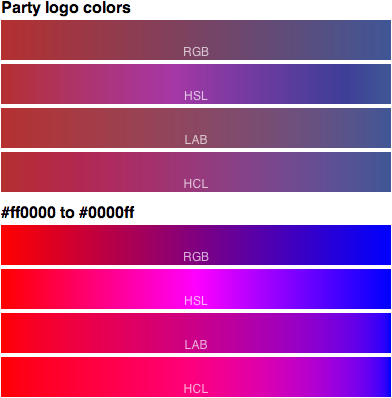
Above are eight options for red / blue color scales. The top 4 interpolate between the sedate party logo colors (from NYTimes), the bottom are fully saturated red to blue. Each set of 4 bars represents four different interpolation functions: the simplistic RGB and HSV scales and the perceptual LAB and HCL scales.

Which is best? It depends on your goal. But RGB and HSL interpolation are almost always wrong, they’re very misleading. And for everyone’s eyeball safety, please don’t use fully saturated colors.

Rural US Internet and Fixed wireless

My new house in Grass Valley really makes me miss wired broadband. I’m only 3 miles from the middle of town but there’s no wired broadband options, no cable or DSL. So everyone uses wireless Internet.

Fixed Wireless is the new hotness. Remember all those nerds throwing WiFi over a mile with Pringles can waveguides and Yagi directional antennas? Fixed Wireless is that idea made commercial with hardware like Motorola Canopy. It’s a peer to peer network; my house has a directional antenna pointed north with an always on 900MHz link to some other house. That house links to another house, which in turn links at 2.4GHz to a tower with wired bandwidth.

The good news is the latency is very low, about 30ms before I reach the edge of my ISP. Compared to satellite’s 250ms+ that’s terrific. Bandwidth is not great; I’m paying $70/mo for 768kbps download. That’s about twice the price and one tenth the speed of my sonic.net DSL, but given the limitations of wireless it seems reasonable. Here’s a roundup of ISP prices in western Nevada County; fixed wireless comes in the middle between DSL/cable and cellular service.

The big bummer is the peer to peer network with houses sharing bandwidth. It’s like a return to party lines! My ISP heavily manages things. My 768kbps is actually more like 2000kbps but only in a burst for the first 15 seconds; just perfect for loading web pages and other quick interactive stuff. I also have a monthly download cap of 15GB. That seems terribly restrictive and I don’t like it, but they tell me they need it to manage shared bandwidth. It’s too bad, a single HD movie or game download is about 5GB. So I’m closely monitoring usage and doing things like bringing my Mac back to SF just to upgrade Xcode.

Internet access is such a vital resource for our culture and economy, bringing good broadband to rural areas is important. There is a fiber backbone project being built now that will bring a lot more bandwidth to Grass Valley mid-2013, but the last mile problem is real. And getting worse; AT&T has actually removed service in Nevada County and Comcast isn’t even trying. It’s not profitable for them to run cable to customers, so they just don’t bother. Wireless seems to be the only option for the future, but there are fundamental limitations that mean it will never be as good as wired broadband.

Cloud Atlas

The new Wachowski/Tykwer film Cloud Atlas is a hell of a good movie. If you’re at all curious about it, go see it in a real theater. It’s a terrific example of what film can be. Sprawling, uncompromising, beautiful.

It’s also one of those rare films that’s better than the book. I read the novel last month in preparation and while I enjoyed it, I found it a bit flat and hard to get through. The film picks up on all the interesting themes of the story and tells it more effectively. My only fear is it might be a bit hard to follow the movie; a plot synopsis of the story may help you enjoy the movie more and won’t spoil too much.

I particularly like how they re-imagined the book as a movie, changing the narrative structure. The book is a series of 6 nested stories told in halves, ABCDEFEDCBA. The film chops that up and interleaves the stories much more rapidly. That lets them systematically highlight the common themes and narratives between each story that makes the whole work so intriguing. They also play off the stylistic inconsistency of each story, the mix of action, sci-fi, and farce coming fast and furious gives the narrative some much needed variety. Add on top of that great filmmaking, casting (Jim Broadbent!), makeup, production design, and it’s a rare example of a complete movie coming together.

I’m also impressed at how the Wachowskis have stayed true to their vision of the filmmaker’s art. After the relative failures of the Matrix sequels and the underappreciated Speed Racer, you could imagine them compromising, retrenching. But there’s nothing tentative about Cloud Atlas, it’s an aggressive film. The collaboration with Tykwer also seems to have worked to everyone’s benefit.

Grass Valley home

Ken and I have bought a house in Grass Valley, CA, off Ridge Road near Slate Creek. We’re not leaving San Francisco, we’re keeping two houses, but we expect to be spending a whole lot of time up at the new place. It’s a big house with plenty of room for guests; if you know me, you’re welcome to come visit!

Why Grass Valley? Ken and I have talked about a country house for a few years now, far enough away to feel like we were getting out of SF but still within driving distance. We also wanted something in the Sierra foothills and with a good GA airport; that quickly narrowed it down to around Grass Valley. It helps that both Grass Valley and Nevada City next door are relatively big with good restaurants, grocery stores, etc. It’s a pretty sophisticated place for rural California.

And life’s good in the country. It’s warm in summer and cool but not too snowy in winter. There’s deer. And friendly neighbors. Not terribly expensive, we were able to find a very nice house with a lot of space and privacy. It’s pretty great, really all that’s missing is the vibrancy and opportunity of a big city. I’ve quickly come to appreciate the beauty and relaxed life in the country. My hope is by spending some time away from San Francisco I’ll appreciate what the city has to offer all the more.

Google Maps visualization (2005)

Here is the first map I ever published online, a visualization of what locations people were looking at on Google Maps on April 6, 2005. This was right after Google Maps added satellite imagery. Here’s the official blog post about the visualization; the published image is gone, good thing archive.org has it.

I wince to see the ugly stretched projection; I didn’t know anything about maps, so I just plotted longitude and latitude as X/Y axes. (Cartographers call this Plate Carrée; it’s generally a sign the mapper is clueless.) The greyscale histogram is not particularly good, although in my defense the original unscaled PNG was nicer. I think the whole thing started as a fun project to learn Sawzall, Google’s 20% time in action.

People’s names have spaces, part two

Check out this amazing popup Citibank gives you when you’re creating an account:

According to Citibank, a person’s name:

  • Can’t be too long or too short
  • Can’t contain a bunch of specific numbers
  • Can’t contain spaces, apostrophes, hyphens

In other words, your name at Citibank can’t be anything like a person’s real name. Really it needs to be more like a password. But not too much like a password.

Welcome to our website. Your designation is THX_1138.

On not flying

I haven’t flown a plane in just about a year. I’ve done some trips with Ken supporting from the right seat but I haven’t been at the controls. My biennial flight review is due in ten days and I’m already well past my comfort level with currency and proficiency. How did this happen?

The main reason I haven’t been flying is that as cool as being a pilot is, flying a little plane is kind of a pain. It’s impractical transportation. It’s fun to just go up and look around but less so in the Bay Area; the combination of weather and airspace makes a Sunday drive a bit of a challenge. And I’ve already done my $200 hamburger runs to every nearby airport. After my big solo Texas trip I’d sort of met the challenge I had set for myself from the beginning.

The related reason is it hasn’t been as fun for me as I hoped. My instrument training stalled out, a common problem with GA pilots; once I’d learned all the fun stuff I was facing lots of hours of grueling practice. I also have never gotten completely over the small anxiety one feels getting in to a little plane. I’m a good pilot and well trained, but the nagging safety concerns in the back of my mind casts a bit of a pall over what should be something just for fun.

I feel badly about not flying. I’m privileged to have a license and a medical and a plane to fly and the money to pay to fly it. I know lots of folks who scrap and save and hustle for every flight hour and here I am squandering my opportunity. I’m sure I’ll go back to flying some time, maybe on an Alaska adventure or around Grass Valley where the airspace is simpler or maybe just for sightseeing with friends. It’s just not where my head is at right now.

XOXO Festival

I had a lovely weekend in Portland for the XOXO Festival, Andy Baio and Andy McMillan’s event for indie Internet-connected culture. It was a great event full of enthusiasm and optimism. I was particularly struck by how companies like Kickstarter, Etsy, and YouTube have enabled a whole culture of creative people making and sharing things. I left inspired to do more creative work, no matter how simple; a nice reinforcement of how I felt after the Eyeo Festival.

The event was designed as a one off for 400 people (funded via Kickstarter), but already folks are talking about the next one. Bigger, better? I hope so but only a little, it’d be a shame if a nice little indie event grew into the giant industrial chaos of SXSW Interactive.

Some more reading.. Anil Dash’s live blogging, the Twitter stream of attendees (should be interesting for years to come), Jason Kottke, Matt Haughey, Ryan Tate for Wired, Ruth Brown for the Willie Week, Wortham and Gallagher for NYTimes.

Route 66 in California

My Parisian friend Evelyne just took a big Route 66 trip, a long dream of hers to drive the Mother Road. (Oddly, Route 66 is a much bigger myth for Europeans than Americans.) I love road trips so was glad to be able to join her for a portion of the trip, from Las Vegas to Santa Monica.

The highlight of the day was lunch at the Bagdad Cafe in Newberry Springs. It’s just a little roadside dive of dubious cleanliness, but it’s awesome because it has become internationally famous thanks to the German film. They get 100+ guests a day from France, Japan, Germany, all over the world, in the middle of nowhere in the Mojave. The owners have recognized the good thing and are welcoming and have decorated the place with mementos brought by visitors. Really cool experience and the chili burger was pretty good, too. (We met Ken at the Barstow/Daggett airport, about a 15 minute drive away.)

The lowlight was buying gas at the Hi Sahara Oasis, the worst gas station in America. It’s the only gas for miles and we were getting towards empty, so I don’t begrudge them charging $5/gal. But the staff was incredibly rude and the place just reeks of bad karma. Avoid.

Honestly, the drive was not awesome; the Mojave is long and boring with very little to see along the badly paved old road, not even many remnants of settlements and amenities. It didn’t help we were starting in Vegas, two hours north of the actual route. If I were doing it again I’d skip the empty road in the desert and focus my time more on surface streets in Needles, Barstow, and Los Angeles. Or else take two days; 380 miles is too long for one day. By the time we got to LA we just took I-10 across town to be done with it.

Evelyne said she had a splendid time from Albuquerque to Vegas, lots of beautiful sites along the way. And I have to think the portion from Chicago to Oklahoma is still vital, nice towns and things to see and do. Maybe I’ll do that trip myself some day.

BTW, the best free guide for Route 66 I’ve found is Route 66: An American Treasure published by AAA. It’s got a good high level map and information. There’s a whole industry in much more detailed maps and guides for Route 66 but the AAA maps are a good start.

The spy myth made miserable

Remember when TV was intelligent? I just finished watching the 1979 TV version of Tinker, Tailor, Soldier, Spy, the BBC’s masterful adaptation of John le Carré’s best spy novel. Such brilliant TV. Slow, deliberate. I particularly like how none of the ensemble cast are particularly attractive or pleasant, a bunch of middle aged doughy miserable men. Who are all fantastic actors playing nuanced roles, a real joy to watch. While the 2011 film was good, the TV show is great, and I highly recommend watching it if you can get your hands on it.

Naturally, Alec Guinness starring as Smiley owns the show. Hell of a performance, so much so that the actor somewhat stole character away from the author. But what a richly written character. A central conceit is that Smiley’s wife Ann sleeps around with other men, and all his colleagues know it, and he’s by turns humiliated, resigned, and accepting of his fate as a cuckold. Such misery! It’s delicious.

All of le Carré’s spy novels have misery at the center. They’re documents from the end of the British Empire, from when noble men with good intentions are plagued by bureaucracy, indecision, doubt, ambiguity. It all reminds me of a brilliant analysis on Bond and Bourne a Metafilter commenter made. James Bond was the product of the optimistic 50s and 60s, Jason Bourne is a product of the pessimistic individualistic 80s and 90s. Tinker, Tailor is another thing, the decrepit outcome of a crumbling English foreign service. It is well suited to a long, careful BBC treatment.

Jersey Shore + Cube

Sex House is must-watch Youtube from The Onion. It’s a parody of vapid reality TV like Big Brother or Jersey Shore: film a bunch of wacky people living together in a house and see what craziness ensues! Only this house is not benign, there’s a pall of a Cube horror over the sexy hijinks.

Each episode is about 8 minutes, there have been seven so far. The first couple are hysterical but seem a little dumb. Stick with it, for it goes to a far darker place.

The overturn of sodomy laws

Flagrant Conduct: The Story of Lawrence v. Texas, is Dale Carpenter’s telling of the story behind the landmark Supreme Court gay rights case. The 2003 decision found that people had a right to private sexual conduct and overturned laws criminalizing homosexual sex as well as a previous, damaging Supreme Court decision. Until this decision, gays and lesbians were effectively criminalized in a good part of the US.

Carpenter’s book is readable and relevant for anyone interested in gay rights in the US courts, particularly as how it may play out for future gay marriage debates. He does a great job explaining the legal arguments and putting them into the context of the gay rights movement. He also tells the personal stories of the defendants and lawyers, particularly the Lambda Legal team who made the case. There’s a particularly moving description about how the Supreme Court itself had changed since the bad 1986 decision, how many of the justices now knew gay people.

The most fun part of the book is all the unknown weird details about the case. Much of this is available in a previous article Carpenter wrote (JSTOR; try your library), but it’s fleshed out more in the book. The defendants in the case, Lawrence and Garner, weren’t lovers and most likely weren’t even having the sex that the arresting officers claimed they were having. They were also 24 years apart and of differing race. All that detail was buried and the defendants were mostly removed from view in order to polish up the specific constitutional challenge that ended up in the Supreme Court. It helped that Texas put up a poor argument for the anti-gay law; the author suggests that the Houston DA’s heart wasn’t really in the case.

Reading this book gave me new respect for how hard, expensive, and detailed the fight for civil rights is in the US. We may be endowed with certain unalienable Rights, but it takes a lot of effort to convince the public to not deny them.

The no TV Mars Curiosity landing

Like most of my nerd friends I watched the exciting landing of the Mars Curiosity rover. What a show! Amazing tension, engineers accomplishing amazing things together, and it all worked! But I didn’t watch it on TV, I couldn’t. NASA TV did have it but Comcast in SF doesn’t carry that channel.

Instead I watched it as Internet video on my Xbox; Microsoft did an awesome job covering the event. Great picture on my big screen TV, Ken and me together on the couch with a glass of wine in hand. There were lots of other Internet viewing options; I had my iPad+AppleTV with UStream as a backup.

I also followed along on Twitter, the outpouring of excitement and joy from my friends was excellent commentary. NASA’s official Curiosity Rover account is good; charming and full of useful info. They did a great job posting instant photos. But even better than the official PR account was flight director Bobak Ferdowsi’s twitter (aka mohawk guy). I was watching him on TV while he was live tweeting the landing he was flight directing. Honest, personal stuff. Really great.

I like this future where events are edited in diverse ways and broadcast via hundreds of different Internet outlets. Between the no-TV Mars landing and the NBCFail Olympics we have two demonstrations that we don’t really need TV networks mediating live events. We’ve got a better way.

Backup solution

A Twitter chat with Mark Fletcher reminds me that after years of trying, I finally have computer backups entirely sorted out. How’s your backup plan? Hard drives fail. And you need offsite backups too. Bad enough to contemplate your house burning down, but what if you lost all your data too?

For local backup, Time Machine is amazing for Macs. I back up to an external 2.5” USB drive. The 2.5” part is important because it’s fully USB powered, no need for a power adapter. For my Linux box I use rsnapshot. I don’t have a recommendation for Windows.

For remote backup, I am really happy with CrashPlan. There are many online backup products and most of them are bad. CrashPlan is good. It’s easy to configure, it’s very gentle on CPU and bandwidth, and they have lots of good restore options. Plenty of advanced features too; serious encryption, seeding by shipping a drive, even a free social backup. The Linux client is a little wonky but the consumer Mac client is fantastic. The price is reasonable, starting at $18/year.

The one hurdle I’m still overcoming is what to back up. I still have more data than is reasonable to back up, particularly offline, so I have these backup sets that exclude ripped DVDs or whatever. Increasingly I’m thinking that’s a dangerous optimization and that I should just back up everything and stop worrying about it.

Update: if you look around you can get a 10% discount on CrashPlan, as via this link.

The last TV Olympics?

Is 2012 the last time the Summer Olympics will primarily be a television event? Will the Internet finally take over?

On my desktop I’m flipping between Archery, Fencing, and Judo streaming live from NBC’s excellent live streaming site. Fourteen live sports; some fully produced, some unenhanced, all with decent camera work and live editing and 1080p streaming. And all enhanced by tweet streams, and articles, and background stories, and blessedly free of the inane chatter of sports personalities and stupid tape delays. If I missed something there’s archive; full events, highlights, analysis, whatever I want online. I can also watch live video with NBC’s iPad app or use the tablet to get extra info while watching the TV. It’s all pretty great, I don’t even mind having NBC as the intermediary.

What’s missing from all this Internet viewing is the sense of a TV event, the whole family gathered around the electronic hearth watching something together. There’s still no great solution for playing Internet video on the big TV. It’s sort of doable as a hack but Internet-on-TV isn’t a mainstream thing, so it’s not a real product. Will it be by 2016? I sure hope so.

But streaming the video is easy; the real problem is producing an event for Internet. The main program needs to be edited, boiling down 100 hours of a day’s events to a 3 hour program. But it also needs to preserve some of the liveness and variety that is the hallmark of web surfing. And then mix that together with Twitter so I can share the experience in real time with folks all over the world. Tall order.

It’ll be interesting to see what emerges out of this year’s Olympics as media producers figure out how to integrate the Internet into event programming. I’m impressed with what NBC is delivering online this year but it feels transitional, like the very beginnings of something new.

Sleep masks

I’m one of those people who wake up at first light. In the summer when that’s 5:30am, it’s not so great. A simple sleep mask really helps in letting me get a proper sleep. There’s a zillion options, the key feature of this one is that it has little cups for your eyes so you can blink without brushing your eyelashes. Much less annoying that way.

Tweetchive, a Twitter archive view

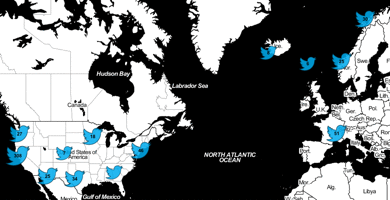
Tweetchive is a little hack I made to show various views of a user’s 3200 last tweets. The coolest thing is the map view, there are also buttons for text, pictures, and links. It’s not a complete product but I’m not sure if I’ll put more time into it and it’s useful enough to share. I was inspired to build this by All My Tweets.

I made this because I write a lot on Twitter and wasn’t satisfied with their archive presentation. It’s awkward to find old tweets by text content. And the geodata is mostly invisible, there’s nothing like my map. So I used the API and built my own archive view!

I launched this now because I fear this kind of hack will soon be harder to do. Twitter has signaled heavily for over a year that they’re uncomfortable with products that use the Twitter API to build competing clients. That stance makes some business sense but I worry they will make non-threatening projects like mine difficult. If Twitter puts more restrictions on the API I hope they do something else to make a person’s own tweets easily accessible to them (including old tweets). Twitter is the steward of our content, they owe us archival access.

The implementation is a client-heavy Javascript app. My server just sends static HTML and Javascript. The browser does unauthenticated API fetches via JSONP and uses localStorage to cache data for repeat visits. The Javascript source is pretty readable if you’re curious. It’s remarkably fast despite being bloated and unoptimized. The key thing is none of the twitter.com traffic goes through my server, keeping everything very lightweight for me.

Update July 24: the Twitter CEO has gone on record saying “We’re working on a tool to let users export all of their tweets”.
Disclosure: I have a financial interest in Twitter

Anthem Blue Cross letter, formatted

My health insurance company Anthem fell afoul of the Affordable Care Act by paying themselves $1.3 million more than the allowed 20% overhead. So they are required to issue a rebate to individual ratepayers like me, a whopping 0.1% of my yearly premium.

The accompanying letter is a masterpiece of passive-aggressive corporate communication. Check out my scan of the letter that shows up as page 2 of an invoice. All caps, monospace font, awkward formatting, it’s almost like they didn’t want us to read it! So I helped them out with this nicely formatted version. I typeset the letter for them but I didn’t correct the awkward grammar; such as inappropriate uses of commas, and the general awkward writing, such as extensive conjunctions.

Typography aside the real offense is Anthem chose to cut a bunch of tiny checks to their customers rather than just applying the money as a premium rebate. Maybe they’re hoping a significant fraction of people won’t bother to deposit the $2 checks. Or maybe the inconvenience is just in keeping with their general contempt for their customers.

Leap Second crashes half the internet

Yesterday’s leap second killed half the Internet, including Pirate Bay, Reddit, LinkedIn, Gawker Media and a host of other sites. Even an airline. Any Linux user processes that depends on kernel threads had a high chance of failing. That includes MySQL and many Java servers like webapps, Hadoop, Cassandra, etc. The symptom was the user process spinning at 100% CPU even after being restarted. A quick fix seems to be setting the system clock which apparently resets the bad state in the kernel (we hope).

The underlying cause is something about how the kernel handled the extra second broke the futex locks used by threaded processes. Here’s a very detailed analysis on the failing code but I’m not sure it’s correct. According to this analysis the bug was introduced in 2008, then fixed in March 2012. But it may be the March fix is part of the problem. OTOH most of the systems that failed will be running kernels older than March so the problem must go further back. There’s a kernel fix and also a detailed analysis. Time is hard, let’s go shopping.

It’s frustrating that these bugs keep popping up; the theory is not so difficult. The NTP daemon tells the kernel a leap second is coming via adjtime(), the kernel should handle it by slewing or holding the clock, all is well. But it didn’t work in 2012. Didn’t work in 2009 either; a logging bug caused kernels to crash on the leap second. 2005 was better. Google’s solution of giving up on the kernel entirely and having the NTP daemon lie about what time it is seems more clever now.

I got hit by this bug myself, the CrashPlan backup daemon runs Java and got caught in a spin. And none of my machines really kept time right because POSIX does not account for leap seconds. Both Ubuntu boxes just ran 23:59:59 twice, so time went backwards on a subsecond basis. My Mac was even worse, it actually flipped over to 00:00:00 before going backwards to 23:59:59 briefly. No doubt my GPS devices are off by a second now; most consumer devices have no facility to update the leap second database. (Correction: GPS satellites broadcast the UTC offset.) The only thing that worked right was NIST’s clock widget pictured above, showing 23:59:60.

UTC vs UT1 and Leap Seconds

Today just before 5pm California time is a special moment in timekeeping, 04:59:60 PDT. All sorts of software will subtly break because of the assumption that every minute has exactly 60 seconds or that time can’t stand still or repeat itself. Even my way of avoiding DST problems won’t help; UTC itself is changing.

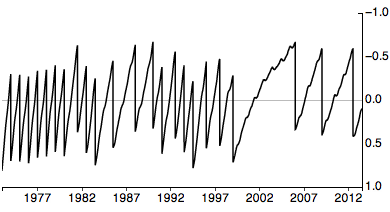
Why do we need leap seconds? Because the earth’s rotation is slowing down about 1.7ms every 100 years. Leap seconds resync our daily earth time to the absolute measurement of atomic clocks. There have been 25 leap seconds since 1972.

The graph above (larger, in D3 code) is the offset between UTC and UT1. We decide to add a leap second when that offset gets too big. The detailed science behind this is fascinating; in the US the Naval Observatory manages the process.

I find it frightening how variable the earth’s rotation speed is. That anomaly around 1998–2005 makes me nervous. The speed changes both on daily and yearly scales in an unpredictable fashion. Among other things it depends on the size of the polar glaciers; global warming may well be speeding the earth up.

Computer games you can lose

Contemporary games are designed so the player can never lose. No matter how badly you play you can always recover or reload and keep going. It’s good design, it encourages players to explore, it avoids frustration. But not being able to fail removes some challenge. If you can’t lose, then is winning really that interesting?

I’m proud because this weekend I got my Hardcore Monk to level 60. Hardcore mode in Diablo 3 is a game you can lose. It’s permadeath; if you screw up your game is done, your character is gone, you have to start over. Most players of Diablo don’t play hardcore; in a normal game if you die you just reload. I played through the game in normal mode first myself. But hardcore is more exciting. And while I didn’t beat the hardest challenge in the game yet, I have played the guy for 45 hours without ever screwing up too badly.

The tension is amazing. For example the boss fights; once you jump into the arena with Diablo you can’t leave. One of you is going to die. But the bosses aren’t the hardest part of the game, the optional champion packs are. And there the anxiety is incredible. I see a group with something hard like molten + frozen + vortex and have to make an instant choice. Do I risk fighting them? Do I avoid them and look for easier targets?

Most of the time I engage because I’m playing for the challenge. And then sometimes things go badly and I’m running for my life, for my 45 hours invested, and those moments of fear and excitement are some of the most visceral experiences I’ve had playing a game in years. Since playing Eve Online, really.

So I’m loving hardcore Diablo. It helps that I’m winning, I imagine I’m going to be pretty angry when I finally screw up. I’m not a very good loser.

Alan Turing / Gay Pride

A nice confluence this week, gay pride in many cities and Alan Turing’s 100th birthday. Anyone paying attention knows by now that Turing was gay, persecuted, driven to suicide by some insane hormone treatment forced upon him. (Although there is room for doubt on intentional suicide). A tragedy, a powerful story about the importance of gay rights.

So today I’d like to honor Andrew Hodges, the author of the 1992 biography on Turing that talked explicitly about his personal life, his homosexuality. So much of gay history is hidden, whispered, unwritten things that are eventually forgotten. Hodges did a huge service for me and other gay nerds by researching, documenting, holding up Turing as a role model.

Here’s a lovely picture of Turing swimming in Sark. I particularly like this photo because it reminds me that Turing was not just a brilliant mathematician. He was also a young man who enjoyed skinny dipping, probably with other young men. It’s such a human moment for one of the most important intellectuals of the 20th century. A reminder of the importance of embracing all of a person’s life, not just their work.

And here’s a photo from today, the Turing statue in Manchester, an impromptu gay pride demonstration. It’s getting better.

Plex media player

Plex is good software. It’s a media player that makes it easy to play downloaded video on a TV. The mainstream market does not provide reasonable solutions for playing Internet video like Indie Game: The Movie. Plex fills the void nicely. There’s a bunch of competing media center apps; what’s important is the user interface, the remote, and the ease of playing video in any format. Plex is the best of the lot I’ve tried. Here’s a video demo of something like my setup.

My player is a jailbroken AppleTV 2 with Plex. I haven’t kept up with the current jailbreak scene, but Seas0nPass at Firecore is a good place to start. I think there’s no jailbreak for the new AppleTV 3 yet, so this may be a bad time to be buying the hardware. There’s other AV hardware that runs Plex, and there are also Plex clients on desktop computers and iPads.

My remote is a URC. The device is clunky but we already had it and the actual control part is rock solid. The AppleTV 2 remote is infrared only (dumb!), the URC is radio. Another option is to use an iPhone to control the AppleTV via WiFi.

My server is Plex Media Server running on a Linux box with my video files. The Plex server transcodes while playing so you can play back pretty much any video format without having to convert ahead of time. I used to think transcoding on the player itself was better (a la Boxee), but I’ve come around.

We’ve had 10 years of Internet video and there’s still no good consumer way to play downloads on a TV. You’d think the convergence would have happened by now. Instead the best mainstream option is still Tivo, a device that gets worse with every revision. In the meantime Netflix and Amazon are doing a complete end run around the mainstream market. I wish it would all just come together already.

Indie Game: The Movie

Interested in stories about motivated artists and craftsmen who toil for years on their own hoping for commercial success? Indie Game: The Movie is for you. I just watched it and it’s absolutely fantastic. Way better documentary filmmaking than the usual independent movie. And the film elevates the story; it’s not just about a few nerds making hipster games, it’s an intimate look into the lives of some very driven and talented people.

It helps that the filmmakers picked three amazing independent games to cover. Super Meat Boy, Fez, and Braid are all great examples of indie games that benefit from a unique artistic perspective while also being fun to play. I really enjoyed the inside view of what it felt like to work for years on something so personal, the crises of faith, the joy of success. The film rests a little too heavy on the tortured artist narrative, but it was a great reminder to me of the cost of success.

You can buy the movie for a very reasonable $10 from iTunes, Steam, or a direct DRM free purchase (1080p). The video quality is excellent.

The Eyeo Festival

Last week I was one of the lucky few to attend Eyeo Festival, a creative code / data visualization / digital artist convention in Minneapolis. It was a great event that reconnected me with some old themes and see a lot of new work from the world’s practicing experts in new forms of visualization and interactive art.

I wish I had a single word describing the conference subject. Part of it was explanations of visualization work by leading experts like Amanda Cox of the NYTimes, Nicholas Felton, or Viegas+Wattenberg. Part was discussion of more artistic projects like the storytelling work of Jonathan Harris, the generative jewelry of Nervous System, or the interactive media pieces of Scott Snibbe. And there was some inward-looking criticism and discussion of digital arts from Paola Antonelli and Marius Watz.

But really Eyeo was an intimate gathering of a bunch of programmers and artists who are the first generation for which the Internet and personal computing are assumed, part of our everyday worlds. Eyeo was a family gathering for the folks who combine the technical capability of informatics with an æsthetic impulse. There’s a significant new worldview that comes with the computer and the Internet; the folks at Eyeo are reflecting that view with beauty.

Assuming there’s an Eyeo 2013, sign up fast; this year sold out in six hours. Part of the magic is it’s an intimate event with as much socializing and lecturing, it can’t really scale.

Marin Marais vs. Liquid Sky

Today I learned that one of the key themes in the electronica soundtrack for the film Liquid Sky is an arrangement of a 1723 piece by baroque composer Marin Marais. Compare for yourself: Sonnerie de Ste-Geneviève du Mont-de-Paris, Noon and Afternoon from Liquid Sky.

Liquid Sky has always been one of my favorite films. The plot’s ridiculous. But the music, the art direction, the costumes, the acting, it’s all beautiful and unique. A particularly heady film for 1982. Sadly my love for the film is not shared by all.

I came to all this while listening to Nicolas Jaar’s essential mix, excellent listening itself. He mixes the baroque piece on top of some Aphex Twin around 19 minutes in.

Dolores Park at 1 pixel per inch

Last Sunday I had the pleasure to participate in making an aerial map, a very detailed overhead image of Dolores Park taken from 200’ to 400’. The fine folks at Public Laboratories have published the result. A couple of direct links: a full page slippy map and aerial video. I also got a nice single shot of the new Dolores Park playground (full size).

This kind of mapping comes from Public Laboratory, a cool non-profit helping ordinary people make their own aerial maps. You don’t need a satellite or fancy cameras on a plane to make a “satellite map”. All you need is a kite or balloon, a cheap point and shoot camera, and a little software.

I particularly like how low tech the setup is. The lift comes from something as simple as a mylar balloon filled with helium (we used a car dealership ad balloon). No fancy cradle, just some rubber bands holding the camera to a plastic soda bottle with the soda cap as the clamp. And no special camera, just an ordinary consumer camera set to continuous drive with another rubber band holding down the button. Launch, fly for awhile, pick the best photos, then stitch them together into a map. (That last part takes some effort; you can do it by hand in Photoshop or use the MapKnitter web app).

The Dolores Park shoot was mostly for fun, a nice way to be outside on a sunny day and excite a bunch of kids. But Public Laboratories participates in more serious projects too, like documenting the Deepwater Horizon oil spill. A key thing about this kind of mapping is anyone can do it relatively cheaply and quickly. You can also fly other sensors, they’re doing a lot of work in environment monitoring,

Many thanks to Stewart Long and Bobby Sudekum for letting me tag along on the fun photo shoot.

FlightPrep’s patent bullying with 7,640,098

Big patent drama in little business: flight planning software vendor FlightPrep has succeeded in bullying free website RunwayFinder offline with a patent lawsuit. It’s not much different from all the other software patent nonsense that goes on, but what makes it poignant is it’s in the small world of general aviation where we’re all supposed to be friends and where no one is making much money.

What follows is my opinion. I’m not a lawyer nor an expert in patent law. I do understand something about software design, though. If this patent affects you, please seek appropriate legal counsel, don’t take my word for it.

Long story short, FlightPrep got a flight planning patent a few months ago and started going after every other online flight planning service. They convinced SkyVector to license, FlyAGoGo shut down, and they sued RunwayFinder claiming $3.2 million / month in damages. RunwayFinder would be lucky if it makes $500 / month in advertising and seems to be a hobby project for its founder. Rather than risk the lawsuit hanging over him, he shut down.

The lawsuit is over patent 7,640,098, a flight planning patent that was originally filed in 2001. It’s a divisional patent that had a lot of trouble being issued, the actual claims that were granted seem to come from September, 2005. There’s lots of prior art: RunwayFinder itself launched in July, 2005 (see also August, 2005). There’s older prior art too, FalconView and AeroPlanner are two names that come up.

The patent itself is very specific and I think most software would not infringe. For instance, the primary claims (1, 11, and 21) all contain specific language about “housekeeping frames,” but who uses frames to do anything? The patent also describes lots of other implementation details that do not seem necessary or even a good idea. FlightPrep themselves makes very broad descriptions of what they own, but it’s not what the patent says.

Finally, as is typical with software patents, most of the claims granted seem obvious to someone with ordinary skill in the art. The patent appears to me to boil down to “draw some lines between points on a map”. It’s hardly novel to apply line-drawing to aviation maps in particular. RunwayFinder itself was very nicely done, but basically was the obvious “Google Maps for aviation” implementation.

Of course none of this armchair analysis helps RunwayFinder; once a patent is granted, you need an expensive lawyer to challenge it. What puzzles me is what FlightPrep thought they’d gain by forcing a small free site offline. My guess is they’re bolstering their patent before going after Jeppesen, the only flight planning company making real money. Then again Jepp can afford lawyers.

Update: nailed it! FlightPrep did go after Jeppesen and AOPA, and Jeppesen has responded by telling FlightPrep to take a hike.

Update 2: this story is getting some play and some of the commentary has been quite hostile towards FlightPrep and Stenbock & Everson, the plaintiffs in the patent suit. While I’m upset about what’s happened to RunwayFinder too, I think it’s wiser to speak respectfully of our colleagues in aviation software. I am hopeful they will see how fruitless pursuing these patent claims will be, undo the damage they’ve done, and go back to concentrating on making products for pilots.

Update 3: Flightaware declined to discuss licensing the FlightPrep patent. FltPlan has refused. SkyVector has shared more of their story about why they licensed.

Update 4: I’m about to leave on a 3 week flying trip and can’t stay on top of this story. No more updates. I expect things to quiet down, but this story isn’t really over until Dave is free of the lawsuit and can bring RunwayFinder back online.

Update 2011-03-29: After three months offline RunwayFinder is back online with the statement “sat down with FlightPrep and FlightPrep agreed to dismiss the lawsuit! The exact details of the settlement license are confidential.”

Update 2012-05-13: FlightPrep sued Jeppesen in late 2011. Also RunwayFinder shut down in 2011; I don’t think it ever really recovered from the discouragement.

Apple’s software control

I have an increasingly bad feeling about Apple’s efforts to control what software runs on the computers they sell. Not just the business implications, but technical issues.

There’s two ways to get software onto a Mac: buy it directly from the developer or buy it via Apple’s Mac app store. App store versions are almost always worse; fewer features, more awkward updates. And now, with the sandbox requirements, total contortions.

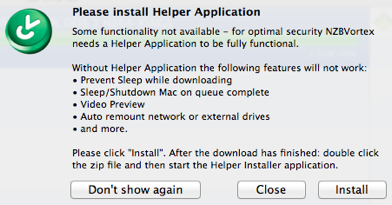
I bought NZBVortex via the app store. Version 2.7 was recently released to be sandbox compatible. But for it to work completely you have to download a “helper application” that runs outside the sandbox. It’s a clever workaround, but it’s needless complexity and subverts the whole purpose of sandboxing.

I also bought Alfred, an awesome app launcher. At first I got the free version via the app store but that turned out to be a mistake, because you really want the (for pay) Powerpack but because of the sandbox restrictions the Powerpack is not available via the app store. The Alfred developers optimistically say “the Mac App Store is one of many ways to buy software for your Mac,” and encourage you to buy directly from them. Which works today.

But what if the Mac App Store becomes the only easy way to buy software for your Mac? Gatekeeper is a step down that road; you’ll still be able to run software from other sources, but only if it’s signed by an Apple-issued developer key or you personally disable a security setting. So far Apple’s not dictating policy on what key-signed code is allowed to do. But what if they decide to?

Meanwhile, over in Apple’s actual computer market, iPhones and iPads, total lockdown has been the rule since day one. And sometimes it goes badly. The most recent kerfuffle is over Dropbox signups; Dropbox has capitulated, removing some aspects of user signups to satisfy Apple’s market monopoly demands. And Apple has behaved poorly in the past, for example blocking Google Voice and Camera+ for ridiculous reasons.

I admire Apple. I sympathize with their desire to control the quality and security of software. But I don’t want to have to completely trust them to make the right decisions.

Perspectives on North Korea

I’m fascinated by the hermit kingdom, North Korea. It’s the world’s most oppressive government, has run its country literally into starvation and ruin and horribly abuses its citizens. And yet it persists as this somewhat stable if entirely isolated country. Also it has nuclear weapons, that commands some attention. So I’ve read a few things about North Korea in the past year, here’s some recommendations.

Nothing to Envy: Ordinary Lives in North Korea by Barbara Demick. A completely fantastic book by an LA Times journalist who has devoted years to North Korea reporting. She tells the stories of six defectors from North Korea, ordinary citizens from the large industrial town Chongjin. It’s a long, heartbreaking read of life in the DPRK around 1980 – 2000. She does a fantastic job capturing what life is like in a totalitarian society, how people really believe in their Dear Leader and the absolute superiority of North Korean communism. At least until the mid-90s when a multi-year famine caused by government mismanagement killed a million or so people and severely starved the rest. Very upsetting to read despite the author’s compassion and skill at nuanced writing; I only made it through because I knew it would end with people escaping North Korea. (Although even that escape is a mixed blessing).

The In Focus photojournalism blog: Inside North Korea • Kim Jong Il, 1942-2011 • North Korea Mourns Kim Jong Il • Glimpses of Humanity in Choreographed North Korea • North Korea Prepares for a Milestone Year. Pretty much all images coming out of North Korea are heavily censored, but even so there’s a lot of amazing photojournalism done by visitors. Alan Taylor’s well edited photo collections tell amazing stories.

The Orphan Master’s Son: A Novel by Adam Johnson. Not so much about North Korea as a book set in North Korea. And with a lot of literary liberties, the author is too clever by half. Still there’s something excellent in the alienation of the story and the characters against the backdrop of North Korean totalitarianism, it was a good read.

Pyongyang: A Journey in North Korea by Guy Delisle. A lovely graphic novel, a French Canadian’s memories of a two month stay in Pyongyang. It’s a bit of a light-hearted treatment considering how awful the place is, but it’s nicely drawn and I appreciated the author’s personal story of his relationship to such a strange place.

An extra set of links.. North Korean Economy Watch, an analysis blog. Korean Central News Agency of DPRK, the official government press outlet. Daily NK, critical news published by defectors and other dissidents. Mourning King Jong-il, a propaganda video; from what I read in Demick’s book these expressions of grief are genuine if coerced. I have more North Korea links, too.

It’s hard to understands how North Korea persists, how Kim Il-Sung’s family maintains control to a third generation and how the country still manages to barely function despite years of complete economic collapse. A key part of it is the utter isolation of the place, convincing most of its citizens that life in North Korea is the best in the world. But that façade is failing between the mass starvation, the rise of communication with China (both illegal trade and cell phones), and the increasing influence of black market DVDs and radios.

Grass Valley and Nevada City

Ken and I had a nice little vacation last week, up near Grass Valley and Nevada City. It’s up in the Gold Country, in the Sierra Foothills northeast of Sacramento, about three hours drive from San Francisco. In the past we’ve enjoyed going up to Placerville; same idea except the towns are bigger and have more to offer up north.

Not that city life is the primary reason to go to Nevada County. It’s quiet up there, and beautiful; a nice escape from the city. Still, nice to have amenities like grocery stores and restaurants. New Moon is good for fine dining and South Pine Cafe is a great casual breakfast / lunch place.

We had a great stay in this log cabin, a bit south of Grass Valley in Alta Sierra. Really comfortable place and big, could easily host 6+ for a week. Nice creek in the back, chirping frogs, wood stove, hot tub, hammocks, and a well furnished kitchen.

A week in Grass Valley

Ken and I spent a week in Grass Valley, up in the Sierra Foothills northeast of Sacramento. We’re thinking about buying a house up there. Here’s where we went.
The map is a screenshot from Google Latitude, a passive location tracker. It’s a roughly accurate view of where we travelled; the purple circle is where we stayed. The spray of red south and west from there aren’t correct, I think it’s iPhone location errors in a rural setting.

The parallel Chinese Internet

There’s a whole second Internet out there, in mainland China. It’s hugely innovative and we in the west can learn a lot from what’s going on there.

We have Google and Bing: in China they have Baidu. Sina Weibo and Tencent Weibo are the Twitter equivalents, Renren is Facebook. The Chinese eBay is Taobao (owned by Alibaba). NetEase is like Yahoo without the miasma. There’s a robust variety of big Chinese websites. Online games, too, Western juggernauts like World of Wacraft are also-rans compared to local games.

Here in the US we tend to dismiss the Chinese Internet as a backwater, some second-rate place that clones American technologies while laboring under the yoke of communist oppression. Nothing could be further from the truth, there’s a lot of interesting innovation and an enormous ecosystem developing independently in China. As a small example, consider maps. Baidu launched indoor maps before Google. Sina Weibo just blew past Twitter in mapping microblog posts. And no one can touch Baidu’s awesomely unique isometric pixel art maps.

I’m trying to learn more about Internet development in China but unfortunately I don’t read Chinese and surfing via Google translate is pretty bad. (Maybe I should try Baidu Fanyi). But thanks to a tip from Richard Chen I’ve been reading the Tech in Asia blog, a great bit of news coverage of consumer Internet stuff in Asia. About 10 posts a day, not just China, most quite readable. The Economist’s new expanded Chinese coverage is also helpful for a broad perspective.

What I haven’t found is a good source for technical innovations. Where is the Chinese open source community, what is their GitHub, their Hacker News? There’s Chinese Linux distros; are there app server frameworks, NoSQL datastores, nerd fights over semicolons? There’s a lot of very smart computer scientists in China, where is their hacker output?

I can’t post this without a word on why the Internet in China is a separate place. Most US coverage talks about China’s censorship, in particular the “Great Firewall” that blocks politically sensitive topics (like Gu). Censorship is absolutely part of the Chinese Internet and is deplorable. But I think most of the division is simple language and cultural boundaries. A quarter of Web content is in Chinese and Americans never read it; why should we expect Chinese to read English content? There’s also a healthy dose of trade protectionism: China is explicitly trying to develop its own Internet industry to be independent of the US. Maybe we should start cloning some of the Chinese innovations.

Unlicensed use is not stealing

We should stop using the words “theft” and “stealing” when talking about unlicensed use of intellectual property. Those words should be reserved for physical property, for things limited by scarcity.

A bunch of the news coverage of Oracle v Google talks about Google “stealing” Java or the “theft” of Oracle’s intellectual property. It is common to talk about downloading music or video as “stealing” or “piracy”. That language is prejudicial. What Oracle is really claiming is that Google has used some of its patents and copyrighted material without a license. Downloading Game of Thrones is not “theft”, it’s “unlicensed use”.

I think copyrights and (appropriate) patents are important; I’ve made my own living by creating intellectual property. One of the great challenges of the Information Age is figuring out how to control intellectual property. But applying 3000+ years of physical property law to intellectual property doesn’t make sense. When I take your cow, I deprive you of the use of your cow. When I copy a song I don’t deprive anyone of the song. Intellectual property is fundamentally different from physical property. We should use different words when describing their misuse.

Keurig single cup coffee brewers

The Keurig B60 single cup brewer makes good coffee. I’m not much of a coffee snob and am perfectly happy with any decent American brewed coffee. For me and Ken, this K-Cup brewer gizmo is better than a generic drip coffee pot.

The main advantage is convenience. We can have a cup of hot fresh coffee in about three minutes; faster if the machine is already on. Any time of day, without the hassle of making a fresh pot (or, guiltily, microwaving leftover coffee). The other advantage is consistent quality. The coffee just tastes better, I think partly because of freshness and partly because of precise temperature control during brewing.

The downside is cost. Even in bulk, my preferred coffee is about $0.65 / 10oz mug. That’s about double what I paid for drip coffee made with decent beans from my local coffee shop. You can use your own cheaper grounds in refillable K-Cups (the ekobrew works OK), but a bit of grit gets through and it’s a hassle to fill and clean. The brewer itself is also expensive, but it’s a surprisingly complicated and well made machine.

Keurig sells a confusing variety of K-Cup systems and now has a new incompatible system called Vue. The B60 special edition looked like the right feature set to me, although I’m already wishing I had some way to hook it directly to my plumbing so I don’t have to fill a water tank.

Update: thanks to Adam for pointing out that the K-Cup patent expires in September. The price of a cup should go down then, it also probably explains why Keurig just introduced an incompatible new system with no obvious major benefits.

iPhone software for international travel

I feel pretty lost without my iPhone, doubly so when traveling. Here’s some of the iPhone apps I found useful on a recent trip to France. Many of these apps cache data on the phone, both to save on roaming charges and for responsiveness.

MapsWithMe ($0): street maps. Caches vector data from OpenStreetMap and then renders maps on the phone. I used to use OffMaps but their raster tile approach just takes up too much space. With MapsWithMe I could download super-detailed maps for all of France with no sweat.

Navigon ($20 – $100): turn-by-turn driving directions. No need for a standalone GPS, the voice prompting and routing is good enough to drive all over France and Norway. Shop carefully to avoid their random pricing; right now it’s $65 for all of Europe, or $90 for just France. TomTom is a strong competitor. Bring a car charger.

Wiki Offline ($10) and AllOfWiki ($10): cached copies of Wikipedia. Really great for research. The 5GB data dump is text only and has some formatting issues, but it’s usable. Both apps work well and you only need one; I think I slightly prefer the Wiki Offline UI.

Accio French-English ($5): translation dictionary. There’s better language software out there, Accio is cheap and good enough for quick lookups.

Photogene² ($1): photo editing. Photogene makes it easy to crop, correct exposure, and upload. iPhone 4S photo quality is great and I really like uploading photos on the fly during a trip; I’ve been home 3 weeks and still haven’t gotten to the 200 photos on my “real” camera.

Twitter ($0): social networking. Tweets are the Internet’s postcards. Particularly good with photos. I’m still looking for a way to archive all my tweets into a journal; here’s a Storify view of my trip to France.

Traboules ($1): Lyon sightseeing. Only useful if you’re going to be in Lyon, I’m linking it here because it’s remarkable. The tourist office commissioned an augmented reality iPhone app; you look through the iPhone screen to see the world with overlaid markers for the Traboules, a hidden bit of Lyon.

Canon S100: camera with a GPS

Canon has a new version of their geek oriented point-and-shoot camera, the Canon PowerShot S100. My S90 essentially replaced my DSLR for walking around. The S100 is great; see this review. The cool new feature in the S100 is a built-in GPS for geotagging photos. I’ve tried to map my photos for years but without GPS in the camera it’s been a hassle. Here’s some notes on how the S100 GPS works.

The GPS antenna is in the top of the camera, above the lens. It’s GPS only, no cell or wifi location, so it needs a view of the sky and won’t work inside. There’s three software GPS modes: entirely off, on when taking photos, or GPS tracking even when the camera is off. A warm start seems to find a position fix in 5–40 seconds. GPS location is written into EXIF tags in the photo and both Lightroom and Flickr understand the GPS format perfectly. There’s no dedicated camera display of GPS data although you can see photos’ locations in the viewer.

Digging deeper, exiv2 identifies 12 GPS tags in the JPEG and CR2 photo files. GPSVersionID is 2.3.0.0, there’s lat/lon, altitude MSL (geoid corrected), timestamp, and minimal GPS status. Unfortunately location accuracy doesn’t seem to be logged in the EXIF.

The GPS tracker is a nice bonus feature, I could see it being useful to document a photoshoot (although one wonders about battery life). Tracks are in standard NMEA format as a text file on the SD card. One fix is logged every 65-90 seconds. Each fix is logged both as GPGGA and GPRMC, basic position data. GPGGA includes HDOP and number of satellites and GPRMC includes speed and track. Note that as documented, the camera won’t write GPS tracks to an Eye-Fi card but a standard SD card is no problem. Here’s a sample log of me walking to lunch, see it mapped here. The track the S100 recorded is roughly accurate but missed logging my actual destination; compare to my AMOD dedicated tracker for the same walk. I’m pleased the S100 was able to log even when in my leather camera case on my belt.

The S100’s GPS is a great addition to a great camera. It’s not going to replace a serious GPS for navigation or technical measurements. But it’s good enough for photos and terrific at making it easy to remember where you took your outdoor pictures.

Update: after a recent tourist trip to France I’m a little less excited about the GPS. It doesn’t acquire position very quickly if you mostly keep the camera off, particularly for the first photos of the day. About 40% of my photos ended up without GPS coordinates logged, and that was after I was conscientious to stand around a minute or two letting the thing find position.

The Hunger Games

Good reading: The Hunger Games Trilogy, young adult novels roughly in the category of Harry Potter but way more interesting. There’s a movie coming March 23 but I worry that it won’t capture the emotional complexity that makes the books so good. So read them! It’s even free on Amazon if you own Kindle hardware and are a Prime subscriber.

The setup for the books is not very promising. Future dystopia, subjects are forced to send children every year to a fight to the death for the amusement of the ruling class. It seems like Most Dangerous Game / Running Man / Arena, a cliché action story. And there’s a risk that’s what the movie will be.

But the books are so much more. There’s an enormous emotional complexity in the main character, Katniss. She’s a badass hunter and is completely capable of killing her competitors to survive. But she’s also horribly conflicted about it and has a really subtle relationship with her situation in the world. And boyfriends, some good writing there, way beyond the pathetic girly stuff in a novel like Twilight. It’s rare to read something so complex and alienating in books for teenagers. Really well done.

The first book is the best but the story payoff in the third book is worth the time.

Dropbox as universal transport API

Resolved: all software that has user data should use Dropbox for its network transport API. I’m about 3/4 serious. Files are the universal datastore for software and Dropbox solves the problem of distributing files between machines. And they have a developer program to make it easy to add Dropbox to products.

I’ve been using an iPhone GPS app to track my walks. They integrate with sites like RunKeeper to upload my data. But they don’t have a convenient way for me to get the track myself, say to import into Google Earth. I have to email it to myself, then download it out of Gmail. I wish the iOS app would just write the track into Dropbox and let me pick it up as a local file.

Many apps have data that fits the Dropbox sync paradigm. My note taking app, for instance, becomes “cloud enabled” by simply storing the notes file Dropbox. People run their own private (or shared) GitHub by storing their git software repos in Dropbox. Want your music to be accessible wherever you are? No need for a special service like iTunes Match or Spotify; just put your MP3 files in Dropbox.

This idea isn’t new: there’s a lot of Dropbox hacks out there and cool services like the Dropbox Automator. But those are all presented as Dropbox addons. I want to turn that upside down, I want Dropbox to be the addon to a bunch of other products I already use.

I floated this idea on Twitter and got some pushback about how Dropbox wasn’t good enough, or not private enough, or had some other flaw compared to a custom transport protocol. I agree, it’s not perfect. But Dropbox works remarkably well and is a good match for a lot of products today. If you’re building something that needs a way to share data between machines, consider Dropbox for the transport.

Update: several folks pointed out that 1Password uses Dropbox to sync. Also, soon after I published this blog post Dropbox announced automatic photo syncing for Android.

40

My 40th birthday is coming up and I’m kind of freaked out about it. I’m no cult-of-youth guy and have a healthy fatalistic sense of the course of human life. There’s just no denying that 40 is a pretty big turning point, particularly physically.

Happily I’ll be spending my actual birthday in France at a fabulously decadent restaurant, so at least I’ll be getting a good start on my gout.

A simple Mac note-taking app

nvALT is good software. Its a simple note taking app, a fork of Notational Velocity. The key thing is it is very simple. You have a bunch of text notes in a bag. You edit one note at a time. Notes can be stored as text files in Dropbox. It autosaves as you type and has a simple navigation search UI. That’s about it.

I’ve tried a bunch of note taking solutions. Either they’re too simple and unstructured (like a simple text file) or they have too many features with a busy UI (like Evernote). nvALT is just about the right level of complexity. I use it mostly to track projects. One note per project, like “blog about nvALT”. Tagged with category (“blog”, “code”) and a numeric priority. I also have a top level Tasks that I prepend the day’s action items to.

nvALT includes a MultiMarkdown formatter with live preview that is useful enough to, say, write blog posts in. What I really wish it had was a simple WYSIWYG editor with HTML output. For some reason there still is no good simple visual editor in the world that spits out clean simple HTML.

Gatekeeper and the Mac App Store

Apple’s new system to restrict programs on Macs is interesting. The default in the next version of OS X will only allow programs from the Mac App Store or programs digitally signed by an identified Apple developer. This could be a good feature, if Apple honestly only uses it to stop malware. But history has shown Apple can’t be entirely trusted.

The Mac App Store itself is not enough. App Store apps have to run in a restrictive sandbox. The sandbox isn’t a bad idea for a variety of ordinary iLife-like apps, but anything a little more technical or hooked into the OS is a non-starter. For example both app launcher Alfred and Git/Mercurial client SourceTree can’t operate in the sandbox.

So the ability to run any signed binary is essential. What will Apple’s policy about the signatures be? All the messaging so far has been about preventing malware. That sounds reasonable to me, but it’s going to be a challenge for Apple to make work. Launching an app the first time will require an online signature verification. Canceling a bad certificate will require some sort of revocation mechanism (something web browsers still can’t make work). And Apple has to administer the program, block spammers registering millions of certificates, deal with support requests from developers. It’s complicated.

The real danger is Apple might decide to use Gatekeeper to restrict what arbitrary apps do on the Mac. They say they won’t do that. Let’s hope not: the history of the iPhone app store with debacles like Google Voice or Camera+ shows Apple can’t be entirely trusted with this power. A power user could always just turn off Gatekeeper, but if it’s on by default there will be very little market for apps that can’t run with it.

See discussions on Metafilter and Hacker News

USB drive adapters

The Vantec SATA/IDE to USB adapter is good hardware. It lets you quickly plug a variety of internal drives into a computer via USB. Great for rescuing data off of an old disk or from a dead computer. It supports SATA and IDE in a variety of form factors and includes a power connector.

There’s nothing special about this Vantec adapter; Amazon has hundreds of similar adapters for $5–$30. The cheapest ones have lousy power supplies that can fry a hard drive, the Vantec one seemed to have better reviews. If I were needing an adapter a lot I’d buy one that supports USB 3.0.

Removing underlines from links in Chrome

I recently switched to a new way to remove the underlines from hyperlinks in Google Chrome; modify the default stylesheet to not have them. Chrome’s user style support is still a little confusing to me, so I use the Stylebot extension to let me add styles and put this in the global stylesheet:

:link, :visited {
    text-decoration: none;
}
:link:hover, :visited:hover {
    text-decoration: underline;
}

By default links won’t have underlines. Sites can still explicitly add underlines. The second stanza adds underlines when you mouse over links. I kind of like that, but I’m on the fence. Tip o’ the hat to Steve Hollasch for the CSS.

Why doesn’t Chrome have the option to remove underlines? Back when it first launched, Chrome had a design philosophy of having a very simple UI with very few options built in, everything to be added by extensions. Feature creep means Chrome now has a confusing panoply of options, but still no underline choice. I used to use the Hyperlink Underline Remover extension but it caused bugs with a few sites.

Skyrim achievement completion

Skyrim is one of the finest computer games ever made. I was curious how people played through the game, so I set up some scripts to monitor achievement completion on the Xbox and drew graphs of how people progressed through the game.

The graph above shows completion of the main story quests; as a bar chart (on Jan 17) and as a time series in days since release. Unbound is 100% because the statistics only count players who’ve completed one achievement. There’s a big falloff after “The Way of the Voice”; only 57% of players started Act II of the game. And 34% of players finished the game after two months; most players who get as far as Elder Knowledge in Act III complete the whole game.

I’ve made graphs for all 50 achievements. The bar charts show which parts of the game are popular. For instance 74% of players joined the Companions compared to only 45% joining the Dark Brotherhood. I suspect that’s mostly due to game structure; it’s hard to avoid meeting the Companions at Whiterun but the player has to actively seek out the Dark Brotherhood. Faction completion is also interesting; mages complete their faction line the most while precious few people finish the Thieves Guild. Only ⅓ of players got married; I think the option may have been too hidden. I’m impressed 12% of players got Oblivion Walker; it takes a significant commitment to get 15 Daedric Artifacts and if the player screws up they can make it impossible.

Unfortunately the time series graphs don’t give a lot of extra insight. There’s a big dip in completion percentages around Christmas, when a bunch of new players started playing. But the basic velocity of completion, the slope of these graphs, is about the same for all of the achievements. In retrospect that’s not surprising but I was hoping it would be more interesting.

Some caveats about the data. It’s Xbox only, a self-selected subset of players that True Achievements tracks. The data is daily and has a few bad days I fudged out. This graph isn’t really a finished work, but honestly the data didn’t turn out to be very interesting so I’m done with it.

Update: you can see bar charts of PC achievement completion on Steam. To compare to Xbox, normalize PC numbers to who completed Unbound (92.4%) and look at current Xbox data. Fewer people have finished the main quest on PC (31%) vs Xbox (40%). And only 2.5% of PC users have completed Oblivion Walker, compare to 15% on Xbox. Far fewer finished the thieves guild, too (7% vs 21%). Maybe PC players aren’t as completionist as Xbox players? It’s not just time played; 63% of people hit Level 25 on PC, 68% on Xbox, that’s pretty close. Maybe it’s the Xbox sample bias; TrueAchievements tends to track players who are worried about completing achievements.

Whoopee! A Zeppelin!

For Christmas Ken gave me a sunset cruise on Airship Ventures’ Zeppelin NT. It was an amazing aviation experience and I enthusiastically recommend it for anyone interested in aviation or sightseeing. I’ve done a fair amount of flying around the Bay Area but nothing approaches the majesty of an airship gliding through the air at a stately 50mph, down low at 1000′. And quiet, calm, incredibly beautiful. I took some pretty good photos.
Zeppelin history is interesting; there was a time when you could take an elegant three day transatlantic voyage on an airship, the Empire State Building was built with a mooring mast, and 780 foot long airships were used as aircraft carriers. (Watch this video of an F9C Sparrowhawk landing on the USS Macon!) After the heydays of the 1910s–30s zeppelins were almost an abandoned technology, but thanks to Zeppelin Luftschifftechnik and customers like Airship Ventures there’s hope for a comeback.

The Eureka N704LZ is the only zeppelin operating in the US. She’s fairly small by zeppelin standards, carrying 14 people (compared to the 100–120 people of a Hindenberg-sized aircraft). Airship Ventures is a bold startup, a bet that this class of flight has an important future. They’re great for sightseeing and also have businesses training pilots and flying sensor packages. They’ve raised $10.5M to date. There’s a fair amount of ground crew required and the airship itself costs €12-15M. We were lucky to have the founder Brian Hall on the flight with us, his enthusiasm and knowledge was really impressive.

The Eureka travels up and down the California coast. We took a two hour sunset tour from Moffett which was fantastic; I think an hour tour from Oakland would be quite amazing as well. We’re very lucky to have this airship flying in California; take advantage of it!

Organizing a music collection

I just organized my entire music collection into well tagged MP3 and M4A files and couldn’t be happier; both iTunes and Sonos work better with clean metadata. The majority of my music comes from CDs which I’d ripped over the years. Between the crappy 128kbps MP3 of the earliest rips and the inconsistent metadata I decided to start over with a clean rip from a ripping service. I’ve also got some stuff bought or downloaded from various sources (mostly Amazon) with varying quality that I had to fit in. 1200 albums in all, 300GB.

A clean rip of the CDs was a great place to begin. I took all my discs to ReadyToPlay, a service down in Palo Alto. They aren’t the cheapest (I paid $1.40/disc) but they came well recommended and their website does a good job explaining how they take extra care with metadata. I was really happy with the result of their work and enthusiastically recommend them.

ReadyToPlay’s setup is a few robots loading discs into CD-ROM drives with dbPowerAmp doing the ripping and conversion. They ripped to Apple Lossless (m4a); now that Apple has opened the format it seems the best choice. ReadyToPlay licenses high quality metadata from All Music Guide and other sources so album and artist names are much more accurate than I’ve seen from free sources. They also do some hand editing and data entry as well as careful handling of the CDs and cases. Money well spent.

ReadyToPlay got me started with a metadata schema. Just 18 genres without silly micro classification. Artist vs. Album Artist vs. Composer is a headache, particularly with Classical music, but iTunes mostly does the right thing even if Sonos is a bit confusing. One clever thing ReadyToPlay did was stuff detailed genre info into the Grouping tag, so while Autechre shows up as “Electronic” in the basic Genre I can also find it in iTunes via a search for “Techno” or “IDM” or “Experimental”.

I didn’t really need to edit any of the ReadyToPlay metadata, it was correct from the start. The other music was more of a mess. I’m surprised at how poorly labelled Bleep and Amazon’s early MP3 sales were. It took a few hours to collapse down the genres, fix up mislabeled album titles, and try to figure out what some of these unlabeled BBC Essential Mix tracks really were. But all that work is done and now I’ve got a great, easy to use music collection.

Anyone want to buy several boxes of used CDs?

Big blog traffic

I was fortunate and my recent blog post about Google was linked to on two high traffic sites: Hacker News and Daring Fireball. I’m grateful; their audiences are just who I wanted to reach with that post. Also they drive a lot of traffic to feed my ego.
I’m struck by how front-loaded the traffic is. Hacker News is on the left (total: 20,000). Daring Fireball on the right (5000). The front spike is particularly notable with Daring Fireball; the moment John posted that to his blog around 1PM California time I hit peak traffic from him and four hours later it’d mostly died out. How does that work so fast? Surely people aren’t just reloading his blog all day. RSS readers? Twitter?

I’m also pleased poor ol’ Blosxom kept up; the last time I got a lot of traffic was a mess. Back then I died at a pathetic 4qps; this time I hit 10x that without breaking a sweat. The key thing is using Apache’s threaded worker MPM instead of the horribly obsolete prefork MPM. I now have 1000 server threads to serve all those parallel fetching, socket-camping modern web browsers. Even better would be a proper non-blocking server but Apache’s worker MPM is still labelled “experimental” and I don’t want to deal with some other HTTP server right now. I did go ahead and switch some images to inline data: URLs; should be an improvement.
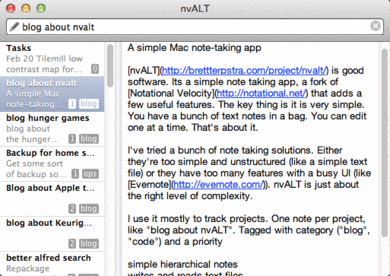
No longer loving Google, Inc.

The growing feeling that I’m a footsoldier in the ongoing Apple v Google v Microsoft v Amazon war is depressing.

I stopped working at Google in 2006 but I only stopped loving it this month. I’ve frequently defended the company in public, explaining unpopular actions from what I imagine their side is. Google has often been in the right but the company is terrible at explaining itself. I felt with my understanding of the company I could do some good in clarifying the discussion. No more.

This last month has been particularly hard for Google lovers. I took the company’s side in the Kenya mobile fiasco up until the company admitted that, indeed, employees were lying to steal customers from Mocality. Then the big stories about Google Search+ and Google’s new privacy policy. I think one is actively bad and the other is mostly harmless, but both changes are so complex and unpleasantly self-motivated it makes me sad. So now when I read about a friend getting terminated from AdSense with no explanation I just get a headache.

I imagine half of my readers are smugly thinking “See, I told you Google was evil all along”. I don’t think that’s right. In particular I refuse to give in to a cynical view of Google’s “Don’t be evil” motto; that ethos was very real, a sincere and important guiding principle. And if a big company like Google can’t avoid being evil, then what world-changing enterprise can? But I think Google as an organization has moved on; they’re focussed now on market position, not making the world better. Which makes me sad.

Google is too powerful, too arrogant, too entrenched to be worth our love. Let them defend themselves, I’d rather devote my emotional energy to the upstarts and startups. They deserve our passion.

The marvelous NTP pool

The NTP Pool is a vital but unappreciated Internet service. It runs quietly providing correct time to millions of computers all on a volunteer basis. A lot of the credit goes to Ask Bjørn Hansen who’s been coordinating the project since 2005.

NTP is an old, simple protocol that lets one computer set its clock by the time on other computers. We take it for granted now, but before NTP was widespread computer clocks were often days off correct time (or worse, 3 seconds ahead). Microsoft and Apple both build NTP into their operating systems now and run their own NTP servers, but where do all the Linux servers get their time?

Mostly, Unix servers use the NTP Pool, a surprisingly small set of servers contributed by volunteers. Today there’s just 2792 NTP servers giving time to an estimate of 5–15 million clients. NTP itself is amazingly efficient; one packet every 17 minutes once things have settled down. But the pool requires a lot of extra management, tracking reliable servers and providing a fairly complex DNS setup.

I love projects like this, where a small team can build a public resource that makes the Internet better.

Switch to UTF-8

I’ve switched this blog to explicitly serve everything in UTF-8 encoding. Before I didn’t think much about it and confined myself to ASCII and hoped for the best. Now I can just type “François Rabelais or Björk Guðmundsdóttir or 艾未未” directly and not HTML entity escape it. If you notice any errors, please let me know.

I was surprised to learn there are at least four ways for a web page to declare their encoding. (Or charset, the terms are ambiguous.) Annoyingly the web server’s HTTP header declaration overrides whatever encoding the document itself declares via a <meta> tag. I think that was back in the fantasy world where servers would negotiate content types and transcode on the fly. These days unless you’re writing in Chinese or are a super-duper expert you should always be using UTF-8.

Unrelated, thanks to Aristotle for finding a bug in the updated tags on my Atom feed. I’d hacked some Perl code and forgot how Perl scoping works.

Google Search+: Microsoft 1995 moment?

There’s an interesting analogy between Google Search+ and Microsoft Internet Explorer in the mid-1990s; let’s hope it turns out better for Google.

In the early 1990s Microsoft didn’t understand the Internet. Windows didn’t even support TCP/IP, you had to download third party drivers like Trumpet Winsock to go online. And there was certainly no web browser, Netscape was going to sell that to users. Then in 1994–1995 Bill Gates executed an admirable turnaround at Microsoft with help from folks like Sinofsky and Allard. They quickly built a TCP/IP stack and a web browser and bundled it with Windows 95 and NT. Gates’ memo The Internet Tidal Wave was the visionary document that explained it all. That rapid embracing of the Internet saved Microsoft as a company; they would have been doomed otherwise.

In the late 2000s Google didn’t understand social media. They had some clumsy efforts like Orkut and Buzz but you had to go to MySpace, Facebook, Twitter, LinkedIn, or RenRen to get social. Then in 2011 Larry Page executed an admirable turnaround at Google, with help from folks like Gundotra and Horowitz. They quickly built Google+ and bundled it with the primary search engine. There’s no visionary memo about Google+ in public but you can bet they have a very clear and strong strategy internally. The rapid embracing of social media is unprecedented for Google; it’s commendable.

Microsoft’s Internet strategy ended rather poorly for them. Their illegal, monopolistic actions finally met with an anti-trust investigation. The resulting settlement significantly weakened Microsoft’s monopoly control and allowed room for companies like Apple and Google to flourish. Microsoft’s still doing OK, but no one thinks of them as a major Internet innovator. (Despite having the only competitor for Google search in the US and Europe.)

Will Google’s social media strategy result in similar anti-trust fallout? I don’t have the legal expertise to say. So far all the anti-trust action has been around ads, but that’s expanding. Google seems to be leveraging their market dominance of search and ads to compete in social media. Hopefully Google’s smart enough to not be saying things about cutting off Facebook’s air supply. But they seem to have made the bold decision to set aside anti-trust concerns and just go for it. We’ll see if that works for them, I just hope they act ethically and leave room for fair competition.

Disclosure: I used to work at Google but left there over five years ago. I have an interest in Twitter, a social media company.

87 key keyboards

We spend all day typing on keyboards. Most of those keyboards are awful; cheap switches, bad pitch, etc. But the layout is the worst problem. Either you have a giant 101 key keyboard that’s too wide with a useless numeric keypad moving your mouse further to the right, or you have a small keyboard which has tiny arrow keys and loses the useful home, end, page up, and page down.
The layout that’s just right is the 87 key keyboard, basically a 101 key layout but without the numeric keypad. It’s not a common layout, Apple doesn’t even sell one, but it’s becoming more available. I have something like these Tenkeyless keyboards with mechanical switches and liked it, although I’m back to a full size Apple keyboard with a mouse platform that fits over the vestigial numeric keypad.

Now if only we could do something about CapsLock.

JP Morgan Select card: with chip

I just had a remarkably good service experience signing up for the JP Morgan Select Card (from Chase). I don’t normally write testimonials for banks, but credit cards are a necessary evil and this one seems pretty good.

The key feature for me is it contains a European-style transaction chip for Chip and PIN processing. If you’ve ever been a poor American trying to use a gas pump or train ticket machine in Europe and been unable to do it, it’s because the US credit card is way behind the times and doesn’t contain a chip. Well, a few do now; this card has both a chip and a traditional magnetic stripe. Unfortunately it does not have a PIN, that’d be too standard, they call it “chip and signature”. Which means I still sign at a restaurant, but in theory an unattended machine will just approve the transaction without the PIN. We’ll see.

The ordinary credit card features seem OK too. No foreign transaction fees. Some sort of reward points system whose details I didn’t look into. Lots of consumer protections, etc. $95/year and 13.24% APR on purchases.

Finally free of AT&T Wireless: Verizon!

I finally left AT&T Wireless. Their service has literally not worked in my house or most of San Francisco for years. The iPhone would display 0–2 bars but over half the time calls and SMS would not go through. And pretty much anywhere I was in the US, calls would drop at random intervals. Web pages wouldn’t load reliably, either. It’s not just me: AT&T has a nearly 5% dropped call rate, 2–3x worse than the competition. And it’s way worse in dense areas like San Francisco or New York.

I finally switched to Verizon after several friends said their iPhones worked better in San Francisco. So far so good. I show 2–3 bars. I can reliably make calls from my house, I can load data over the 3G network, SMS seems to work. A cell phone that can make calls! I just wish I’d taken the leap earlier.

Ookla’s speedtest.net app tells me Verizon gives me about 400kbps up and down for data at home. I’ve seen it go as high as 1500/800 and as low as 200/100 when I have better signal. More importantly the speed test has worked every single time I’ve run it. I can’t even report AT&T speeds because the majority of the time, the test won’t complete. Verizon voice quality also seems OK. Definitely has that talking-underwater quality when the signal is bad, but it’s intelligible and, more importantly, doesn’t drop.

I don’t understand how in 2012 AT&T’s network is still so bad. San Francisco is an especially challenging environment but you’d think after years of the iPhone monopoly they’d have found a solution. Or at least owned up to the problem. Also confused as to why AT&T’s 3G reliability is so bad: my experience was the link would either be great or dead, no graceful degradation.

AT&T’s goodbye to me after being a customer for eight+ years was to refuse to unlock my old iPhone 3GS and to refuse to refund a prorated amount for the last month. “Our corporate policy”, they said, along with their policy of not providing a working service. Verizon’s policy is to unlock after six months. Why did I stick with AT&T so long? Even my first experience with them was terrible. Stockholm syndrome, I guess.

Prescription medicine insanity

San Francisco’s biggest health insurer, Anthem Blue Cross (and its partner Express Scripts), no longer allows its customers to buy prescription medicine at Walgreen’s California’s largest pharmacy. Why? Anthem claims it’s about price. Walgreen’s says it’s anti-competitive behavior. People like you and I could care less about this squabble between two giant companies: we just want to take the medicine our doctor says we need to stay healthy.

I now have exactly one pharmacy within a mile of my house I’m allowed to use. It’s a spooky place, so I’m going mail order. Of course Anthem and Express Scripts are right there to make it easy to order my medicine directly from them. Which I did, because what alternative do I have? Apparently anti-trust law doesn’t apply to healthcare.

Capitalism does not work to provide health care efficiently. There can be no free market in healthcare: consumers are intensely limited by geography, insurance underwriting, and medical need. Regulatory requirements make competition from upstarts nearly impossible. The US spends 50%–100% more than every other industrialized nation on health care in total and spends just as much per-capita of public funds on health care as every European nation. But we have lower life expectancy. What we’re doing now doesn’t work.

Weblog server migration

I’ve migrated this weblog to a new host. You shouldn’t notice any changes, if you’re reading this post you’re already reading it on the new server. But if you notice something wrong (or if it works and you feel chatty) please email me at nelson@monkey.org.

I’m a bit disappointed I haven’t yet switched weblog software. I’m still using Blosxom, an idiosyncratic if capable Perl script I’ve been running for 8 years now. The only real drawback is lack of modern blog editing tools. The main reason I haven’t switched is none of the hosted services have a good way for keeping my weird old URLs working. Also I’ve recently needed a real server in a datacenter for some projects so it’s easier and cheaper to just move to a new host.

The new server is at 208.110.64.210, hosted by Wholesale Internet in Kansas City. They seem like a good small server option: $70/month for a decent dedicated, self-managed server. I also took the chance to move from Debian to Ubuntu Server, some of my reactions to that change on my secret work blog. I sure wish I had a better way to manage a server than logging into it and modifying random config files all over /etc. Puppet and Chef are way too much work for a single casual server and Blueprint, while cool, is a bit too simple minded.

Hat tip to Adam Fast for recommending Wholesale Internet

US / Iraq war body count

For many years now my blog has had a little number on the left, cryptically unexplained other than the link to Iraq Body Count. It currently stands at 109,295. That’s the number of civilians killed in Iraq since the 2003 invasion by the US. Well, an average, the best guess is somewhere between 104,000 and 115,000. Not a guess really, a meticulously researched list.

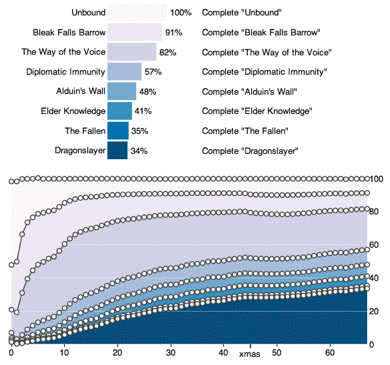
100,000 dead in Iraq because of the US decision to start a pointless war on false pretenses. Never forget the Big Lie of the Bush Administration. Invading Iraq had nothing to do with the 9/11 attacks. It had nothing to do with weapons of mass destruction. There was no nuclear weapons program in Iraq, no yellowcake uranium, no meaningful chemical weapons stockpiles, no biological weapons. We knew that before we went in. What we did get there was becoming a nation of torturers.

I’m blogging this to mark the count as I remove the number from my blog. Partly because the US occupation is over, partly because I’m simplifying servers, and partly because it’s just too depressing.