Some Bits: Nelson's weblog

The post-laptop era

I gave my 13 year old nephew an iPod Touch for Christmas. It’s the perfect gift for a young man, it does almost everything on the Internet he wants to do. Email, Facebook, Youtube, web browsing, SMS (via WiFi), maps, games. And while it’s not a phone (at least, without Skype), it’s also not a device requiring a $90/month service plan for AT&T cell phone service that doesn’t work anyway. Really the only thing it’s missing is a camera, which if rumour is to be believed was a last minute omission.

Here’s the thing: thanks to the iPhone and the iPod touch we are now in the post-laptop era. There’s no need for a big awkward computer anymore for being an Internet citizen. Yes, the screen is tiny. And yes, the keyboard isn’t great for long text entry. But those are remarkably minor tradeoffs considering what you get in a pocket size device. I wanted my nephew to become more active on the Internet, more involved, and I think with the Touch in his pocket he’s pretty well along the way.

My one caveat about this post-laptop world is that so far it’s dominated by a single manufacturer, Apple. Blackberries aren’t complete enough, Palm is irrelevant, and Android isn’t quite ready yet. Apple is doing a very good job with the platform so far, but I’ll feel better when there’s more competition. I have high hopes for Google and Android chipping away at market, and at this point I can’t help but wonder if tablet and hiptop computers are more relevant than cell phones.

One Flew South, Atlanta airport restaurant

Ken and I had two excellent meals at One Flew South, a serious restaurant in the Atlanta airport. Concourse E, in the secure zone, easy to get to from any of the terminal buildings. It’s not cheap ($15-$25 main courses) and not particularly quick (an hour minimum), but if you’ve got a couple of hours to kill at the Atlanta airport and you want a fine meal, One Flew South is the place to go. They also have a great cocktail selection at the bar if you just want a nice drink.

The menu is pleasantly eclectic with a welcome attention to local artisanal ingredients. They bill themself as Southern-influenced international. The best dish I had was a pulled duck sandwich. Exactly like a pulled pork Georgia BBQ sandwich only with lovely duck confit, a fine marmelade, and good fresh bread. Also had a well balanced frisée salad with excellent local bacon and a surprisingly great sushi roll. They even have a cheese plate, three pleasant Georgia cheeses. Local ingredients and a careful chef, miles away from the Chili’s / TGIFridays / Sbarro horror of the usual airport dining experience.

Service was friendly and professional. A bit uneven in the pacing, particularly for drink service, but the friendliness made up for it. They were nicely accomodiating about returning a corked bottle of wine. It’s a good dining room, too, a comfortable and pleasant private space separated from the terminal by a wood screen that creates privacy while letting you still watch the people walking by. Concourse E seems to be the new international terminal in Atlanta and is quite civilized, particularly the live piano playing in earshot of the restaurant.

The executive chef is Duane Nutter; the other principles are chef Todd Richards (also of Rolling Bones BBQ) and manager Jerry Slater. I imagine it’s difficult to run a fine restaurant in the secure zone of an airport. High rent, awkward delivery logistics, and a bizarre and changing customer base. I sure hope they’re doing well because I’d love to go back.

Plane engine failure is bad

One important difference between planes and cars is that planes are in the air and require power to stay up there. That sounds obvious, but I’ve only begun to appreciate exactly what engine failure means to a plane now that I’ve started engine-out training. And yesterday I had a real world brush with engine failure that has made the importance of that training very clear.

We were in Ken’s Cardinal, over Monterey at 11,000 feet when the engine started running rough. Switching the magnetos fixed it for a minute, but it started running rough again soon after and was producing reduced power. We decided it’d be prudent to land the plane immediately. Ken radioed in “rough running engine, request expedited landing” and we were immediately cleared to land on the big runway at Monterey airport. Neither of us trusted the engine to keep running. Fortunately Ken had no trouble making an uneventful landing; if anything, we had too much altitude and power. The nice fire crew was standing by on the ground, a precaution we were glad was unnecessary.

When a plane engine stops you don’t fall out of the sky immediately, you glide. But you’ll be landing soon. How soon? Very roughly, for a plane similar to ours, for every 1000 feet above the ground you have about 80 seconds and can travel about 1.8 miles. So if our engine had quit entirely we would have had about 13 minutes to fly up to 18 miles before we were on the ground. (Note: rough estimate, read your POH for actual flight performance!) Our engine didn’t actually quit, and even if it did we had a lot of altitude and three airports we could have made. The picture looks quite different if you’re only 2000 feet above mountains with no airport around.

Once we were on the ground in Monterey I had some foolish idea that we could try to clear the engine problem ourselves, maybe test it in a run-up and continue our three day trip to Florida. Ken is much wiser than I and said “no way until a mechanic checks it”. Which reminded me of various horrifying stories of pilots taking off with flaky engines. One of the worst things that can happen to a plane is losing power 500 feet after takeoff; the only option is to land on whatever’s straight in front of you and all that fuel on board makes for a big hot fire.

So instead we parked the plane at the friendly Del-Monte Aviation FBO where it sits until Monday for a mechanic to look at it. We rented a car and had a nice lunch with a glass of wine and made alternate travel plans on Delta Airlines. And now I’ve gotten a gentle practical demonstration of why all this engine-out training is important.

Bay area airport tour

I had a really fun flying lesson today, a tour of Bay Area airports. San Carlos, Palo Alto, San Jose, Reid-Hillview, Livermore, Hayward, and back to San Carlos. 90 miles and 7 landings in just under two hours.

Lessons have been going well. It’s challenging. I skipped right over learning to land on this blog. That’s a major topic and I don’t quite know what to say about it, other than I’m not scared of landing anymore but have a healthy respect about how every landing is a unique challenge.

The difficulty in today’s lesson, what made it so exciting, was putting together a bunch of skills and doing everything at once. Reading charts. Taking off, cruising, landing. Avoiding restricted airspace. Flying the pattern, setting up an approach from whatever weird direction I was coming from. Finding airports. Judging the weather. And juggling radios: 11 controllers, 7 ATIS. I’m proud of myself that I handled about 95% without mistakes and 100% safely. Now I just have to practice for 50 more hours!

Farmville considered

Over on my secret gaming blog I just wrote a long post analyzing Farmville
FarmVille is a great social, viral app. The puzzle I can’t work out is whether FarmVille would be more successful if it were a better game. I think probably not; the casual, simple gameplay along with the fun Sims-like construction is a pretty sweet spot for the Facebook market. Too bad, I’d love to play a game like this that was actually interesting as well.

FBO service at airports

One of the pleasures of flying private airplanes is the amazing service you get at the airport. FBOs are the airport terminals for general aviation. A staffed office with a waiting lounge, bathrooms, telephones and Internet terminals, car rentals, and if you’re lucky some fresh baked cookies. But unlike airport terminals the experience is entirely genteel, welcoming, unhurried. And no security screenings. You can tell the luxury aspirations of the FBOs by their names: Million Air, Signature Flight Support, etc.

The primary business of FBOs is selling fuel to rich executives. All that service is there waiting for a private jet to drop in and buy $2000 worth of gas. The FBOs are a helpful base for air taxi operations for people who think nothing of paying a few thousand bucks to hire an airplane and a couple of pilots for a quick trip to Sedona. There’s always a beautiful lounge with black leather sofas for the customers and a quiet back room with a comfortable recliner for a nap for the pilots. Also, always mouthwash in the men’s room so the pilot can be fresh and clean.

Ken’s little plane is more like a 1973 Volkswagen than a Mercedes limousine and we’re seldom buying more than a hundred bucks of fuel. But we get the same executive service when we wander in with our ratty flight bags with charts falling out of the pockets. I really appreciated that last week for our unplanned stop in Medford. We found our way to Million Air and five minutes later had hot coffee, fresh cookies, and a rental car being arranged by an intelligent and helpful woman at the desk. Nice welcome after a long flight with frustrating weather.

Of course most little airports don’t have fancy FBOs. But even the places with nothing but a mechanic and a fuel pump are generally friendly and helpful. I fondly remember a few years back near San Antonio stopping for gas and being offered to borrow their old beater car (“keys are in the ignition”) to go get some great barbeque. Sure beats McDonalds at the airport food court.

Useful Google Chrome extensions

Google Chrome now supports extensions in the beta build. They work great. Here’s useful extensions I’ve found:
AdThwart
There’s several choices for ad blockers right now, this one seems to work best out of the box.
FlashBlock
Makes it so you have to click to activate any Flash object on a web page. Not so critical with the ad blocker, but still a nice thing.
RSS Subscription Extension
Adds the little “subscribe to feed” button in the address bar on blogs. This really should be in Chrome by default.
Send from Gmail (no button)
Rewrites mailto: links so they open in Gmail instead of the OS’ mail client. This unofficial version doesn’t have a toolbar button.
Google Quick Scroll
When you click through a Google search result, gives you a UI on the landing page that makes it easy to find your keywords on that page. It’s quite clever.
Extensions seem to work great in Chrome. My one complaint is UI. A lot of extensions want to add buttons to the toolbar, but I’m very jealous of that real-estate and don’t want random coloured icons cluttering up the browser. Even worse, some extensions are binding magic keys (like FlashBlock’s Ctrl-Shift-F). That’s just inhumane and needs to stop. I think the best answer is to let extensions add stuff to the right click menu; I don’t think that’s possible right now. Then again that leads to menu proliferation.

Google Earth for general aviation

One of the fun things about learning to fly is figuring out where you’re going to fly. The official old-school way to plot a course is to grab a sectional chart and unfold it on a big table (or in a small cockpit), then bust out the compass, protractor, and slide rule. It’s fun to do things that way, but fortunately in the modern computer age there’s easier ways. (I like AOPA’s flight planner).

Google Earth is a great tool for answering the question of where you want to go. It’s particularly good at showing terrain, since the primary view is overhead photos overlaid on an eleveation model. But Google Earth is also uniquely good at layering in extra information that helps figure out where someplace interesting to fly would be: what airports have nearby restaurants, hotels, parks, etc.

The default Google Earth layers are pretty good, but there are a few special layers from third party sources that are specifically useful for general aviation pilots. Here’s a few I’ve found. Note: these datasets are often out of date and not suitable for navigation.

Airport placemarks (Sampas KML, JustSoar KML)
Google Earth’s airports layer only shows big commerical airports unless you zoom way in. So it’s handy to have a KML file with a zillion pushpins that are always visible. I prefer Larry Sampas’ version because the display titles are short 4 letter codes. The JustSoar versions include runway geometry and are handily categorized as public vs. private.
Circle generator (KML generating form)
Very simple tool: draw a circle of a specific radius at a specific point. I have 100nm and 200nm circles drawn around my home airport.
Sectional Charts (GELib KML, ChartGeek)
These sources do a massive overlay of your familiar paper chart right on top of the Google Earth display. You’ll want to adjust the layer transparency to see through it. Both versions also have a 3d polygon view of controlled airspace that helps you make sense of the smashed wedding cake of San Francisco Bravo. The Google Earth Library data is free, but based on a 2006-era dataset. ChartGeek is selling frequently updated datasets with lots of nifty features. They have a free San Francisco sample you can try.
OpenStreetMap (KMZ)
Street maps. Shows where people live: the terrain view of Google Earth isn’t very helpful when trying to estimate how big a town is. I’m not wild about this Google Earth / OSM integration, but it works OK.
There’s some other work out there integrating more aviation data into Google Earth: IFR routes, more geometries of the stuff on charts, etc. The core data source for all of these things is the National Flight Database, the government’s publication of aviation navigation data. That data won’t work directly in Google Earth, but its availability means geohackers can build their own products. Sadly the data is no longer free, it’s $5 - $x00 depending on how much data you want and whether you need a recurring subscription.

The challenge of learning to fly

So I’m learning to fly airplanes. Nothing too fancy, just a basic private pilot’s license and maybe instrument flight afterwards. (I’m training in a Skyhawk SP out of San Carlos with Paolo Resmini). My partner Ken has been flying for 20 years so this is something we can do together, and it’s a challenge a bit outside my comfort zone so seemed a good thing to do.

The biggest challenges of flying an airplane are attention management and responding correctly to the current situation. There’s a lot going on in the cockpit: three to eight gauges, the radio, navigation, not to mention keeping the wings level and avoiding hitting the ground. And when something gets complicated you don’t have a lot of time to think. So a lot of the seventy or so hours of training for a PPL is practicing things over and over until proper procedure is ingrained. The training sounds boring, but a good instructor is always pushing you just beyond what you can comfortably handle.

I was a great student in school. But entirely because I would out-think the problems, I was terrible at memorization or practice. I remember getting in trouble in 3rd grade because I couldn’t pass my multiplication tests fast enough. See, I didn’t bother memorizing the times tables for 8 because I knew you could just multiply by four and then double it. That’s the kind of student I am, and it’s not what you need to be to learn to fly. There’s definitely some thinking learning to being a pilot, particularly when it comes to navigation or understanding why you do stuff. But there’s way more practice, and memorization, and developing the right instincts. It’s a challenge for me, I’m liking it.

PS: after my last aviation post a couple of people were kind enough to say they’d like to read more about flying. So I plan to write some, but not the blog-post-per-lesson I obsessively was considering.

San Francisco “street cleaning”

SF used to clean the streets once a week, but recently shifted to twice a month (“second and fourth Friday”). I suspect this new schedule has resulted in more tickets being issued, since it’s harder to remember. I could put up with our tickets (it is my fault, afterall) if they actually cleaned the damn street. Instead they just push all the dirt to the middle of the parking lane.

METARs: Aviation weather

I’m learning to fly airplanes. Weather is important. Pilots get weather reports as METARs and TAFs. Which are inscrutible at first blush, but remarkably concise and efficient once you learn it.

You can get a sense for how inscrutible the language is when you learn that METAR officially stands for “aviation routine weather report”. The actual reports are no better.

KSQL 081950Z 35006KT 20SM SCT100 16/05 A3008
KPAO 081947Z 34010KT 30SM SCT150 A3007
KHAF 081955Z AUTO 32007KT 5SM HZ CLR 17/07 A3006
KSFO 081956Z 04004KT 10SM FEW100 SCT180 17/08 A3007 RMK AO2 SLP182 T01670083
That wodge of text is current weather at four airports in the Bay Area. The first line is San Carlos, where the wind is from the north at 6 knots, visibility is 20 miles, cloud cover is scattered at 10,000 feet, and it’s 16°C (dewpoint 5°C). That report is pretty simple; it gets more complex when you have codes for thunderstorms, fog, volcanic ash, etc. Charmingly some of the codes are English (TS: thunderstorm) and some are French (GR: grêle, hail).

On first and second exposure I was horrified at this coding. It felt like a 1940s telegram. But having spent a couple of hours studying it I can appreciate its brevity. One particularly nice feature is that it’s (more or less) fixed width, so you can quickly vertically compare reports over time or from multiple airports. They’re also ideally suited for Twitter: @KSQL, @KPAO.

The METAR websites offer a “translated view”, with the data all unpacked into multi-line English. I see now why the pilots I know don’t use it; too wordy, and you know the compact format already why not use it? I still think you could make a better reporting system using simple HTML tables, but aviation is conservative. mobilemetar.com strikes a nice balance for iPhone users.

I’m toying with writing blog entries about the pilot learning process, maybe even a separate pilot blog. Or maybe just mix them in here. Have an opinion? Mail me.

Daylight Savings Time vs. your server

How many hours are there in a day? Twenty-four of course, except for the couple of days a year when there’s 23 or 25. Worse, which days have odd hours changes every year, is unpredictable, and is subject to the whim of local politicians, religious leaders, and sporting events. This fall’s DST change happens at 50 different times depending on your location. It’s a terrible way to keep time.

Daylight Savings Time is confusing enough for people but it plays hell with software. There’s an Internet advertising company I’m intimately familiar with that used to lose significant money twice a year because of customer budget algorithms that assumed every day had 24 hours. Once a year customers would only spend 23/24 of their budget losing 4% revenue, and once a year they’d spend 25/24 of their budget requiring 4% refunds. Now fixed, I’m pretty sure, but fixing it isn’t easy if you’re calculating in local time.

The solution for software is simple; do all calculations in Coordinated Universal Time. UTC doesn’t do daylight savings, so every day has 24 hours. (Technically some days can be a second too long or short, but for most applications that error is small enough to be ignorable.) The easiest way to be sure you’re doing UTC everywhere is to set your servers’ timezones to UTC. You’ll forever be confused when looking at log files, particularly since your own offset to UTC is changing with daylight savings, but with a desktop clock showing UTC you can usually puzzle it out.

AT&T iPhones in Europe: a survival guide

For our recent trip Ken and I took our iPhones. It’s nice to stay in touch back home and I’ve become pretty reliant on my iPhone for getting around. Here’s some tips on using an iPhone internationally for Americans stuck with AT&T. (There’s a whole alternative of unlocking the phone and using a European SIM; not discussed here). See also AT&T’s iPhone travel tips, they’re pretty useful.

AT&T’s roaming is pretty unreliable. Half the incoming phone calls I know about never arrived, not even to voicemail. Caller ID doesn’t work. SMS messages disappear. Rates are outrageous, something like $2/minute. It’s a bit cheaper if you set up “AT&T World Connect” on your account for $4/month before you leave. But who cares about the phone, you really want your iPhone as an Internet terminal. And it works pretty well for that in Europe, provided you either find free WiFi or else you don’t mind paying through the nose.

If you don’t buy the “Data Global Add-On” you will be paying $10/mb for data from the cell network (EDGE or 3G). That’s absolutely hideous pricing. You can pre-order a chunk of 20, 50, 100, or 200 mb/month at roughly $1 / megabyte. That’s still outrageous but bearable. Note: you can order the data for just a few weeks and cancel. Overage is $5/mb.

How much bandwidth do you need? If I was being careful, it was 2 mb/day. That was enough bandwidth to catch up on email and Twitter twice a day, maybe get a couple of web pages or upload a photo. Then I had one bad day where I looked up a few maps and restaurants and blew through 10 megabytes. You really have to be careful.

How do you be careful? #1 way is to find free WiFi. There’s a lot of free WiFi in Europe, more-so than the US. Public town squares, train stations, and busy cafes are good bets. Sometimes the cafe WiFi is password protected, just ask and they’ll give you a password. Hotels are hit and miss. A lot of my rooms only had wired Internet, I regretted not bringing a little WiFi router.

If you’re stuck with using cell for data, the #1 option for being careful is to turn off “Data Roaming” in Settings. If you do that, you’ll use no bandwidth. You’ll also not be able to use the Internet. Geolocation won’t work well either. I found it really irritating to have Data Roaming off all the time. So instead I configured the phone to be lean by turning off Notifications and “Mail / Fetch New Data” in Settings. I also reset my Usage counters to track what I was using in Europe.

iPhone apps will still use a lot of bandwidth when you launch them. The real killer is Google Maps, a total hog. OffMaps is a nice alternative with cached maps in offline mode. Expect to pre-load 500-1000mb of maps for a long trip, you really want the finest grain detail when walking around. Apple’s Mail app is reasonably network efficient, particularly compared to Gmail in Safari. The New York Times app is great for caching a bunch of news articles on WiFi then reading them later. And Twitter is a great low bandwidth way to keep in touch with people, although apps like Tweetie are not particularly network efficient.

AT&T’s data roaming charges are ridiculous and it’s a real pain watching your bandwidth. But it’s totally worth it, the iPhone makes a great little companion while travelling. I particularly liked being able to use Twitter as a travel diary complete with photos, it was a lot of fun seeing responses from people to what I was doing that day.

Notes from Austria, Slovakia, Poland, Czech

We’re back from our 25 day trip to central Europe. Ken and I were invited to a friend’s wedding in Spišská Nová Ves, Slovakia. That seemed a great excuse to travel around a bunch of Central Europe. So we visited 13 cities in 4 countries. Here’s some quick impressions, along with a map of where we stayed (you may need to zoom out to see everything).

The trip started in earnest for us in Slovakia, which we loved. It’s a small country and not terribly wealthy. But it’s also proudly part of the European Union and people were very friendly and welcoming, even flattered to be visited. Bratislava is a great international city. The smaller towns we stayed in were a bit disappointing (I’m sorry we didn’t stay in Banská Bystrica instead), but the High Tatra mountains were phenomenal. And the high point of our whole trip was my friend’s wedding in Spišská Nová Ves: nice family and friends, beautiful part of the country, great folkoric wedding elements. Really glad we had the opportunity to participate in such a special event.

From Slovakia we headed into southwestern Poland. Kraków was everything we hoped for and more, a beautifully preserved old town full of things to enjoy. (Although I suggest skipping the salt mine.) And Wrocław was a nice surprise, it’s a university town with a tranquil old cathedral district. But while we had a good time in Poland it was probably the least friendly of all the places we went. Also the roads are terrible for driving.

After Poland we went southwest into the Czech Republic, stopping for a night in a ridiculously luxurious hotel and then spending time in Prague with an old Parisian friend. Prague is great, beautiful and overwhelming with so much to do. I wish I had a warm relaxed week to enjoy it instead of two bitterly cold days. Will definitely be back. We also spent a couple of days in Český Krumlov, a well-preserved medieval town that’s definitely worth one tourist night but probably not two. Overall we liked our time in Czech, just wish I’d seen more of it. It seems very Western to us, like it’s already made the post-Soviet transition that Slovakia is working so hard to make now.

We started and ended the trip in Austria, familiar territory for us. Honestly Vienna didn’t work very well for me, restaurants, sightseeing, etc were all a struggle. I guess it’s more of a place real people live than a welcoming tourist city. On the way home we also spent a couple of nights in Dürnstein, a tiny town in the Wachau wine region on the Danube. Totally beautiful area.

Overall it was a great trip, a nice sampling of some very different places. If I were doing this trip again I’d consider doing it entirely by train, skipping the smaller towns. Vienna, Bratislava, Kraków, Wrocław, Prague, Vienna again. Driving gives a lot of flexibility in seeing smaller places, but it’s expensive and stressful and there’s a lot to see in just the bigger cities.

Hello from Poland

Ken and I are in Wroclaw, Poland. The trip so far has been great, particularly my friend’s traditional Slovakian wedding. Emacs is a terrible moblogging platform, but Twitter is working well. See @nelson for thoughts, photos, etc.

Off to Slovakia, etc

This blog’s going to go quiet for a few weeks, Ken and I are off on our first European trip in some two years. Headed to Austria, Slovakia, Poland, and Czech. The centerpiece of the trip is a friend’s wedding, but lots of other tourism in Vienna, Bratislava, Krakow, Wroclaw, and Prague. You can see my planning notes in this custom Google map; obviously not hitting everything!

FlickrNear, another geolocation demo

I’ve made another mini-webapp for tourists: FlickrNear. Like my previous WikiHere hack it uses the Geolocation API and other web services to show you something about where you are standing right now. FlickrNear shows interesting photos that were taken near your current location. Some examples: San Francisco, rural Texas, Chinon, Lagos, Easter Island, Ely, Nevada.

The app should work on any geo-location web browser. I’ve customized it for the iPhone (bookmark it to home screen!), including using small image sizes to cope with AT&T’s offensive $1/megabyte data charges. If you want to explore from your desk try the map mode; click on the map to open a view at that spot. (Should work in Firefox and Chrome, dunno about IE, etc.)

FlickrNear is more subtle than WikiHere because of the need to rank photos. My ideal result page has three photos of different things of tourist interest: for San Francisco that’d be the Golden Gate Bridge, Alcatraz, and Fisherman’s Wharf. Not very interesting for SF, but should be handy when you’re in the middle of nowhere.

Unfortunately I haven’t gotten to the result quality I want yet. Flickr’s geosearch is very powerful, but coming from the outside I don’t get much control. I need to make the range of the search dynamic and get more diversity by using photo owners and tags. It’d also be nice to filter out the trendy garbage that can be Interesting to Flickr (like garish HDR). Still, release early and often, and since I’m about to take a long trip I wanted to put this online. Tell me what you think!

Webapps with static HTML, dynamic data

I’ve found a new way of writing web applications and couldn’t be happier. HTML pages are all static, nothing generated server side. Everything dynamic is done via Javascript in the browser. I know I’m a few years late to the AJAX party, but I really like how it works so I thought I’d share some thoughts.

The new app is a nerdy game thing: graphs of Warhammer PvP history. There’s a server backend scraping web pages and creating a historical database. The main user page is a graph rendered entirely in the client, using AJAX to load the data from my server and the Protovis Javascript library for the rendering. In the old days I would have generated HTML and an image in my server. Now, like my WikiHere demo, the server isn’t doing anything complex.

The main advantage to this approach is development speed. I can fine-tune the presentation just by editing the HTML and Javascript. I don’t even need a web server to test. My dev code is my live code; no translating back into JSP or whatever nonsense I used to do. That’s a particular advantage for big software projects, the UI team can do real work and not just mockups.

There’s other advantages too. Testing the server is a lot easier; all its doing is returning JSON blobs. The server is easy to scale since it’s doing so little; in my case I started down this path because Google App Engine doesn’t really have a good way to do server-side graphs. Caching is easier; generic JSON business objects instead of some over-customized generated HTML. And the JSON API the server implements can be used for other presentations.

The only major drawback I’ve found with this project is supporting Internet Explorer. Every other web browser in the world implements Canvas and SVG, letting Javascript beautifully render pixel and vector art. But not Microsoft. The medium-term solution may be be excanvas and svgweb, emulation libraries for adding the features that Microsoft was too lazy (or evil) to implement.

So now I have a new way to build webapps. The server becomes a simple business logic API server. Javascript code does all the presentation work. It’s a fun way to code.

ReBit: Time Machine-like backup for Windows

Ken’s Windows hard drive died and it took us two days to recover from a full backup we’d made with Norton’s horrible software. So I went looking for better recovery software. And I may have found it in ReBit, either as $25 software or $140 with a 500 GB backup drive.

MacOS’ Time Machine sets the standard for consumer backup software. ReBit isn’t quite as impressive but it’s pretty good. It’s a simple install-and-forget backup solution. No configuring backup schedules, no managing disk space. Just plug in a big USB drive, click a couple of buttons to install, and forget about it. The rest of this blog post is pretty technical, but a key selling feature of ReBit is you don’t need to know any of this technical crap. Just trust the frog and you can get your files back.

A word on Windows backup. You have three choices: remote file backup, local file backup, or local disk image backup. I like JungleDisk for remote backup but it’s not suitable for recovering a failed 500 gigabyte system disk. Local file backups are also not very useful for disaster recovery; you’ll have to reinstall Windows from CD. Recent versions of Windows have a cool Volume Snapshot Service that lets you make consistent copies of a full disk image, but the built-in tool seems to not support making shadow copies to an external disk. (Ie: useless in the event of a disk failure.)

ReBit seems to work by using the VSS every 24 hours to make a recovery point. In addition it is continuously doing incremental backups while you work; every time the mouse goes idle it’ll start backing up changed files. In practice it works quite well, although I find the chattering hard drive a bit annoying.

Backup is easy, what really matters is the restore process. Restoring individual files is really simple. The backups just look like another drive in Explorer, you can open or copy off the files you need. You can also get to older versions of individual files, but it’s a bit awkward and there seems to be no facility for getting back an entire folder at once from some old version. So not ideal, but good enough for typical file restores. And very, very easy. I haven’t tested a full system recovery; don’t really want to chance wiping my drive. The restore disc booted just fine on my system into a simple Linux GUI that presumably knows how to a system restore.

ReBit’s not perfect. The CD I bought from Amazon didn’t support Vista/64, so I had to contact support to download a more recent version. The software has some activation-based DRM that locks the software to one machine. I’m ok with that, but they damn well never require activation to recover data from the backup. There’s a few minor UI bugs here and there. But ReBit’s email support has been good and the important stuff, the backup and restore system, seems to be working just great.

Afghanistan’s election symbols

Afghanistan recently had their national election. And like India, they use symbols on their ballots to help non-literate people recognize their candidate (as well as portraits). There’s a great photograph of the ballot in the Big Picture.
The symbols are qualitatively different than the Indian ballot. There’s an odd use of multiples: two or three objects to fill the square. And they seem more abstract, no hammer and sickle or the like. According to PRI candidates were given a choice of three random symbols, although some candidates were able to pick things that seem representative. As an American it’s hard not to see the airplanes as provocative.

District 9

Children of Men was a huge breath of fresh air to scifi films. Tight movie, shot intelligently, interesting cinematography and storytelling. District 9 isn’t quite as solid or well polished, but it’s a thoughtful and entertaining film. Worth seeing in a theater as an antidote to all the garbage American action flicks.

Both films are grimly depressing. But they’re not simplistic dystopian future films where the horrible world is comfortably distant from today. The world in these films is terrible now, today, for identifiable reasons. It’s a very pessimistic reflection on our current society. It works quite transparently in District 9’s case, drawing directly on apartheid experience to tell the story of what would happen if indigent aliens came to Johannesberg and squatted there in shantytowns. Basically the director is expanding on his short film Alive in Joburg, taking good advantage of his $30 million budget and less good advantage of a 112 minute running length.

District 9 is strongest at the start setting up the world. Excellent use of documentary-style filmmaking and lots of shaky-cam to reveal classic unthinking xenophobia of various stripes. The movie then goes on to more of a classic action flick with slightly irritating Enemy Mine moralistic overtones. It works pretty well though, doubly so because Neill Blomkamp applies his CG background to some really great mech-suit and giant spaceship scenes.

If District 9 is a success we can no doubt look forward to District 10, a Roland Mmmerech / Michael Bay $200M production. The explosions will be bigger, the action sequences will be edited to a frame of their lives, and the soul will be completely gone. In the meantime maybe they’ll be making good scifi films somewhere outside the US studio system.

Grown-up movie theater in San Francisco

The newly renovated Sundance Kabuki is a pretty good movie theater. It’s a fancy theater for grownups: reserved seats, an effort to show good films, even a bar that lets you bring cocktails into the movie screening.

We had a pretty good experience on Thursday seeing Julie & Julia. Great film. The balcony seats were comfortable, the projection and sound were good, and the audience was polite. That last point is important; I seldom go out to movies because I hate the rude audiences but a movie about Julia Child at a theater that’s $2 more / ticket than normal is a bit self selecting. Also the theater didn’t show any ads, too many previews, or offensive threats to put the audience in jail. A welcome change.

The real novelty of the place is decent food and drinks in the movie. That was a mixed bag. The menu sure beats jujubes and popcorn, but it’s not a proper dinner. And the alcohol service is limited to an awkward, crowded upstairs bar, a few small theaters, and balcony seating in the main theater. But the balcony worked out quite well, it was very nice to enjoy a martini and some fresh potato chips from our front row balcony. I can recommend Dosa across the street for a late dinner afterwards to make a full date.

I sure wish San Francisco had something like Portland’s brewpub theaters. I have many happy memories of beer and pizza watching second-runs and old flicks at the Bagdad. Great place to watch Repo Man.

A better web browser

Google Chrome is good software. If you’re a normal user that’s all you need to read from me. Download it and give it a try, it’s a significantly better web browser than Firefox or MSIE. If you’re a software nerd, read on. Chrome is a great example of Google’s commitment to software engineering excellence. It sounds cliché but people at Google really care to get things right, in a technical sense, and Chrome is a product where that ethos really shines.

Foremost, Chrome is fast. Everywhere. Fast rendering, fast compiled Javascript, responsive UI. I most appreciate the incredibly fast startup time, I never wait for a Chrome window to appear. It takes a lot of discpline to make things fast; check Evan Martin’s blog post about Chromium startup times where he explains that even adding 3ms to the startup time is unacceptable.

Also, Chrome seems correct. I’m not an HTML and Javascript spec expert, but in my limited experiments I’ve quickly come to believe that if Chrome does something it’s probably for a good reason; they have incredibly comprehensive testing. Also Chrome implements useful standards like SVG and Canvas. It’s shameful how Microsoft refuses to implement these simple things that every single other web browser supports. When it was just MSIE vs Firefox, Microsoft would often win the debate. But now it’s MSIE vs. Firefox, Safari, and Chrome. It’s clear that Microsoft is the odd man out.

Speed and correctness are not just technical niceties; they are transformative product features. I use my web browser and my desktop far more efficiently now that I have a web browser I trust to open fast. And I use Javascript-heavy webapps like Google Docs or Google Maps a lot more frequently now because they run so well in a good web browser. Of course, that’s Google’s whole point.

It wasn’t clear at first Google was serious about making Chrome a desktop product. They didn’t exactly need it: Firefox is a fine competitor to MSIE already and Google already finances most Firefox development. A common theory is that Chrome was built for Android, the phone OS. Whether or not that’s true it’s clear that Chrome is also a serious desktop product on Windows, and soon on Mac and Linux. They’re even adding desktop frills like changable themes. Chrome works great right now, making both Windows and the Web a better experience. Thanks!

AT&T / iPhone FAIL in San Francisco

Frustrated with iPhone data service in San Francisco? Call 1-800-331-0500 and complain; AT&T claims they have no problem. #attfail.

I’m an enthusiastic iPhone user. I’m a captive AT&T customer. They’re not awful as cell phone companies go. But their data network is terrible in San Francisco. It’s totally random whether I’m going to be able to load a web page at any given time or place; I’d say about 25% of my network requests fail. I’ve taken to using an offline map just so I don’t get lost. I’m not the only one: every iPhone user I know hates the service in San Francisco. So I called today and tried to do something about it. Specifically, I asked for a refund for the $30/month data plan.

It didn’t go well. The customer service reps I talked to were all polite and communicative and did a game job in dealing with an unhappy customer. They also refused to admit they had any real problem. In the end they gave me a one-time $10 refund just to shut me up.

The astonishing part of the call was that the CSR did have access to my data records and said she saw some pattern in the data that suggested only 3 requests out of 4 worked. (Specifically, 1kb downloads, which she took to be evidence of a failure.) According to her, a 25% failure rate isn’t a problem. And the fact that I’ve never called and reported problems before must mean everything is OK. No one in San Francisco calls and reports problems, she said, so they must not have any.

Hopefully AT&T doesn’t just rely on customer reports and has actual network engineers monitoring their networks. But what we really need is some external, objective measure of network quality that AT&T can’t deny. Or just a couple of Apple execs living in the city, fed up with the way their monopoly network provider makes their flagship product look bad.

Stack Overflow

If you’ve searched Google for software development questions in the past few months you’ve probably found links to Stack Overflow, the question and answer community for programmers. Best charts in Python? Next/Prev links in Rails? jQuery array operations? Stack Overflow’s got answers.

I’ve always liked community question sites. Ask Metafilter is my favourite, it’s a good community and the questions are eclectic. Most other question sites have failed. Yahoo Answers is a cesspool, Experts Exchange is downright deceptive, and Google Answers with its paid researchers is sadly gone. Stack Overflow and its sister sites for sysadmins and users have a strong community of experts with a good attitude.

Two key features of Stack Overflow are Digg-style voting and Advogato-style reputation scores for users. Voting helps good answers rise to the top, often augmented by comments from other experts. And reputation serves as a compelling incentive to answer questions quickly. I’m surprised how often I check the site to see if there’s a question I can answer and how quickly I jump to help someone if I think I’ll get up votes and increased reputation. The reputation game does encourage some unfortunate behavior, but in general it seems to work.

The folks behind Stack Overflow are understated and quite modest. But they may be crafty; I think the site they’re building is really valuable. There’s already some modest advertising on the site, but the real value may well be in a jobs board. An active community of programmers, everyone annotated with their areas of expertise and ranked by helpfulness? That’s gold.

Sexy gay swords and sorcery

I wish I could remember who suggested The Steel Remains (Ian?), because I simultaneously enjoyed it and was annoyed by its tedium and would love to talk to someone who really enjoyed it.

It’s your basic hard-edged fantasy novel, lots of gore and twisted demon sex and noble heroes with dangerous edges. There’s some novelty in that the main character is gay and the author isn’t afraid to write some hot man/man action (well, man/demon) and explore the irony of being a bad-ass warrior who’s loathed for being a faggot. But it doesn’t serve the story very well.

And the story.. The book never quite goes anywhere, and honestly I never could quite follow all the world-building service and made-up names. (Eskiath, Majak, kir-Archeth, Khazad-dum, Kiriath, Egar; who can keep them straight?) It doesn’t help that the book follows the tired narration of interleaving chapters from multiple stories. The novel works best at the end, when everyone is brought together and follows a single story.

At the end of the book the author thanks Moorcock for the inspiration of Elric, etc. Which is a nice acknowledgement, but I think I’d rather be reading novels that name-check Delany’s Dhalgren for hard-edged gay fantastic fiction. Heck, it’s about time for me to read Dhalgren again.

Geography and Modernity

The Discovery of France tells the story of the unification of France as one cultural identity stitched together out of the zillion little villages, languages, cheeses that surround the capital of Paris. It’s a cultural history of France in the 18th and 19th centuries exploring life in the country before it was truly unified by roads and telegraphs.

The author does a great job conveying just how large a country France is and how far-flung places are before travel and communication was easy. The chapter title “O Òc Sí Bai Ya Win Oui Oyi Awè Jo Ja Oua” gives an idea of the author’s approach, in this case cataloging the linguistic diversity of various words for “yes” across France. The book is full of amusing anecdotes from travellers, explanations of religions, the role of the Enlightnement and the Revolution in unifying the co untry, and overall a deep love for the French countryside.

I particularly liked reading this book as an American. Our vault into modernity comes at the same time as the founding of the country itself; we never had an isolated agrarian past. European history is quite different.

I’ve been reading a lot of books lately. I hope to blog about them more, reviving a 13 year old tradition.

Same-origin policy vs. JSONP

For my recent geolocation demo I wanted a web page hosted on somebits.com to be all Web 2.0 and dynamically load data from geonames.org. I’ve never really done AJAX before so I was surprised I couldn’t do this remote call because of security restrictions. And I was even more horrified at the workaround. I couldn’t find any place where all this is succinctly explained, so here’s some notes.

The same-origin policy is a rule web browsers enforce for security. Basically, Javascript code running on a webpage at somebits.com cannot access any resources from any other domains. No access to the DOM of other sites, no cookies, no frames. And, important for AJAX, no XMLHttpRequest to a remote domain. So much for mashups where you load data from multiple sites!

There’s a variety of workarounds. The one I used is JSONP which turns the declarative JSON data you would load from a web service into imperative Javascript code. Where a JSON reply from a web service might be

{"balance": "3942.12"}
A JSONP reply would include a function call:
callback({"balance" : "3942.12"})
Why wrap data in a function call? Because the same-origin policy does not apply to scripts! A browser won’t let you load a few bytes from a remote server as data but it will happily load those same few bytes as code and execute it. And so you execute the remote JSONP in your page and it calls your callback() function to use the data. A kludge, but frameworks like jQuery hide the mess.

At first blush this seems crazy. It’s insecure to let me load remote data but it’s fine to let me run remote code? But I’d misunderstood the purpose of the same origin policy. The reason somebits.com can’t load stuff from geonames.org isn’t to protect somebits, it’s to protect geonames! Without this policy XSS attacks would be trivial; any Javascript code in your browser could steal cookies from other sites, inspect private data, etc. Apparently executable Javascript is considered not-private, so I’m allowed to execute anyone else’s code anywhere. (Terrible assumption, no doubt there’s already a class of XSS attacks against JSONP services.)

Frankly the whole thing smells rotten and shows just how complex and twisted the Javascript security model is. There’s a couple of proposals for more cleanly enabling remote web service requests. Firefox 3.5 implements HTTP access control, a W3C standard where a website can say “go ahead and let anyone load this content remotely”. IE8 implements XDomainRequest, which is restricted to “anonymous” requests to limit security exposure. And so the squabble continues.

WikiHere, a geolocation demo

There’s a cool new thing in web browsers: the Geolocation API. It lets web pages ask your computer where you are right now. It’s easy to program with and already works on the iPhone and Firefox 3.5.

Try out WikiHere, a demo I built. Load the page, give it permission to read your location, and you should get a list of Wikipedia pages near where you are right now. It works great on the iPhone. It works slowly on Firefox and thinks I live at my ISP. Google Chrome, Safari, and MSIE don’t support the API yet, although the Gears plugin does.

I’m excited by location-aware applications. Modern cell phones have great web browers and know my location. Now any web page that I trust can give me results specific to where I am. Yelp restaurant reviews, Google Local nearby businesses, tourist siteseeing, Flickr photos, nearby friends to meet with.. All of these location-aware products can now be built easily right into a webapp.

It’s a pretty simple API for a Javascript programmer to work with. Basically you call navigator. geolocation. getCurrentPosition() and you get back your current position, heading, speed, and accuracy. There’s support in the API for multiple samples, caching, etc. It’s complete enough it looks like you could make a GPS tracker all in Javascript.

Credits: I cribbed off of Ian Walsh to figure out how to use the Geolocation API. Wikipedia lookup comes from Geonames and its fantastic API, insecurely crammed into the page via JSONP so that I don’t have to host any sort of server myself. Thanks to the ubiquitous jquery library for Javascript sanity. And a hat-tip to the GeoPedia iPhone app for the inspiration; it’s cool that with this new API you don’t need a native app at all to build this kind of function.

iPhone roadtrip apps

I took myself and my new iPhone 3GS out for a two night road trip. The iPhone really is a perfect travel companion. Here’s some travel-specific apps (and hardware) I used:
Tweetie: Twitter app
There’s nothing travel-specific about Tweetie except that it’s a really great Twitter app. And Twitter is great when travelling solo. Keeps you from getting lonely, lets your friends know where you are, good place to ask advice. The photo and GPS/maps integration are great for travel notes.
TripTrack: all-in-one travel diary
After my last trip I wanted a geotagged photo diary. Sadly, TripTrack isn’t good enough. The photos are 240x240 toys, there’s no way to put text annotations in the log, no support for links to hotels, etc. The automatic geotagging is a little handy, though, and I like the Web presentation. You can see my trip (access code is “p”).
MotionX GPS: GPS tracker
The most full-featured of the various iPhone GPS apps I’ve seen. It works great but the GPS tracking mode kills the battery in 90 minutes. What I need is an app that does one GPS sample every 10 minutes.
Nearby, Where, Geopedia, Yelp: geosearch
All of these apps answer the question “what are some interesting things near me”? It turns out the quality of the database is much more important than the app itself and so both Nearby and Where are mostly useless. Geopedia is pretty good in pointing out nearby Wikipedia articles and Flickr photos, although the new Geolocation API means that Safari will do this itself soon. The Yelp app is the big winner, Yelp’s data about restaurants and hotels is quite good.
Offmaps: caching for offline map viewing
Surprisingly useful; you cache maps when you’re on a good network, then view them offline no matter how crappy the AT&T service is wherever you happen to be. A full detail map of San Francisco is 130 megs. Like many mapping iPhone maps the data is from OpenStreetMap since the Google Maps licensing doesn’t allow caching.
Griffin iTrip Auto FM Transmitter with SmartScan
FM transmitters are totally sucky, but if your expensive luxury car doesn’t include a $1.99 line-in jack on the car stereo it’s the only practical way to play music from the iPhone. The iTrip seems to work particularly well as long as you’re not in a big city; good display, easy to use scanner, and the cable doesn’t amplify GSM chatter. Just ignore the dire warnings about airplane mode and incompatible with the iPhone, it works fine.

It’s time for OpenID

The recent theft of confidential documents from Twitter has proven more than ever: Internet logins suck. It’s not just that it’s too easy to hack our accounts, it’s also a pain for us to log in everywhere. I’ve got 400+ logins at different sites, not to mention a variety of fake accounts and email addresses for sites I don’t want an account with. And like everyone else I tend to use the same password at a lot of unimportant places. It’s terribly insecure.

There is a solution for the Web login mess: OpenID, what the nerds call “federated authentication”. It’s simpler than it sounds. You log into a big site on the Internet like Yahoo or Google: this is your OpenID provider. Then when some little blog wants you to log in, it asks your OpenID provider who you are and logs you in on their say-so. One password for the whole Internet; it’s very convenient.

OpenID will also be more secure. It allows normal websites to get out of the messy business of logins and just delegate responsibility to a serious authentication provider. Think of it: no more sites storing your password wrong, no more bizarre vulnerable security questions at every web site you go to. Just one safe login at a company with engineers dedicated to getting it right. Your OpenID provider could even use simple hardware to make your authentication significantly more secure. I’d gladly pay $25/year to a smart startup to be my secure OpenID provider.

OpenID is usable now. A variety of services you already use will act as a provider for you. I’m using my Flickr/Yahoo login now; I’d like to use Google, but their implementation doesn’t seem to work right. Unfortunately, fewer sites will let you log in via OpenID. But a lot of the big blog sites allow OpenID logins for comments, that’s a good start.

OpenID is not quite there yet. Usability is still a bit awkward: my first time logging in via Flickr, LiveJournal decided my name was “M8NL6R93r5YcAH4cOe1pK .tabWS9XTGzFg--” (fixable, but confusing). And there’s unpleasant politics associated with user ownership; Yahoo, Google, Apple, and Microsoft aren’t interested in having their users use their competitor’s logins. That’s why it’s time for users like you and me to start demanding OpenID logins. It’s more convenient for us and it will be more secure.

TechCrunch wrong again

Once again we’re reminded that TechCrunch is not journalism, just a rumour and speculation blog unwilling to do the work required to get stories right.

Around 1am July 7 TechCrunch posted What the Hell Happened to the Free Version of Google Apps. The first sentence asserted “The free version of Google Apps is history.”. And later, “they just killed the Standard product entirely.” The sourcing was Arrington’s own observation that the link to the free option was gone from the web page. And the post said “We’re emailing Google for comment.” (Note the present tense; did he email just when the post was published, in the middle of the night?)

The story turns out not to be true. An update appeared on TechCrunch several hours later from Google explaining “In experimenting with a number of different landing page layouts, the link to Standard Edition was inadvertently dropped from one of the variations”. And there the link is, back again on the front page. In other words, TechCrunch rushed to publish a story before bothering to check any facts. Not doing any investigation, not giving the subject a chance for comment. Just speculating on the basis of one observation. It’s nice for TechCrunch to at least update the story with some actual facts after publication (including a snarky retraction) but the damage has already been done.

For a second and much uglier example of TechCrunch’s journalistic practice, there’s the story of whether last.fm colluded with the RIAA to expose its users to prosecution. TechCrunch said they did, last.fm strongly denied it, then TechCrunch came back with a followup three months later. This second post from TechCrunch isn’t bad, it has actual sourcing (albeit anonymous) and a bunch of detail. Only last.fm and CBS both denied it again. And TechCrunch is so compromised there’s no way to know what to believe. The story is completely tainted. (The Guardian did a great opinion piece about this debacle.)

Why do I care? Because I care about journalism and I care about truth. And because TechCrunch is influential and is taking over the role that tech journalists used to fill. And the process they follow doesn’t safeguard the truth. The Google Apps and Google PC false stories just cause confusion. The last.fm story did real harm to their business. Journalistic practice comes out of decades of experience in acting ethically and working to get the story right. It kills me to see an important blog throw all that out.

Update: Arrington responded to my criticism in Techcrunch comments. He’s now asserting “It was a removal of the links to see how conversions to paid went.” He also told me to “Go kick a cat or something. You’ll feel better afterwards.” Guess he’s having a bad day.

Our experience with Randall Koll Design

We bought a house and remodelled it extensively. The new kitchen and bathrooms were the biggest part of the work but we also repainted, added new lighting, new hardware, and generally changed the place around. It was expensive and took a lot of time and energy but the result is great. We’re very happy with our home.

We worked with a designer for about a year, Randall Koll Lifestyle & Design. And while the resulting design is mostly good some of the things he did caused a major project management and payment mess. I wouldn’t work with him again. The main life lesson I learned doing this house project is to always be in control of the money and top level contractor relationships. No matter how much you like your architect or designer a lot of things can go wrong. But if you always know who’s doing the work, who you’re paying, and how much things cost then you can retain control.

Sanborn maps

Thanks to a neighbour I learned about Sanborn Maps, an amazing historical resource for maps of American cities. The Sanborn Map Company drew maps of American cities from 1867 to 1970 for sale to the fire insurance industry. They’re incredibly detailed drawings of every building’s shape and structural details with annotations of nearby ovens and fire hydrants. There’s a significant collection of these maps at the Library of Congress, since digitized by ProQuest and often made available for online PDF download via your local library.
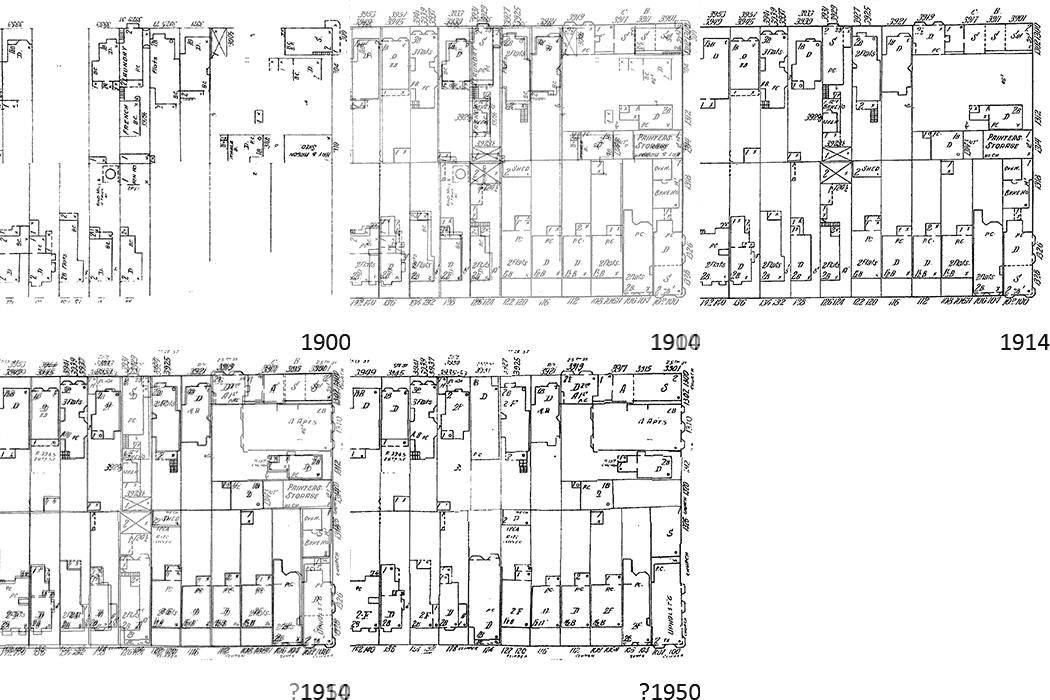
Above is an animation of my half block (Church & Clipper in SF) from 1900, 1914, and 1950. All the old 1900 buildings survived the earthquake and you can see the whole block fill in around 1914. No major changes in 1950 except my house and the one behind me which were rebuilt in the 1930s. Still don’t know why.

What I find most interesting are the ephemera, the sheds and workplaces. In 1900 my house had a big hen house, behind me was a French laundry, and the block had three windmills pumping water. In 1914 my hen house had turned into a third apartment, the laundry became a bakery (along with two others on the block) and the windmills were all obsoleted. And by 1950 my house is entirely new, the bakeries are all gone, but now there’s a print shop in someone’s back yard.

There’s an enormous amount of data about American city development, the problem is it’s all locked away on paper or, if you’re lucky, microfiche. It’s great that we have our libraries and companies like Google and the Internet Archive doing so much archiving work, but we’ve a long way to go before all this data is digitized and indexed.

San Francisco to Portland roadtrip

A couple of weeks ago I took a road trip up to Portland for my college reunion. I took three days to drive up the coast and two days back on I-5, twittering all the way. I had so much fun I made a custom Google map with annotations, photographs, tweets, etc. Embedded below, but you really need to see the full view to read the annotations.

I’ve always loved road trips: my US tour in 1996 is one of the most important experiences in my life. Having an iPhone along for a road trip is entirely transformative. Maps that know where you are, directions, email, Twitter, Yelp, music, and a telephone all in this little device.

And, importantly, geocoding. There’s no reason your iPhone can’t annotate every tweet and photo with your exact location. A bit of extra battery life and it can keep a GPS track for you too. I made the Google map by hand in about two hours. But it’d be a great and doable product to automate that whole process, give iPhone owners an easy way to create their own travel diaries. The Google Maps presentation isn’t perfect but it’s very easy to produce and is a good start.

Thanks to Kastang I now know about TripTrack, an iPhone app that does almost exactly what I’m asking for.

Stopping the Examiner litter

San Francisco residents are no doubt familiar with the Examiner newspaper, largely by tripping over unwanted yellowing copies scattered on our sidewalks. The paper claims 250,000 subscribers by virtue of them delivering copies free whether you want them or not. And stopping the litter is remarkably difficult, particularly since their unsubcribe web form does nothing.

But thanks to the Noe Valley blog I found a solution: asking Bevan Dufty, my Board of Supervisors representative, for help. I hate to waste an elected official’s time on something so trivial, but apparently he’s handled this problem before and within minutes I was put on an audit list of people who didn’t want copies delivered. And today was garbage free!

Here’s some ways to try to stop the Examiner, in order of escalation:

The useless web form

Calling circulation at (866) 733 7323

Politely contacting Edie Alejandre, Circulation Manager of the Examiner. She really exists and answered my mail.
ealejandre...sfexaminer.com, 415-359-2818

Asking Bevan Dufty (or your district supervisor) for help

Seeing the Examiner always makes me angry because of its sorry history. SF used to have two real newspapers, but The Examiner was in decline before I moved here. But the anti-trust dodging scam negotiated between King Willie Brown and the fake newspaper Fang family was just too much. The Fangs made out like bandits and the Examiner crumbled. Sadly, it’s maintained enough fake circulation to siphon off life-giving advertising from our one remaining real newspaper.

Social capital and online games

The older I get, the more I think about social capital. Am I making enough friends to last me through my life? I’m naturally a bit introverted and don’t work a regular job or go to church or have a social hobby, so making friendships doesn’t come easy.

For the past three years I’ve been playing World of Warcraft. Playing a lot: 25 hours a week. And well: full Black Temple clear pre-3.0, Sarth+3D, Zul’Aman bear, etc. WoW is a very social experience. Playing seriously means being in a guild, playing intimately with 25 people ten or more hours a week, learning to work together, handling personal conflicts, etc. I got to know a lot of people playing WoW, made some friends, and at various times was a leader of my guilds and raids.

I just quit playing WoW. And looking back on all that time I invested, I didn’t get much social capital in return. I’ll never talk again to 90% of my guildmates. I have one friend from my old guild I keep in touch with via Twitter, mostly because he’s so smart. And one friend from my new guild who I’m emailing with to talk about games, if nothing else. There’s a few other people I’d enjoy keeping up with but haven’t. And as nice as my former guildies are, none are “real” friends. I’d never invite them to a wedding, or loan them some money to help them through a bad patch, or expect they’d visit me in the hospital if I get sick. It’s not just how well we know each other (all that time together!), it’s that our friendship is virtual.

Why is that? The simple answer is online games are limited by not allowing face to face meetings, everyone’s scattered around the globe. And that’s certainly an important factor. But I’ve got lots of real friendships from other online communities. I met my partner Ken via a friend from Usenet. On my recent trip to Oregon I made a special point of seeing people I know through Metafilter. Even something as simple Twitter plays a more important role in cementing and reinforcing friendships than WoW ever did.

I think the difference with online games is that the experience is mediated via an avatar. To my WoW friends I’m not Nelson, I’m Flyv the bear druid (rawr!). Our primary shared experiences weren’t talking to each other or eating in a cafe, they’re exploring virtual temples and slaying synthetic monsters. All fun and productive social activity, but mediated, insulated by our virtual skins. And without a reason for our friendships to transcend the game world they remain locked inside it.

That’s a shame. I like online gaming, I like the social experience. I’d like my friendships from online gaming to be more real. I wonder if the key is to better bridge out of the virtual world into the real one. I don’t particularly need the role playing or anonymity of MMOs, I just like playing fun games. It’d be nice if my virtual game experience leaked out more into other online media, into Twitter, blogs, email. It’s not an accident that the two friends I mention above have blogs and Twitter accounts; it’s given me a handle to keep up with them after the virtual world ended.

Avalon hotel in Portland, Oregon

Finding a good hotel in Portland is always a challenge. I’m generally visiting friends in Southeast near Reed, but there’s not any good hotels there. There’s a variety of fancy hotels downtown, but none are as good as their cost and being downtown is a bit of a hassle.

So this time around I stayed at the Avalon Hotel, located in the forgotten John’s Landing neighbourhood. Very pleasant. There’s not a lot in the area and a car is pretty much essential, but it’s a nice out of the way quiet spot and convenient to both the Ross Island and Sellwood bridges. (Except during rush hour, there’s only one road out).

I stayed in a nice king river view room. Great balcony on the fourth floor with nothing but trees between me and the Willamette looking over Ross Island. Tranquil view. The hotel is pretty new and is the sort of comfortable anonymous business hotel I love to relax in. All in all very comfortable and easy.

The hotel also has a day spa with massages, etc. And a fancy bar/restaurant that I fear no one ever goes to. Beautiful view from the windows, though, and the bar is comfortable and the menu looks reasonable.

Wing IDE for Python

I’m a die-hard emacs-and-command-line hacker. Once a year I try to evolve past my 1991 toolset and use an IDE for coding, hoping to find something as transformative as the Smalltalk 80 environment. The various Java IDEs never worked for me, even VisualAge. Visual Studio is great, but I don’t program for Windows much. Most of my coding is Python. So for my latest project I decided to finally try a Python IDE. After an abortive attempt with Eclipse + PyDev I settled on good ol’ Wing IDE. Which is great, and I’m ready to pony up $180 for a license.

The key thing about Wing is that it works very well for Python and Python alone. This is not the IDE for a multilanguage product. But if you want a simple path into running a quick Python hack, with room to expand to complex Python projects, it’s very good. Note you need the full professional version to get the important features.

The key feature of Wing is good integration to the Python interpreter. There’s a Python shell built right in for interactive hacking. And you can interrupt or breakpoint a running program to examine variables on the stack or execute new code in the process context (great for exploring state). The underlying integration is built right into Python and I’m sure emacs, Eclipse, etc can drive it too. But I could never make it work productively for me, whereas with Wing it works right out of the box.

Of course Wing has all the basic IDE stuff: indenting editor, syntax highlighting, code completion, etc. There’s code analysis for contextual help, although without static typing it’s a a bit awkward. There’s also some tacked on unit testing and revision control support, adequate but not great. Honestly the whole IDE suffers a bit from having a Python hacker’s idea of good user interface, but the quality of the interpreter integration is good enough to make up for any rough edges in the UI.

I still need a command line. For Windows Vista it’s good ol’ Cygwin for a Unix-like environment along with PuTTYcyg for a terminal emulator. (Note that stock Python doesn’t work well with Cygwin TTYs, but it’s usable.) I finally have a way to hack as efficiently as I used to in Unix, but driven mostly from the Windows machine in front of me instead of via remote sessions. It’s pretty nice.

iPhone apocalypse

Yesterday I tried to load some music on my iPhone for the first time in a year. The result was a complete iPhone apocalypse. Long story short; at some point iTunes decided to do an incredibly long and slow sync of some music I didn’t want to copy. With no progress bar, no indication of how long it’d take, and no cancel button. So I did the only sensible thing and unplugged the phone.

The result? Not only did I have no music on my phone, but now I had no third party applications, either. Well I had a couple, some random subset were left behind. The other apps were deleted. Along with their data. Including a month’s pain-stakingly collected diet data, gone forever.

Two-way sync is hard. But it’s not that hard. iTunes’ model is apparently that it has the canonical copy of what’s on your phone. Only it doesn’t update that model correctly in all cases, and then deletes whatever is on your phone that doesn’t match the incomplete copy on iTunes.

I can sort of understand that failure with the music library; your iTunes install is the only conduit for putting music on to the phone. But apps can be installed independently, and generate their own data on the phone. iTunes can’t be sure it has seen all the app data; so why be so casual about deleting it? Even if you can count on the user not to unplug the phone mid-sync, what happens if iTunes crashes? Or the machine crashes? Or the cat knocks over the phone? Or the power goes out?

I’ve made a sport of iTunes-bashing on my blog and Twitter the past few years. It’s a bit obnoxious, but every time I try to use iTunes I’m stunned at how bad it is, particularly on Windows. Apple’s reputation of building humane, user-friendly software is completely misplaced in this case.

India’s election symbols

India just finished a mammoth election. With over a billion people it’s the world’s largest democracy by far, and with several hundred languages, at least two alphabets, and only a ⅔ literacy rate communication is a challenge.
So I’m fascinated by this photo of a ballot. Every candidate is represented by their name in Sanskrit, Roman, and with an abstract symbol. Vote for the train, the whistle, or the telelvision set? Such a simple way to help people who can’t read pick their candidate.

The collection above is from an incomplete list of symbols I found online. The icons look abstract to my American eye, but they’re symbolicly rich for snarky deconstruction.

Bush evils won’t go away

I pity President Obama. He didn’t inherit just one shit sandwich, but two: a deeply broken economy and the legacy of the Bush Administration’s disastrous war policies. I have some sympathy with his desire to “put the past behind us”, but as Frank Rich argues persuasively today that’s impossible.
Until there is true transparency and true accountability, revelations of that unresolved eight-year nightmare will keep raining down drip by drip, disrupting the new administration’s high ambitions.
What’s new this week? It looks like in 2003 Cheney ordered cooperating prisoners to be tortured to help support the fabricated Iraq/Al Qaeda connection. Meanwhile Rumsfeld was distributing war briefings with Bible quotes about America’s Crusade. The Pentagon now admits the truth of the story that they used retired generals to manipulate the media. Nancy Pelosi is either lying about her approval of CIA torture or else revealing just how useless she and the rest of Congress are in the face of an abusive executive. And now Obama is helping hide the photographic evidence of prisoner abuse.

There’s no ignoring this stuff. The Bush Administration conducted some very dangerous, ill considered business to get its war in Iraq. And it illegally tortured people. There has to be accountability for that. The truth needs to come out and the people responsible for criminal acts need to be jailed. I know the economy is a disaster and the Obama administration has another agenda, but we have to start from a firm moral foundation.

Directories with 100,000+ files

About once every six months I do some hack which involves caching web pages on disk. While hacking I always just write stuff to a cache directory so I can load it / replay it quickly. And inevitably I forget about the crappy cache and when I run the job for real I only remember three days later when the directory has an unwieldy 200,000 files in it.

Operating systems fail in all sorts of charming ways when you have a directory with “a lot” of files, typically over 10,000. Both the Vista and Linux kernels no longer seem to have O(n) operations on directories, so deleting all the files is no longer O(n^2). But the tools still freak out. For example, rm * doesn’t work if the expands to larger than the command line limit.

Vista has a host of joys associated with giant directories. Opening the directory in the file shell actually works. Selecting all files and deleting doesn’t, though, and the entire UI becomes unresponsive on a directory with even 20,000 or so files. del * from a command line does seem to work, but is awfully slow. I finally wrote some custom Python to unlink the files quickly only to find they were in a search indexed directory; the entire deletion process would freeze for 20 seconds at a time while the indexer chewed over the removals. Ugh.

By the way, if you ever need to remove a bunch of files the lower level you do it, the better. Even rm does more examination of the file than you want. Here’s a quick python hack that seems pretty efficient.

files = os.listdir('.')
for f in files:
  try: os.unlink(f)
  except Exception, e: print e

Subversion + ssh on Windows Vista

Want to use Subversion on Windows Vista, with the svn+ssh protocol (you know, the only sane one?). It’s remarkably tricky, but it’s doable. There’s a bunch of incomplete docs on the web, including Wingware and Piwigo. Here’s the steps in schematic form.
  1. Install the command line Subversion client for Windows. Yes, you have to register for an account to download this free software, at least from collab.net.
  2. Install PuTTY, the free ssh client for Windows.
  3. Get PuTTY configured so it’s using Pageant as an ssh key agent. When you can use Putty to log into your SVN server without typing a password, you’re set.
  4. Go to a command line and verify you can run
    plink server hostname
    without typing a password. Plink is what PuTTY named the command ‘ssh’.
  5. Go to
    C:\Users\username\AppData\Roaming\Subversion
    and edit the file config (in Notepad or whatever).
  6. Head down to the [tunnels] section of the config and enter this line (all one line, but with lots of \\ quoting nonsense)
    ssh = C:\\Program\ Files\\(x86\)\\PuTTY\\plink.exe
  7. Test everything from a command line.
    svn info svn+ssh://server/...
  8. Swear at Microsoft for moving the paths for everything in Vista. And swear at the Subversion community for not producing a humane Windows install.

Calorie counting and metabolism

My fitness plan has been simple: eat whatever the hell I want and don’t exercise much. That’s had the predictable effect at age 37 that I should lose a fair bit of weight. I’ve always been suspicious of specific diets and I’m too lazy to exercise properly, but I finally found something that seems to be working for me. Simple calorie counting.

The key enabler for me is the free iPhone app Lose It!. I finally have in my pocket a simple way to track what I eat during the day. It’s incredibly eye opening to learn, for example, that a tablespoon of butter is 100 calories, or about 4% of what I should be eating a day. Or roughly the same calories as in a small 8oz glass of juice. Now I have a specific measurement of putting less butter on my bread or drinking unsweetened iced tea.

What you eat is energy in, what you do is energy out. There’s a surprising amount of specific research on metabolic rates for people. Lose It! follows the Mifflin Equation to calculate the calories you burn simply for being alive, then bumps it up 145% to account for your daily activity (may be a bit optimistic). A 3500 calorie deficit translates into a pound of flesh, so eating 500 calories a day less than your calorie need will result in losing a pound a week. Exercise helps too, of course: 20 minutes of walking = 100 calories.

A lot of the discussion about weight and fitness is tied up in emotional discourse, judgement, and poorly tested theories about how bacon is a Fatkins diet food, how you can change your metabolic rate, or you should only eat what they eat in Provence. And it may be simply controlling calorie intake and getting a bit of exercise isn’t the whole story, but it’s a helpful place to start. If nothing else I’m now much more aware of what I’m eating.

House sale friction

I’ve recently had the pleasure of selling a house in San Francisco. The long list of random fees in the transaction process encouraged me to dig up the documents from when we bought the house, in 2002, and looked at the random fees we paid then. All told buying and selling the same house in SF cost $3800 in pure administrative friction, or roughly 0.5% of the value of a typical SF home.

Buying: $3215

$900 Escrow fees
$40 Escrow: notary fees

$765 Mortgage: loan origination fee
$400 Mortgage: appraisal
$36 Mortgage: credit report
$61 Mortgage: tax service
$350 Mortgage: loan processing fee
$50 Mortgage: wire fee
$18 Mortgage: flood certification fee
$595 Mortgage: administration fee

Selling: $583

$32 Title: Recording Notice of Default
$50 Escrow: Draw Deed
$17 Escrow: Overnight delivery
$40 Escrow: Notary

$10 Mortgage: county recording fee
$45 Mortgage: reconveyance fee
$30 Mortgage: expedited payoff service fee

$75 Underground tank inspection fee
$160 3R report fee
$124 Hazard for 3R report fee

Mind you, this isn’t counting for the big stuff: 5-6% real estate agent fee, 1% county transfer tax, 0.3% title insurance policy, or 1-3% in points paid on the mortgage rate. This is just the little crap. You know, $50 to pay for the frickin wire transfer. Telegrams are expensive, I guess.

Words in Craigslist M4M ads

I’ve been working on understanding the unique language of Craiglist man for man personal ads. Here’s one measure: a list of the words that show up frequently in ads but relatively seldomly in ordinary English, in particular television and movie scripts.
pic host cock stats suck masculine asian discreet horny oral smooth reply neg hairy im bi cum thick email hiv latin hosting std hwp seeking vers ddf gwm athletic sucking uncut lbs latino gl muscular jock porn cocksucker slim poppers nsa ur bj pnp horned bb discrete seeks etc rim versatile dd dont stocky beefy shaved cocks submissive swap emails sensual loads bod toned anon anal dom cuddle bs chubby dominant blowjob goatee shaven hookup font husky replies cant serviced stroking asians whats completion slender ft cuddling buzzed stds mod filipino moderately kink muscled oakland servicing nips unzip uc orally boyish cl yr br scruffy endowed
The word pic (or pics) shows up once every 120 words in a Craiglist ad, but only one in a million in TV/movie scripts. Cock is about 800 times more likely to occur in a Craiglist ad than in a script. The non-sexually-explicit terms like moderately and masculine interest me most.

For completeness, here are the top words that are common in TV scripts but not in Cragislist m4m ads. A lot of proper names and feminine terms.

she’s uh mother um hmm whoa mrs daughter killed wedding sonny upset theresa ooh she’ll luis grace they’ll sweetheart julian antonio ms charity billy ray miguel kay evidence sweetie shawn mommy mama barbara elizabeth congratulations aw mother’s jennifer witch skye father’s gosh ian maria powers mitch witness eddie hank grandma harmony bloody everybody’s

Squirting warm salt water up your nose

I’ve found a miracle cure for spring allergies. A Sinus Rinse, also known as squirting warm salt water up your nose. It is, quite frankly, disgusting. But it works.

Very simple idea. You get about 8 ounces of warm salt water. Warm water, preferably previously boiled, and definitely not cold or hot (it’s going inside your head). Then you dissolve a magic salt packet in it, a balance of NaCl and NaHCO3 that makes the water have roughly the same salt concentrations as the inside of your sinuses.

Then you fill the little squeeze bottle, stick it up one nostril, tilt your head forward, and squeeze the water in. Hopefully the water splutters out the other side, or a bit down the back of your throat. It feels a bit like getting hit by an ocean wave and drowning. Messy business that requires a sink, although I manage to keep my shirt dry.

Like I said, it’s disgusting, but it seems to really work for my pollen allergies. I guess I’m flushing irritants out of my sinuses. A quick rinse after coming in from an outdoor walk and I’m much better off the rest of the day and night.

It’s simple enough you can probably make the stuff at home. But for $10 at your pharmacy you can buy a Neilmed kit with bottle and a zillion premeasured salt packets. Your hippie friends may also suggest a Neti Pot, which is a similar idea, but I’m told the positive pressure of the squeeze bottle is more thorough than just gravity flow.

Having babies

I’m 37 now. Most of my friends my age are just now having babies or are thinking about it. Ken and I have no desire to raise children ourselves, and honestly not a lot of interest in babies. But I get it now, how natural and deep the experience of having children is. And so I’m very happy for all my friends who are having kids.

The one thing I ask of my friends and readers: if you’re going to have kids, please do it soon. I worry for my friends who are waiting to 35, 40 before deciding to have a baby. I hadn’t understood this, but making babies is actually pretty difficult. And it only gets harder the older you get. For instance, six week miscarriage rates go from 15% on average up to 42% at age 40.

Many of my friends having kids now have had some sort of trouble: difficulty in conceiving, or a miscarriage, or a scare at birth. Fortunately everyone’s turned out OK and they’re happy parents to happy children. As far as I know, none of them regret waiting. But even if waiting until you’re 35 to have kids is pretty common in the US now, consider not putting it off any longer than you need to.

The failure of the User-Agent string

Every time you fetch a web page, your browser sends a special User-Agent string to the server telling it what software it’s running. It’s defined in RFC 2616:
This is for statistical purposes, the tracing of protocol violations, and automated recognition of user agents for the sake of tailoring responses to avoid particular user agent limitations.
Fast forward to 2009, and here’s the User-Agent string you get from Google’s fancy new Chrome browser:
Mozilla/5.0 (Windows; U; Windows NT 6.0; en-US) AppleWebKit/525.19 (KHTML, like Gecko) Chrome/1.0.154.48 Safari/525.19
It’s like a browser salad! But the Google guys aren’t doing anything wrong, this boneheadedness has to be there in order to satisfy the “automated recognition” part of the spec. Chrome’s just a little ol’ chameleon.

Removing the iGoogle sidebar

Do you use iGoogle? Do you hate the sidebar on the left side that wastes 100 pixels with useless tabs and an advertisement for Google Talk? There’s no official way to turn that sidebar off. But if you set your start page to http://www.google.com/ig?gl=all, why there’s your iGoogle page without the sidebar. Lovely.

Don’t get me wrong, I love iGoogle. I’ve been using personalized start pages for years and iGoogle is the best. It loads super fast, it’s easy to configure, and it has enough useful modules to keep me occupied. Just don’t appreciate some product manager deciding to keep features in front of me that I do not want.

Privacy and Google’s new ads feature

Google has just announced a major new ads product, interest-based advertising. Google is now building a profile of you, the user, based on what websites you go to. They then use that profile to show you ads for things you think you’ll be interested in. For the first time Google’s targeting ads at who you are, not just what you’re currently looking at.

I’m usually quick to criticize Google on privacy issues. But not this time. Because along with this juicy new ad product, they’re giving users unprecedented control and visibility into the ads they are shown. We can opt out of tracking entirely. Or we can set our ad preferences, viewing and altering Google’s profile of ourselves. And Google has a detailed and readable page describing how their ad products works with personal user data. All of this privacy protection looks real, a user-focussed product, not just some sham to satisify lawyers.

Interest-based advertising will likely be enormously profitable for Google, both because the ads will work better and because no other company has the resources to compete. It’s essential for Google to treat user privacy seriously, to protect their ability to implement the product. It’s also good for users, both that we have control of our personal data and that we may actually see ads that are interesting to us. And of course it’s good for advertisers, too. I think everyone wins.

PS: I used to work at Google, but it was a long time ago. I have no inside information on this ad product.

Hours of Craigslist M4M ads

Following on my new fame for looking at the ages of Craiglist ads, I did a bunch of crunching and got six months of collected ad data into a database. Which makes it easy to produce reports like the following:

There’s a 10:1 variance in ad volume based on the hour. The quietest times are 4am with about 15 ads an hour, the busiest times are around 8pm with about 150 ads an hour. Noticeable bump when people get home from work, surprisingly little variation in day of the week. Overall the distribution looks like graphs of pretty much any Internet activity with some bias towards more use in the evenings.

What I really want to get at is the content of the ads, classify them by desired partner, desired scene, drugs, desperation, etc. I need to chat with someone who understands text clustering.

Ages of Craiglist M4M ads

I’m fascinated by the Craigslist man for man personal ads (NSFW). I’m not in the market myself but the discourse is so efficient that I enjoy reading it in idle moments, it’s a great capsule of gay casual sex culture. Most of the ads are quite terse: the poster’s age, a self-description, a description of the man they’re looking for, preferred sexual acts, and a proposed location.

For the past seven months I’ve been archiving the RSS for the Bay Area boards, a collection of 485,000 unique personal ads. Here’s the distribution of ages of posters.

The data isn’t terribly surprising. I suspect it’s a mix of Craigslist’s demographics and the relation between sexual desire and sexual access as men age. Note that relatively few people are 31, 41, or 51 on Craigslist.

I’m hoping to do more analysis. I’m particularly curious about the relation of the poster’s age and the age of their preferred partner, but the data is a bit fuzzy.

Happy New Year!

Today is the real start of the new year, with a new president in office and a lot of hope and promise. I feel very proud today, optimistic, but I can’t quite get the dread out of my mind.

Bush was truly a terrible president. Political speech on blogs is given to hyperbole, but I don’t know what else to say. Bush was challenged by a terrorist attack and failed miserably, botching the occupation of Afghanistan, destroying important civil liberties, and turning us into a nation of torturers. Bush led us into war on Iraq under false pretenses and failed there, too. Domestically he failed New Orleans and his financial policies have failed the country. New Orleans may never recover, let’s hope our economy does better.

Obama ran on a campaign of hope and change. Lord knows we need it. But given the shit sandwich he’s inherited we’re bound to be disappointed. We can’t just bail on Iraq and Afghanistan. Gay rights will move slowly. The economy is in awfully bad shape and will take years to recover. Health insurance and income taxes both need radical overhaul, problems that have been slowly burning for twenty years. We’ve got a long way to go, but at least we finally have some hope at the top.

Interesting things I did 1989-1994

Like most of my nerdy friends I find twittering is replacing blogging. Poorly archived 140 character statements are a meagre substitute for thoughtful essays, but it’s so much easier to tweet. Also I haven’t had a lot to blog about. Which is why I’m starting on a short blog series about the interesting things I’ve done in my life so far.

In college I did a lot of fun and valuable things: academics, friends, Unix hacking, etc. I was very lucky to be at Reed, just the right college for me, and I look back on that as the most formative time of my life. But what did I do that matters?

The biggest thing I did as an undergrad was my thesis, Relaxation Dynamics of a Lattice Spin System. Catchy title, no? It was an outgrowth of some work I’d done as a summer intern at the Santa Fe Institute, a discrete dynamical system that is a useful foil for understanding solid state physics. Mostly I liked it because it involved computer simulations and pretty pictures. As far as I know this work has had no significant influence, although I learned a lot about how to do computational modelling research.

The most influential thing I did while in college was html-helper-mode, an emacs mode for editing HTML pages. I was offended by some crappy emacs code from a scrub named Marc Andreessen so as a way to procrastinate on my thesis I wrote a better one. I don’t know what’s more appalling: that an emacs lisp program is my most significant open source contribution or that I still use this code fifteen years later. But I did a good job on it at the right time and I’m proud of it.