Some Bits: Nelson's weblog

My racism at accents

Interesting NPR segment today: A powerful eruption on the sun disrupted radio signals on earth. What’s remarkable is it’s a PhD candidate talking to an NPR host about solar flares, completely in two Southern Black accents. Two women, at that.

I am dismayed at my own involuntary racist reaction to these voices. I do not expect educated people to speak this kind of English. A crystal clear example of my prejudice. I know and respect Ayesha Rascoe’s work on NPR. India Jackson is a PhD candidate and clearly a domain expert. The segment is good, detailed at the right level for the NPR audience. But I hear the accent and my knee-jerk reaction is negative. In my defense I was raised to be like this and I am trying to be better.

My favorite moment is about 2 minutes in, discussing the threats to humanity from a solar flare:

RASCOE: Do we have any way to prevent that?
JACKSON: Oh, God, no. (LAUGHTER)
RASCOE: No, no.
JACKSON: No, no, no.
RASCOE: That’s not…
JACKSON: We cannot…
RASCOE: We don’t want to hear that, India.
JACKSON: We cannot prevent the sun from doing what she goin’ to do.

The way she delivers that last line, stretches “sun” to two syllables with an intense diphthong. It’s delightful! And effective. She’s discussing a complex topic in astrophysics and the frightening threats it poses to humanity. But then she uses a vernacular phrasing, “doing what she goin’ to do”, to highlight our impotence. She makes the topic relatable, almost friendly, a perfect tone for an NPR’s more casual weekend programming.

I hate this prejudice in me, that certain kinds of accents read as ignorant. I know I’m not alone in having it. I am glad this NPR segment challenged me.

Trump’s plans for his second presidency

The Trump campaign and his braintrust have been very clear and open about their planning for a second presidency, mostly under the umbrella of Project 2025. There’s been a lot of good journalism about it. Some examples:

None of these articles are speculation or alarmist inflation. They are direct reporting of what they themselves are saying they plan to do. Not only does the Trump camp feel free to be so open in their extremism, they see it as an election asset.

No more talking to politicians

I am no longer talking to politicians. I have been aggressively filtering my email, a constant battle. Now I will no longer accept their calls. Unfortunately my home phone number is ruined. Between scams and politicians I never answer my phone unless I recognize the caller ID.

I’m an active political donor, particularly for US Congress. But once you get seen as a mark who is willing to give $$$$ to a candidate, you get a lot of personal communications. Congresspeople call me several times a month. The email is overwhelming. I do not want to talk to people who pretend to be my friend for two minutes and then ask me for $3300.

The worst are the few politicians who’ve succeeded in making a connection with me. They’re personal on the phone, they took good notes, it feels like we have a conversation. But of course it’s all in service to their fundraising campaigns. They’re just good at pretending a polite social connection.

I’ve protected myself from spam by withholding my email address and phone number. But I started too late, that data is already out and widely shared. Candidates buy this information and abuse me. It’s mild corruption but worse it’s obnoxious. I am done with it.

I might still donate based on my own research. Toying with the idea of not donating to anyone who spams me too much.

Bonus: NGP VAN, the company that enables a lot of Democratic Party spam, is collapsing. Ever since Apax Partners bought them they’ve been laying off people and their meagre services are deteriorating. This is terrible for the Democrats, they don’t have a good alternative. It may make the spam problem worse too.

The Sandbaggers

I just finished an extraordinary late-70s TV show, The Sandbaggers. It’s British spy TV. While the show name-checks James Bond frequently the soul of it is more of a Le Carré thing. Intelligence as a series of dismal political battles between underpaid civil servants at the home office. Occasional forays into the field where everything is squalid or ambiguous and nothing grand is ever achieved.

The show hangs on Roy Marsden’s performance as Burnside, the Director of Operations at a British intelligence agency. The titular Sandbaggers are field agents, vaguely like the Bond 00 agents, but there’s never any swashbuckling action or romance. Occasional gritty affairs and some grim minor violence, all done on a low budget and with precious few location shots. If you ever enjoyed Blake’s 7 or early Doctor Who the low production values will be familiar. So will the excellent quality of the writing and characters, there’s a lot of complexity and subtlety and more than a few surprises.

Mostly the show has aged well. It’s firmly set in late Cold War, there’s no hint of the extraordinary transition that happens in the 80s as the Soviet Union fell apart. Unfortunately the show is unimaginatively sexist with a lot of “men hitting on women in the workplace” nonsense. There’s one good female character in part of the show and Burnside’s secretaries are both good actresses with some sharp writing. But it feels dated even for its time.

I appreciated watching something at a slower and more thoughtful pace. I think the show is ripe for a reboot. Keep it set in the Cold War with roughly the same stories. But update the show: write better women and modernize the production. Then branch out and tell some new stories in Asia or South America or Africa.

You can watch a licensed copy in the US on britbox.

The Transcantábrico Train

We recently took the Transcantábrico, a week long luxury train trip across Northern Spain. It was great! Like a cruise but on a train. We did something similar in India in 2015 and it’s an interesting way to travel. Some photos here.

The Transcantábrico goes across a part of Spain a little off the usual tourist track. From Santiago de Compostela through the mountains south of the coast to Donostia / San Sebastián. Along the way we saw towns I never would have gone to on my own: Gijón, Potes, and Santillana del Mar were particularly memorable. Also some beautiful nature including Cathedral beach in Gallegos and Hermida Gorge in the Picos de Europa. The excursions from the train were well organized with a very nice bus and guides.

The hospitality on the train was terrific. Our “cruise director” Cristina was particularly amazing, friendly and knowledgeable. All the staff were great and very accommodating. Maybe 12 people helping 25 guests. Meals on the train were excellent and comfortable. Most days breakfast and dinner were on the train, lunch was out. The restaurants were all high quality but variable and honestly just too much food. The highlight was El Corral del Indianu.

Living on a train has its limitations. The private shower was very nice with lots of hot water but you’re still washing in a telephone booth. The queen size bed was comfortable but in a very tight space, we wished we’d booked two single beds. And getting around the train was difficult (you have to move sideways in the corridor), particularly when the train was moving. After a week I was ready to be back in a normal hotel. OTOH it was beautifully furnished and it was great being unpacked and taken care of so well.

I’d definitely do another luxury train. But maybe fewer days. The key thing is the itinerary, the places to go. That was amazing in India, a week long trip from Delhi to Mumbai. Spain was beautiful and I appreciated going slowly through a place off the beaten track with knowledgeable local guidance. Rewarding trip!

PS: if you want to see more, Mighty Trains S04E02 is about the Transcantábrico.

Overhead shower drips

Do you have an overhead rain shower? Does it drip cold water on you when you’re not using it? It may be water trapped in the pipes. A plunger will temporarily fix it.

We have a fancy shower with an overhead rain shower and a ordinary wall sprayer both controlled by the same thermostatic valve. There’s a diverter to control which head gets the water. Every time we used the sprayer the overhead would drip a tiny bit of cold water on us. Annoying!

We assumed it was a leaky diverter valve, had it replaced. Didn’t help. There’s a zillion websites wanting to sell you plumbing parts that suggest a valve is the problem. But this discussion explained the real culprit.

There’s water trapped in the pipe leading to the overhead shower. Weirdly there’s some water above the tiny holes in the showerhead, held there by air pressure. Running a hot shower in the same area changes the air pressure / flow enough that a little cold water manages to leak out.

You can test this theory by running your finger over the holes in the overhead showerhead; for me that was enough to express 10mL of water or so. To really get the water out I took a plunger to the shower head. No tight seal needed, just want to force air in and water out. I think I got 200+mL out that way.

It’s a temporary fix, next time I use the overhead the pipe will fill again. I wonder if someone sells a showerhead with some sort of permanent fix? A release valve would work but be fiddly.

Obsidian

Obsidian is good software for taking and organizing notes. There are many apps for this task, Obsidian is my current favorite. In the past I’ve used a text file, SimpleNote, Standard Notes, Joplin. I never used emacs org-mode nor Evernote. Obsidian works reliably and is simple yet powerful.

The core Obsidian data model is “a folder of markdown files”. That’s it, really basic, and the files are easily usable as ordinary files. There’s natural support for links between notes. There’s also a metadata option I don’t use. I appreciate it’s easy to move files in and out of Obsidian.

But where Obsidian really shines is the plugin ecosystem. I don’t actually use many plugins, just HTML export and system tray. But I appreciate the power. If you check the reddit you’ll find an enthusiast community that does a lot more complicated stuff, turning their Obsidian archives into 1000+ article infobases. Me, I just write grocery lists and blog posts.

Obsidian is not open source. They’re thoughtful about why not. (Logseq is a popular open source alternative). The core product is free and works great. I am paying $96 per year for syncing. It’s pricy but it works well and I want to support the company. You can do your own free sync but none work as easily.

I want to give a shout-out here to Simplenote, an excellent and venerable free product. And after a brief lull development started again in 2020. Kudos to Matt and Automattic for supporting that tool. I like Obsidian’s fanciness but Simplenote is pretty great.

Cronometer is a good food diary

Recently I switched to a new calorie counting app, Cronometer. I’m quite happy with it. It’s a huge improvement over MyFitnessPal (MFP) or Lose It and is not exploitative like Noom.

The key improvement with Cronometer is accuracy, particularly good data sources for nutrition information. MFP offered obviously wrong entries from random people, sapping my confidence. Also it’s quicker to log things from a trusted database.

And the app works well. Cronometer’s UI is modern and easy to use. It doesn’t display extra distractions. MFP’s insistence on scolding me about things I don’t care about was a bummer. The data sync is fast. And they have a good data export, something MFP won’t do.

I have some minor complaints. Cronometer is very excited to track macros and every single obscure nutrient (threonine, selenium?!). I really only want to track calories. Fortunately the other things don’t take up too much space. They also display ridiculous calorie precision in the diary. But that feels like a rare UI mistake, not a general design ethos.

The free version is pretty complete. The $55/year paid plan adds a bunch of stuff, the one I care about is dividing your diary up into individual meals.

I have a long history with food diaries, more off than on. Having a good app that I trust and is easy to use is important.

Toto C5 Washlet power usage

I got a fancy bidet toilet seat. It works fairly well and having water for washing is great. But I don’t love some details, see notes below. Mostly I wanted to share how much power the thing uses.

About 80 Watt-hours a day, or an average of 3 watts. Note this is without the seat heater. About ¼ of the power was from using the bidet actively once a day; the rest was just having it plugged in unused.

That’s very little power, like one hour of an old fashioned lightbulb per day. Or about 3 cents a day. Most bidet functions take just a few watts when operating: the pump, the fans. It uses less than a watt on standby. The big power consumption is anything with heat: the water heater, the blow dryer. Those use 200W when active but that’s not very often, the water tank seems well insulated. In theory the device can draw up to 500W but the most I saw was 250W. But then I never used the seat heater.

I don’t like the compromises involved in having the bidet be built into the seat. It’s great for retrofitting an existing toilet but it makes it bulky and the seat is uncomfortable. Having the water supply and bidet sprayer integrated into the toilet bowl must work better. I wish I at least had an elongated toilet; the washlet blocks a fair amount of the bowl.

Toto washlets come in a dizzying array of options; see here for a breakdown. Honestly all I want is warm water and an oscillating spray, the other features don’t seem so important to me. (For awhile I use one of those cheap $30 cold water doodads; it worked pretty well.) I think an instant heater is probably worth the upgrade price though; the C5 tank runs out fast and while it’s well insulated, heating on demand would be better.

APIs for content sites must be free

Social media businesses should not charge* for APIs. If a company like Reddit or Twitter derives most of its value from content that users write for free then it must provide APIs for anyone to download and manipulate that content. While an interactive API that enables third party applications is desirable, a simple static dump is the bare minimum to fulfill the social contract (see StackOverflow or Metafilter for examples.)

Unfortunately Twitter and Reddit don’t agree. They are both rent seeking with their APIs. Their main intent is to destroy third party apps that no longer aid the company’s business goals. But they’re also trying to make a few million bucks a year licensing access to data, particularly on the back of AI training. It’s wrong.

The key thing here is social media sites don’t produce content. They merely host it. Millions of users create the content expecting it will be widely available. Locking down an API breaks that social contract.

Honestly I don’t care as much about full fledged third party clients like Apollo or Tweetbot; I like them but I understand why the companies want to kill them. What I care about more are analytics sites, things that provide interesting alternative views like a Reddit user profile or Emoji tracking. I also think it is the greater good to let AIs train for free.

*I don’t mind a site charging a nominal fee for API access. Either to cover the cost of API service itself, or more importantly to encourage API developers to be efficient when making API requests. But that’s hundreds to thousands of dollars a year, not millions.

The short sighted thing about these API fees is they will harm the company in the long term. If it becomes difficult to use a proper API to get at content folks will simply screen scrape it instead. That’s bad for everyone.

GAS

I’ve been listening to the same music every night when I go to sleep 10+ years now. Weird endorsement; I’ve listened to it with more attention plenty of times too. But it’s particularly good for going to sleep; calm, interesting, and comfortably familiar.

That music is GAS, Werner Voigt’s ambient techno project (Bandcamp, Youtube). The primary collection is Nah und Fern, four albums that were made over 1996–2000. In 2017 he released a new GAS album, Narkopop. Followed in 2018 by Rausch and 2021 Die Lange Marsch (a sort of remix). I like the first four most.

Ambient music is pretty hit or miss. For every brilliant work like Music for Airports or Aphex Twin’s early music there’s a zillion gormless electronica and “earth fart” recordings that fail to inspire. Furniture music is supposed to be in the background, sure. But still high enough quality to be appreciated.

GAS succeeds. It has just enough of a beat (sometimes) to make time flow without being overwhelming like regular techno or something rhythmically complex like Autechre. The sounds are richly textured with a bit of fuzz and noise to make it organic. And I like the slightly broody or sinister tone. Not scary, but they make me happy I’m snug in my home under the blankets.

What are passkeys?

That’s the post. What are passkeys? I don’t have answers, just questions. I believe passkeys are a great idea but the tech world is doing a terrible job explaining them. Someone really needs to explain how passkeys work in Internet products. Existing descriptions aren’t sinking in, as evidenced by the confusion online. For instance this Hacker News discussion where a new Passkey product announcement is met with a bunch of basic questions about what Passkeys even are.

Update: see these newer Passkey overview articles here and here. Also my own notes written after this was published.

The tech is pretty well defined: Passkeys are a password replacement that uses WebAuthn to log you in to stuff. Companies are widely deploying them now: Apple, Google, Microsoft, 1Password. Passkeys are an industry consensus and are arriving in production very soon or already has. Great! Now then what are they really?

Here’s some questions from my perspective as an ordinary if expert Internet user. I own a few computers and phones and don’t want to trust just one company with my entire digital identity.

  • What device holds my passkey(s)? Let’s assume it’s my phone.
  • What software do I use for my passkeys? I trust 1Password already; can they do all my Passkeys for me? Or can my web browser hold my passkeys?
  • Who issues me a passkey? Let’s say Google issues me one.
  • Logging in to Google with a Google passkey is easy, right? I just unlock my phone and press a button? Awesome!
  • Do I have many passkeys or just one?
  • How do I log in to some other website, say my Mastodon server? Can I use my Google passkey there too? Or does my Mastodon server issue a different passkey?
  • How do I log in to Google if I temporarily don’t have my phone with my passkey on it?
  • How do I reset a passkey if my phone is stolen?
  • How do I log in to other sites if Google goes offline or revokes my account or something?
  • How do I migrate my passkeys to a new phone?
  • Can I store the same passkey on several devices for convenience?
  • Can that passkey be automatically synced between devices, securely?
  • Can I use multiple passkeys to log in to the same account?
  • Can I share a passkey with my partner so we can both log in to the thermostat?
  • Can I still use passwords to log in to a site even with a passkey enabled?
  • I have two factor authentication with a TOTP code generator. Does the passkey replace my password? The code? Both?
  • I really want to use two factors for my bank: I don’t trust just my passkey on my phone to log in me in. How does that work?
  • Can I use passkeys to log in to apps and computers? Or just web sites?
  • If I own a fancy Yubikey device can I use it as a passkey? Use it to protect my passkey?
  • Is there a way for me to generate a passkey myself so I don’t have to trust a company to issue it for me?
  • Can I turn off passkey on a site and log in some other way?

The core of many of these questions is exactly what a passkey is. What I want to read is an article that explains the gestalt of passkeys and identity on the Internet in a way the answers to all these questions becomes clear.

My understanding from what I’ve read is that passkeys are an authentication token, basically a replacement for a single secret like a password. Naively that’d mean I’d need a different passkey for every website I log in to (just like I need different passwords). But I could be wrong. Or maybe the passkey intention is that we use federated logins, so sites like my Mastodon server use Google to help me log in with my Google passkey? (That’s an enormous business problem, if so.)

My other understanding is a lot of my questions don’t have good answers yet. Ie: revocation of a passkey or migrating to new devices. The product announcements from various companies say “trust us, that’s coming soon”. But I do not trust a company like Google or Apple to later add a feature that will make it easy for me to migrate away from their loving embrace. That stuff has to be defined and working before Passkeys are a good product for consumers and the Internet.

Update: Ensuing discussion has made one thing clear: you don’t share passkeys between sites. You have a separate passkey for each thing you log in to. That clears up several of my questions. I don’t know how I didn’t understand that already but the confusion isn’t mine alone.

There really needs to be a good, clear description of Passkey as a product so questions like this aren’t being asked over and over again. I’m hopeful the folks working on this stuff understand the answers and just haven’t communicated it well.

Passkey authenticators for consumers (May 2023)

After yesterday’s post about passkeys I got enough answers to learn how to use passkeys myself as a consumer. Here’s what I learned. If you want to try it yourself, passkeys.io is a nice demo server.

Passkeys work a lot like passwords do today. You create a different passkey for each website and use it to log in. Your passkeys are stored in what’s called a “Passkey Authenticator”, agent software on your computer. (Behind the scenes passkeys use public key systems that are better than passwords.) Your phone probably works today as a passkey authenticator but most sites don’t support passkeys yet.

Managing passkeys — backing up, migrating, sharing passkeys between devices — is still a work in progress. Android and Apple both support syncing passkeys between devices, that’s important so you can log in even if you don’t have your phone with you. Some software can also delegate. For instance Chrome on Windows will use Bluetooth to use a passkey on a nearby Android phone.

The passkey authenticator is the main user interface. The rest of this post is notes on what authenticators are available to consumers. See also this companion piece that’s a deep dive into the user experience on Android, Chromebooks, and Windows.

Apple seems the best implementation of a passkey authenticator today. It’s built in to Keychain, Apple’s existing authentication product that is pretty well designed. There’s a bunch of screenshots in this article of how the Apple experience works. My Apple-using friends say it’s pretty usable. Keychain syncs passkeys between devices via iCloud.

Android has a passkey authenticator built in called “Google Password Manager,” which already saves ordinary passwords you use in the phone’s web browser. Here’s Google’s docs for users about that and some technical notes on security. Android syncs syncs passkeys between devices. It’s also pretty usable but passkeys are Android-only, not available on desktop (yet).

Chrome on Windows or a Chromebook has passkey support. But the Chrome browser doesn’t store passkeys itself, it delegates to nearby Android devices via Bluetooth. Firefox and Edge on Windows can also do this delegation. Chrome can also delegate to Windows as the passkey authenticator instead of Android.

Microsoft Windows has an authenticator that is connected to Windows Hello, their relatively new login system. I don’t know much about it but it’s what you’d use to store passkeys on your Windows machine.

1Password, the password agent, is shipping passkey support in about a month. They have a demo that actually works on Chrome and Edge. It’s nice! In theory this should be a good cross-device way to manage and sync passkeys. I’m waiting for it before adopting passkeys widely.

Dashlane, the password agent, has passkey support. Sounds like early days but usable.

Yubikey, the hardware login token, has a passkey story. I don’t know much about it, their writing points out that passkeys aren’t really anything new and they’ve been doing this kind of thing all along.

Having spent most of a day playing with passkeys my impression is they work today and are usable. My main concern is there’s no support for migrating your passkeys out of, say, Google Password Manager and in to Apple Keychain. And I fear given business realities no one is in a hurry to enable that. The other problem is how long it will take sites to adopt passkeys; we’re going to be stuck with passwords for a good long time.

Noom is exploitative

I tried out Noom, the weight loss and cognitive behavioral therapy program. The app is more like CBT for upselling customers than CBT for weight loss. Now I’m hoping they’ll delete my sensitive medical data and refund the $3 they tricked me out of. (They did, quickly in response to my support email.)

I was excited to try Noom. I’ve used basic calorie counters in the past and was hoping for something better. I’m also curious about CBT. And a friend recommended it.

The account creation process goes OK at first. Then it gets more and more involved, taking 10–20 minutes to fill out the questions. There’s little UI tricks to keep you engaged: fake progress bars, questions injected at random intervals. Classic product UI hacking.

At first it told me that I’d reach my weight goal in about a year. Seemed reasonable! Then it kept shaving weeks off that as I answered questions, like I was making progress already. The conclusion it came to is that I was going to lose 18 pounds in the first month. Pretty sure that’s not possible, certainly not healthy.

Then the upselling begins. They ask some questions to find out your interests and then offer premium packages. “Folks who pay for this package lose 35% more weight” Look, I just want to try the basic thing.

It looks like a 7 day free trial but before you know it they want you to pay asserting “it costs $10 to offer a 7 day trial”. Really? They gave me a choice of what to pay from $0.50 to $18.83. I chose $3 and had to pay via PayPal / credit card; super sus they don’t just use Google Pay on the Android app.

They also try to get you to sign up your friends. They talk about how having folks involved in your program will make you more successful. Which is probably true but then immediately they’re asking for email addresses and offering discounts and gift certificates. It’s marketing, not therapy.

The whole thing was so sleazy and deceptive. Particularly for a therapy-like product. Real therapists have all sorts of ethical guidelines to stop them from exploiting their customers. Noom instead seems to be using CBT to trick customers into paying more. Gross, gross, gross.

My work at early Twitter

I worked at Twitter part-time starting June 2007. I’ve never talked much about this in public. I’m revisiting it because of the complete disaster Elon Musk has made of Twitter. His sabotage of the company has felt personal to me. It hurts to watch him destroy something I helped create. The recent API debacle particularly stings.

Early Twitter was chaotic without enough experienced engineers. I acted as a management advisor. I helped the engineers organize and the executives work better with engineering. I did some good but I’ve always wished I could have done more. In retrospect, I should have committed more time. I did enjoy a long insider relationship with some of the leadership and was of some help that way.

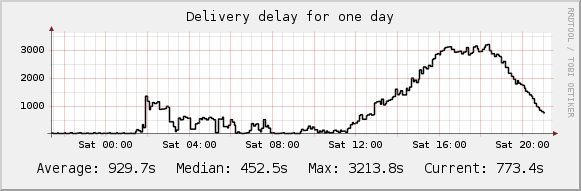
The most useful concrete thing I did was what we called “Nelson’s graphs”. I made some simple measurements of performance like tweet delivery times. Post a tweet to one account and see when it shows up on another account’s timeline. (Note this graph shows an average of 15 minutes!)

Simple but useful. It was a clear view of whether the site was working and ended a lot of arguments. These days we’d call this basic devops but in 2008 it was still a novel idea. My graphs kept running for several years even after they leaked to the press.

I grieve for Twitter now. I grew to love it over the years and was an enthusiastic user. Musk has ruined Twitter both culturally and technically. I suspect Twitter will survive in some new smaller, crueler form. But I’ve moved on to Mastodon and that’s working for me.

Windy.com is good weather

I’ve found a mobile app for weather I finally like enough to be happy about paying for. Windy, best known for its website. The mobile app has extra phone features like notifications and home screen widgets. Also its UI is a little more understandable.

Windy makes a strong first impression with its colorful animation of winds. But wind speed is not that interesting to me. Windy also does an excellent job displaying radar, air quality, current thunderstorms, etc. Even weather station observations and webcams. All displayed beautifully and uniformly; that’s not easy!

But my favorite thing is the forecast view, hidden away in the website but a bit easier to find on mobile. It’s a lot of detail packed into a very small tabular display. I appreciate that it shows the full forecast by hour going out for days. Also the choice of forecast models; their website explains the options. It’s all very nerdy in the way I want. It’s not great at “weather at a glance” but is good for a deeper understanding.

Their business model seems to be a $19/mo yearly subscription. Their privacy policy is clear they won’t sell your data to third parties. The app says “we do not store your location on our servers”. Most weather apps are sleazy and sell your location to advertisers and data brokers.

Sadly they have nothing like Dark Sky’s unique microforecasts. Nothing to say “it will rain where you are standing in 7 minutes”. But they do have excellent presentation of large scale traditional forecasts.

Linkblog archives

I’ve added an archive calendar to my linkblog, so you can see old posts going all the way back to 2003. The UI is a little minimal but usable and it will work for any search indexers, which is what I most care about. Note old posts will have a grey background because I wasn’t classifying link sentiment (new posts are white or black).

The most fun thing here are the images; I generated them for all my old links. Of course that’s only possible if the site is up, I generated most of these in July 2022.

I’ve got a total of 20,700 links going back 19 years; that’s an average of about 90 a month. I’ve been pretty steady the whole time, 50-150 a month with no missing time. A key thing is it’s very easy for me to linkblog a new post, I just use the Pinboard browser extension and it’s done.

The time sorted archive is not too thrilling. The other choice here would be to use the tags somehow to extract archives by topic, maybe cluster in to categories or (god forbid) do a tag cloud. A project for another time.