
| ||

Fri 2025-07-04
Wed 2025-07-02
Mon 2025-06-30
Sat 2025-06-28
Fri 2025-06-27
Wed 2025-06-25
Tue 2025-06-24
Mon 2025-06-23
Sat 2025-06-21
Thu 2025-06-19
Wed 2025-06-18
Mon 2025-06-16
Search
Archives
2024
12 11 10 09 08 07 06 05 04 03 02 01
2023
2022
2021
2020
2019
2018
2017
2016
2015
2014
2013
2012
2011
2010
2009
2008
2007
2006
2005
2004
2003
One good site
MDN
Nelson Minar
Blog licensed under a Creative Commons License
|
I tried out Noom, the weight loss and cognitive behavioral therapy program. The app is more like CBT for upselling customers than CBT for weight loss. Now I’m hoping they’ll delete my sensitive medical data and refund the $3 they tricked me out of. (They did, quickly in response to my support email.) I was excited to try Noom. I’ve used basic calorie counters in the past and was hoping for something better. I’m also curious about CBT. And a friend recommended it. The account creation process goes OK at first. Then it gets more and more involved, taking 10–20 minutes to fill out the questions. There’s little UI tricks to keep you engaged: fake progress bars, questions injected at random intervals. Classic product UI hacking. At first it told me that I’d reach my weight goal in about a year. Seemed reasonable! Then it kept shaving weeks off that as I answered questions, like I was making progress already. The conclusion it came to is that I was going to lose 18 pounds in the first month. Pretty sure that’s not possible, certainly not healthy. Then the upselling begins. They ask some questions to find out your interests and then offer premium packages. “Folks who pay for this package lose 35% more weight” Look, I just want to try the basic thing. It looks like a 7 day free trial but before you know it they want you to pay asserting “it costs $10 to offer a 7 day trial”. Really? They gave me a choice of what to pay from $0.50 to $18.83. I chose $3 and had to pay via PayPal / credit card; super sus they don’t just use Google Pay on the Android app. They also try to get you to sign up your friends. They talk about how having folks involved in your program will make you more successful. Which is probably true but then immediately they’re asking for email addresses and offering discounts and gift certificates. It’s marketing, not therapy. The whole thing was so sleazy and deceptive. Particularly for a therapy-like product. Real therapists have all sorts of ethical guidelines to stop them from exploiting their customers. Noom instead seems to be using CBT to trick customers into paying more. Gross, gross, gross. My Starlink Internet service has gotten pretty bad; every evening I'm well under 50Mbps and some hours I only get 2Mbps. (Compare 100Mbps+ last year.) I've given up trying to stream 1080p video at night; that's a pretty dismal result for a new Internet service in 2022. Starlink imposed major restrictions on US customers last month: 1 TB / month data cap and expected download speeds dropped from 50-200Mbps to 20-100Mbps. Details of all that on my secret blog. Note they didn't drop the price, we're still paying $110/month. Maybe the new caps will help the congestion? I'm sympathetic to their technical problem. They have limited bandwidth and they have to share it somehow. Caps are an awkward solution; most users have no idea how much bandwidth they are using or why and thus can't control it. Starlink's caps are nice in that if you exceed the cap you just get lowered in priority, not charged money or cut off. So maybe it'll be self regulating. My real fear is that instead of improving service the result of all this is Starlink is just going to add even more customers to an already overloaded network. Starlink is oversold in North America. I've had the service since March 2021 and it's mostly great. But every evening it slows down. On bad nights I can't watch a single 1080p video stream reliably. Over half of Starlink customers report problems. Starlink's speed test app now admits "the network may be affected by slower speeds during busy hours". As if that were OK. Overselling capacity is a common problem with American ISPs. More customers means more revenue and if customers get a crappy experience? Too bad, there's no regulation to stop them. Starlink has a serious financial challenge so of course they have an incentive to oversell. And service quality is likely to keep getting worse. Their user growth is accelerating and the new RV service means literally anyone can buy a dish now without waiting (albeit at a lower service tier.) They are adding capacity but their growth plan hinges on the troubled Starship launch vehicle. Customers were promised better. Starlink was advertised as offering 100-200Mbps and 20ms latency; their legalese description promises 50-250Mbps / 20-40ms. My reality is speeds drop to 10-20Mbps every evening. Upload speeds are tiny, often well below 5Mbps. 20ms latency is a fantasy; 50ms is typical. And capacity is highly variable minute by minute, a technical challenge for rate limiting protocols. The US government is giving Starlink $900M to sell rural Americans 100Mbps download / 20Mbps upload. But Starlink is delivering just a tenth of that download speed during peak hours and nowhere near that upload speed ever. I hope the FCC RDOF contract includes measured performance targets. I am still grateful for Starlink, it's significantly better than anything else I can get in Grass Valley, CA. But they're making a business decision that's bad for customers. It's a reminder of how important it is to have Internet competition. Investing in wired infrastructure is as important as ever. Goodreads lost my entire account last week. Nine years as a user, some 600 books and 250 carefully written reviews all deleted and unrecoverable. Their support has not been helpful. In 35 years of being online I've never encountered a company with such callous disregard for their users' data. Update: Goodreads gave me a recovered copy of my data Do you use Goodreads? Don't trust them with your data. Protect yourself with a backup; use their data export service right now. Consider quitting Goodreads entirely. LibraryThing and The StoryGraph are promising competitors. This blog post also has some ideas on DIY indieweb alternatives. Don't trust any cloud service with the only copy of your data. Most companies are not quite so reckless but consider what you'd miss if an uncaring company lost your data. Many of the better services have data export products; Google Takeout is fantastic, Twitter has good export, as does Facebook and Instagram and Letterboxd and others. I've enjoyed using a product like Goodreads. My plan now is to
host my own blog-like collection of all my reading notes like Tom does. It will be a lot
of work to set up. Fortunately not all is lost, I happened to take a
data export last July and I can recover some of the more recent data
from emails they sent to my friends. For anyone wondering how Goodreads could have simply lost all my data, I'm wondering too! It bespeaks contempt for users. And terrible system design, services should not be able to lose data irrecoverably. The specific bug is related to my removing Twitter API access to Goodreads last week (they stopped supporting Twitter login months before). Somehow that triggered their system to delete everything. Goodreads promises me it was a true delete, the data is wiped from their database. I don't believe this: sites generally flag data as deleted, they don't actually remove it. Goodreads also ignored my request to restore my data from backup. Either they don't have backups or they can't be bothered. I've learned a hard lesson in trusting cloud services. Unfortunately just having a copy of your data isn't enough; it's a lot of work to build a useful product. In the meantime I will be more careful about which companies I trust. Goodreads has been in decline ever since Amazon bought them in 2013. Apparently an anti-competitive purchase, not a strategic acquisition. I felt physically ill reading this story about Facebook’s facilitation of murder and slavery. ... reports from employees who are studying the use of Facebook around the world, including human exploitation and other abuses of the platform. They write about their embarrassment and frustration, citing decisions that allow users to post videos of murders, incitements to violence, government threats against pro-democracy campaigners and advertisements for human trafficking. There’s been plenty of stories about Facebook’s malfeasance over the years. Two things make this story particularly awful. One is the human scale of the harm they cause. It’s not some abstract discussion about political influence, it’s personal examples like a woman named Patricia being recruited and sold into slavery. The other is that Facebook knows about the problems and is choosing not to act. Or at least not act enough to be meaningful. Facebook treats harm in developing countries as “simply the cost of doing business” in those places. I had enough. I rage quit Facebook Thursday. Or at least tried to. The problem is I’m a captive of Facebook. Because despite all the horrors it’s still a good semi-private way to keep in touch with people. It’s my primary social connection to the small gay community in Nevada County, for instance, including a group that organizes weekly meetups. Also it’s helped me reconnect with old high school friends. I’m well aware of the hundreds of other social media tools I could ask them to use, I helped design some of them. But the reality is that a lot of community happens on Facebook and if you don’t participate there, you miss out. I don’t know what I’m going to do with Facebook. I was going to delete my account but feel I can’t. I’m trying to stay logged out but I already feel the need to connect occasionally, even if only to arrange social connections outside of Facebook. I’m one of those extremely online people, I can’t just disconnect entirely. But I’m being forced to visit the house of a psychopath. This story this week is one in a series of investigative articles by the WSJ. Some Facebook employees have been trying to lessen the harm their company is doing and they’re tired of being ignored. So they’re talking to reporters, particularly Jeff Horwitz. As a collection the reporting is incredibly damning. Lying to their oversight board, ignoring mental harm to young women, amplifying anger and lies, sabotaging American vaccination efforts, and helping the business of murderers and slavers. Facebook is in some ways just reflecting the larger evils of society. I’ve worked on social media policy. I understand the difficulty of moderating conversations. But as a medium Facebook is a very efficient amplifier of evil; its existence uniquely enables things like the genocide of the Rohingya. That creates an obligation on Facebook to mitigate the harmful uses of their product. They have failed to that. Maybe the only remedy is to stop them from operating. PS: the WSJ has a strong paywall. There are accessible copies of the specific story I reference here and here. The Firefox extension Bypass Paywalls Clean can help you read the WSJ and other sources. It’s property tax time. So I went to the SF treasury website to pay my tax bill. And got an SSL certificate error from Firefox. 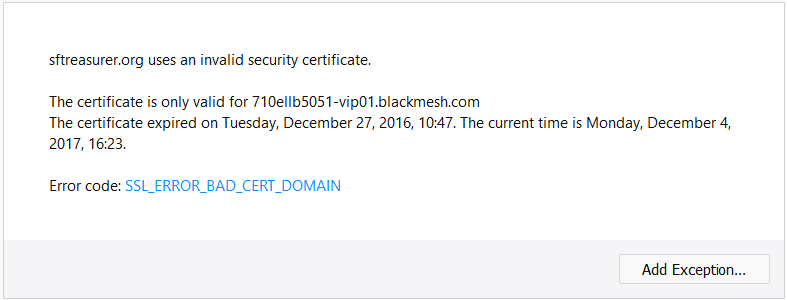 Oops the cert expired a year ago and is for the wrong domain. I get it, government web sites are often underfunded and don’t work well. Maybe they didn’t know how big a problem this presents in modern browsers that are enforcing SSL security. So I wrote a polite note to support. And got this response from the San Francisco 311 Customer Service Center. Please use the right protocol to access our website. Please use http://sftreasurer.org instead of https://… OK then…  The Internet mostly survived the leap
second two days ago. I’ve seen three confirmed
problems. Cloudflare DNS had degraded service; they have an
excellent postmortem. Some Cisco
routers crashed. And about 10%
of NTP pool servers failed to process the leap second correctly. The Internet mostly survived the leap
second two days ago. I’ve seen three confirmed
problems. Cloudflare DNS had degraded service; they have an
excellent postmortem. Some Cisco
routers crashed. And about 10%
of NTP pool servers failed to process the leap second correctly.
We’ve had a leap second roughly every two years. They often cause havoc. The big problem was in 2012 when a bunch of Java and MySQL servers died because of a Linux kernel bug. Linux kernels died in 2009 too. There are presumably a lot of smaller user application failures too, most unnoticed. Leap second bugs will keep reoccurring. Partly because no one thinks to test their systems carefully against weird and rare events. But also time is complicated. Cloudflare blamed a bug in their code that assumed time never runs backwards. But the real problem is POSIX defines a day as containing exactly 86,400 seconds. But every 700 days or so that’s not true and a lot of systems jump time backwards one second to squeeze in the leap second. Time shouldn’t run backwards in a leap second, it’s just a bad kludge. There are some other options available, like the leap smear used by Google. The drawback is your clock is off by as much as 500ms during that day. The NTP pool problem is particularly galling; NTP is a service whose sole purpose is telling time. Some of the pool servers are running openntpd which does not handle leap seconds. IMHO those servers aren’t suitable for public use. Not clear what else went wrong but leap second handling has been awkward for years and isn’t getting better. I ran into an awkward problem in Europe; I couldn’t get SMS messages. It’s a design flaw in Apple’s handling of text messages, its favoring of iMessage over SMS. If you turn data roaming off on your phone when travelling, you may not be able to get text messages reliably. If you have an iPhone suitably logged in to Apple’s cloud services, other iPhones (and Apple stuff in general) will prefer to deliver text messages via iMessage instead of SMS. You see this in the phone UI: the messages are blue, not green. In general iMessage is a good thing. It’s cheaper and has more features. The problem is Apple’s iMessage delivery requires the receiving phone have an Internet connection via WiFi or cellular data. If you have no WiFi at the moment and have data roaming turned off, your phone is offline. And so Apple can’t deliver to you via iMessage. They seem to buffer sent messages for when you come back online. Which is too bad, because your phone could still receive the message via SMS. Unfortunately iMessage doesn’t have an SMS delivery fallback. In practice this design flaw meant I had to leave data roaming turned on all the time because I needed to reliably get messages from another iPhone user. Which then cost me about $30 in uncontrollable data fees from “System Services”. Some $15 was spent by Google Photos spamming location lookups (a bug?), another $15 receiving some photo iMessages from a well-meaning friend. Admittedly the SMS fallback I’d prefer would also cost some money, but I think significantly less in my case. There’s a broader problem with iMessage which is that once a phone number is registered with it, iPhones forever more will not send SMS to that number. Apple got sued over this, so now they have a way to deregister your number. The world has had its first self-driving car fatality: a Tesla autopilot failed. So far the world hasn’t freaked out. I think self-driving cars will be way safer than human-driven cars. But there’s a lot of shaping the truth in Tesla’s announcement. (Fair warning: this blog post is uninformed hot take territory. I’m reacting to Tesla’s description of the crash, published two months after the death. We’ll know a lot more after an independent investigation.) Tesla’s press release is masterful. It characterizes the cause of the accident like this: the vehicle was on a divided highway with Autopilot engaged when a tractor trailer drove across the highway perpendicular to the Model S. Neither Autopilot nor the driver noticed the white side of the tractor trailer against a brightly lit sky, so the brake was not applied.A truck pulled out in front of the car on the highway. It may well have been an unavoidable accident. We’ll know eventually. But note the facility of claiming the “driver” didn’t notice the truck. How do we know that? The man is dead, we have no idea what he saw. I don't know about you, but I've never once failed to spot a white truck against a bright sky, particularly when I'm driving towards it at 70mph. I could see how a computer vision system would fail that test though. “The brake was not applied”. It takes time to apply the brakes after you see your death coming at you. Doubly so if you’re not actually driving. The passenger-behind-the-wheel was almost certainly not having his foot hovering gently near the accelerator / brake like an engaged driver would. That slows reaction time. I do this all the time with my simple cruise control and it scares the hell out of me when some slow jerk pulls in front of me and I don’t react quickly. (I also admire the comfort of “he never saw it coming”. Sort of takes the sting out of the next sentence, which describes the unfortunate’s grisly decapitation.) The real problem here is Tesla’s autopilot is a half measure, “driver assist”. It doesn’t fully drive the car. This design is the most dangerous of all worlds. I had this experience with my airplane’s autopilot all the time. At some point when the automation does enough work, you can’t help but check out mentally, let the machine take over. But if the machine isn’t capable of taking over entirely you can end up dead. That’s why I’m in favor of fully autonomous vehicles. No steering wheel, no accelerator, maybe just a single brake or other emergency cutout. Of course in this situation the software has to work reliably. Let's say a fatality rate of 50% of human drivers. And insurance and the law have to adapt to this shift of control to software. I believe the technology nerds are very close to having systems that can fully drive a car with no “driver assist” ever needed, at least in clear weather. It will be a better future. And those robot cars will kill some of their passengers. Far fewer than humans are killing now. The Economist infected readers with malware. The vector? PageFair, a technology for web publishers for circumventing ad blockers. The payload was a remote access tool. Goodbye bank accounts! This is outrageous. I install software on my computer to block ads, a clear statement of user preference. The Economist colludes with PageFair to ignore my choice, to run software on my computer that I explicitly don’t want. That software they run turns out to be installing malware. The folks who write things like PageFair need to be sued into oblivion. Not just the company; stop the people who built this abusive technology from ever creating software again. |
|


