Some Bits: Nelson's weblog

PageFair serves malware on the Economist

The Economist infected readers with malware. The vector? PageFair, a technology for web publishers for circumventing ad blockers. The payload was a remote access tool. Goodbye bank accounts!

This is outrageous. I install software on my computer to block ads, a clear statement of user preference. The Economist colludes with PageFair to ignore my choice, to run software on my computer that I explicitly don’t want. That software they run turns out to be installing malware.

The folks who write things like PageFair need to be sued into oblivion. Not just the company; stop the people who built this abusive technology from ever creating software again.

Some notes on the Louvre

The Louvre is one of the world’s great museums. It is enormous and full of riches and totally worth several repeated visits. I particularly like the sculpture, but I discover something new every time. The Louvre is also a poorly designed tourist experience. Some notes below on making it better.

My discovery this last visit was the Marie de Medici cycle. Phenomenal series of 24 enormous Rubens paintings of the life of Marie de Medici, commissioned by Marie herself in 1622 for the Palais du Luxembourg. It’s painting on a scale that can only exist in a place like the Louvre. The story they tell is fascinating, you could spend a whole day looking at these paintings with Wikipedia’s competent explanation. Long story short she married the King of France and took over as regent when he died. When her son wrested power from her she was exiled. Part of her securing her legacy was having Rubens make these elegiac paintings telling her side of the story. They’re particularly unusual in that it’s a woman being lionized. They are fascinating. And being Rubens, they are amazingly well executed.

My other discovery at the Louvre was how difficult it is to get inside the door because of the security theater. This article describes your options. The tacky Carousel de Louvre mall seems best. While it only has a single security line, it has fewer visitors. The fancy main entrance is an hour+ disaster, the Porte des Lions is often unstaffed, and the Rue Richelieu entrance requires a hard-to-buy advance ticket. Past security, the fastest way to get a ticket is from an automated machine. Don’t follow the sheep; look for the machines without a line.

Once inside the Louvre not everything is available; rooms are regularly closed. Why? Hard to say, but much of it appears to be staffing. Also be sure to check the Louvre is open at all; sometimes some part of the staff goes on strike and the whole museum is closed.

One should approach the Louvre with a plan but I never manage. “Avoid the crowds” is a good heuristic; the Mona Lisa is lovely but the experience of shoving in to see it is not. This time I amused myself taking bad snapshots of painting details: one and two. Next time I should finally get to their ancient Egypt collection.

One last thing: a plan for lunch. You need a break. Unfortunately there is no longer a good proper restaurant in the museum, just some mediocre cafeteria options. We did well heading outside to the Brasserie du Louvre, surprisingly well really. Best salade niçoise I’ve had in awhile.

Machine Learning

Machine learning is becoming a mainstream technology any journeyman software engineer can apply. We expect engineers to know how to take an average and standard deviation of data. Perhaps it’s now reasonable to expect a non-expert to be able to train a learning model to predict data, or apply PCA or k-means clustering to better understand data.

The key change that’s enabling high end machine learning like Siri or self driving cars is the availability of very large computing clusters. Machine learning works better the more data you have, so being able to easily harness 10,000 CPUs to process a petabyte of data really makes a difference. For us civilians with fewer resources, libraries like scikit-learn and cloud services make it possible for us to, say, train up a neural network without knowing much about the details of backpropagation.

The danger of inexpert machine learning is misapplication. The algorithms are complex to tune and apply well. A particular worry is overfitting, where it looks like your system is predicting the data well but has really learned the training data too precisely and it won’t generalize well. Being able to measure and improve machine learning systems is an art that I suspect can only be learned with lots of practice.

I just finished an online machine learning course that was my first formal introduction. It was pretty good and worth my time, you can see my detailed blog posts if you want to know a lot more about the class. Now I’m working on applying what I’ve learned to real data, mostly using IPython and scikit-learn. It’s challenging to get good results, but it’s also fun and productive.

Ad blocking is self preservation

The addition of ad blocking capability to iOS has brought on a lot of hand-wringing about whether it’s ethical to block ads in your web browser. Of course it is! Blocking ads is self preservation.

Ad networks act unethically. They inject huge amounts of garbage making pages load slowly and computers run poorly. They use aggressive display tricks to get between you and the content. Sometimes negligent ad networks serve outright malware. They violate your privacy without informed consent and have rejected a modest opt-out technology. Ad systems are so byzantine that content providers pay third parties to tell them what crap they’re embedding in their own websites.

Advertising itself can be unethical. Ads are mind viruses, tricking your brain into wanting a product or service you would not otherwise desire. Ads are often designed to work subconsciously, sometimes subliminally. Filtering ads out is one way to preserve clarity of thought.

I feel bad for publishers whose only revenue is ads. But they and the ad networks brought it on themselves by escalating ad serving with no thought for consumers. The solution is for the ad industry to rein itself way in, to set some industry standards limiting technologies and display techniques. Perhaps blockers should permit ethical ads, although that leads to conflicts of interest. Right now Internet advertisers are predators and we are the prey. We must do whatever we can to defend ourselves.

Ubiquiti: prosumer wireless networking

The Ubiquiti NanoStation loco 5M is good hardware. It’s speciality gear for setting up long distance wireless network links. All of Ubiquiti’s networking gear is worth knowing about if you’re a prosumer-type networking person. I will probably buy their wifi access points next time I need one.

I’m using two NanoStations as a wireless ethernet bridge. My Internet up in Grass Valley terminates 200’ from my house. I couldn’t run a cable but a hacky wireless thing I set up was sort of working. So I asked on Metafilter on how to do a wireless solution right and got a clear consensus on using Ubiquiti equipment. $150 later and it works great! Kind of overkill; the firmware can do a lot more than just bridging and the radios are good for 5+ miles. But it’s reliable and good.

The key thing about Ubiquiti gear is the high quality radios and antennas. It just seems much more reliable than most consumer WiFi gear. Their airOS firmware is good too, it’s a bit complicated to set up but very capable and flexible. And in addition to normal 802.11n or 802.11ac they also have an optional proprietary TDMA protocol called airMax that’s designed for serving several long haul links from a single basestation. They’re mostly marketing to business customers but the equipment is sold retail and well documented for ordinary nerds to figure out.

I still wish I just had a simple wire but I’ve now made my peace with wireless networking. It works well with good gear in a noncongested environment. I wrote up some technical notes on modern wifi so I understood the details better. Starting with 802.11n and MIMO there was a significant improvement in wireless networking protocols, it’s really pretty amazing technology.

A small UPS

The CyberPower CP350SLG is a good small uninterruptible power supply. Its only rated for 250W and it only has a few minutes of battery life. Not suitable for a big computer. But it’s perfect for backup power for network gear, like a router or a modem or the like. And it’s pretty small, just 7x4x3 inches. I made a mistake and bought APC’s small UPS first and the damn thing is ungrounded, which is ridiculous and dumb. I’ve had better luck with CyberPower UPSes anyway and this small one is exactly what I needed.

I’m a big fan of small UPSes. I don’t need something to carry me through a 30 minute power outage, I just want some backup that will keep my equipment running if the power drops for a couple of seconds. Because PG&E, you know? It’s a shame there’s no DC power standard, I bet you could make a DC-only UPS 1/4th the size with a lithium battery. But instead it’s all lead-acid batteries and producing 110V AC just to be transformed back to DC by all the equipment its powering. (That APC UPS does have powered USB ports, a small step towards DC UPS.)

Some day I should look into whole-house UPS units. A quick look suggests it’s about $2500 for 2.7kW, plus installation. This discussion suggests $10k is more realistic if you really mean a whole house.

Jupyter Notebooks: share exploratory coding

Jupyter Notebooks (née IPython Notebooks) feel like an important technology to me. It’s a way to interactively build up a computer program, then save the output and share it with other people. You can see a sample notebook I made here or check out this gallery of fancy notebooks. It’s particularly popular with data scientists. If you’re an old Python fogey like me it’s kind of a new thing and it’s exciting and worth learning about. I’m focussing on Python here, but Jupyter is now language-agnostic and supports lots of languages like R, Go, Java, even C++.

The notebook is basically a REPL hosted in a web browser. You type a snippet of code into the web page, run it, and it shows you the output and saves it to the notebook. Because the output is in the browser it can display HTML and images; see cells 6 and 7 in my sample notebook. There’s excellent matplotlib support for quick data visualization and lots of fancier plugins for D3, Leaflet, etc if you need.

Notebooks are made to be shareable. My sample is basically a static snapshot of a program’s output, there’s no Python running when you view it on GitHub. But you can also download that file, run the Python code on your own computer, and modify it however you want. That makes it an incredibly useful pedagogical tool. There are complex notebooks you can download that are effectively whole college courses in computing topics. And you can keep your own notebooks around as documentation of the work you’ve done. It’s a very powerful tool.

Behind the scenes what’s going on is the browser window acts like an attachable debugger. There’s a headless IPython server process running somewhere and the browser connects to it. It’s easy to run IPython yourself on your own machine or there are other options including cloud hosted live notebooks. Most of the display magic works by having objects define their own _repr_html_ methods, that’s what lets Pandas show that nice HTML table in cell 6.

Installing and starting IPython is pretty simple, just install it with pip and run ipython notebook. You’ll also want %matplotlib inline for inline plots. Notebooks seem particularly popular with data scientists; if you want a full Python data environment with Pandas, scikit-learn, etc then the Anaconda distribution is an easy way to get going.

Goodbye 1 Mbps

I just upgraded my Internet in Grass Valley from 1 Mbit/s to 12 Mbps. And it is so good. I no longer think about scheduling Internet access, about starting a download when I go to sleep or having the iPad download the newspaper while the coffee is brewing so it doesn’t interrupt my email. And I no longer worry about software upgrades killing my network.

1 Mbps is just not fast enough for modern Internet. That’s 450 MBytes/hour, or about 30 minutes to update a typical medium-size program. It’s just about fast enough to stream a 360p video from Youtube, but you better not be doing anything else. It takes a little over a minute to download a crappy modern web page. I’d never click on video links and those cute animated cat GIFs everyone likes were just pain. And while slow is annoying but predictable; the worst thing is trying to do two things at once online. Once a week I’d be wandering around the house unplugging devices because some autoupdate decided to run and ruined whatever I was trying to do on my desktop computer.

Right now I think there’s a usability inflection point at 6 Mbps. That’s fast enough to watch a 1080p video stream while leaving some headroom to do something else; casual web browsing or the like. Faster is better of course; I have 100 Mbps in San Francisco and it is amazingly good. The FCC recently defined broadband at 25 Mbps, seems like a good goal.

Why was my Internet so slow? My house is in a rural area. Only a mile out of town, but all hills and trees and only a few houses. The Comcast/AT&T duopoly refuses to provide service to houses like mine and the toothless FCC won’t compel them. Wired service does not exist. Our local wireless ISP SmarterBroadband is pretty good but we were limited to 900MHz radio links because we didn’t have a clear view to one of the other sites in their peer to peer network. I finally paid someone to climb 70’ up a tree to get a good view and install a 5GHz antenna. Works great, at least until we have to repair it.

I don’t know for sure, but I suspect SmarterBroadband is only able to provide my service thanks to federal subsidies. They upgraded a lot of their internal network in the last year with a federal grant. They were also nicely proactive in getting us to upgrade, which I suspect is tied to some sort of bounty or benchmark for customer bandwidth.

Sonoma Brinery pickles

There’s two kinds of cucumber pickle in the world: fermented and vinegar. Vinegar pickles are what you generally see in the grocery store, the Claussens and Vlasics. They’re not bad but they are awfully salty and the industrial vinegar is not a very good flavor. Fermented pickles are made without vinegar. Instead the vegetable is salted and then fermented to encourage lactic acid bacteria, which makes the pickles sour.

Sonoma Brinery makes an exceptionally good fermented pickle. They’re available in grocery stores in the US west, sold refrigerated. And while they’re not cheap at about $1 a large pickle they are delicious. Great flavor and good snap. They call them “half-sour”. They have a pleasant sour taste but it’s subdued, also the salt level is quite low. The result is a mild, fresh tasting pickle, something I much prefer to Bubbie’s intensely sour and salty fermented pickles. Sonoma Brinery’s fresh sauerkraut is also delicious.

Fermented foods are newly trendy thanks to the probiotic food fad (move over, gluten free). I could care less about the fake food science but I am glad that fermented flavors are more widely available in grocery stores. I’m not a fan of kombucha, too expensive and too sweet. But sauerkraut, kimchi, etc are delicious. I’ve started trying to ferment my own things now with Sandor Katz’s excellent book.

India 2015

Ken and I went to India in February, a three week wealthy tourist’s trip. Absolutely loved it, would like to go back, enthusiastically recommended it. I documented most of the trip on Twitter as I went. I collected all the tweets in a Storify page; quite readable with lots of photos.

Our trip started in Delhi. From there we took a luxury tourist train through Rajastan for seven days to Mumbai. Then flew to Kolkata, then to Varanasi, then back through Delhi to home. So many amazing experiences. Some tourist sites that stuck with me most are the Qutb Minar in Delhi, the Jantar Mantar observatory in Jaipur, the Elephanta Caves in Mumbai, the Marble Palace in Kolkata, and offerings to Shiva in Varanasi.

But what really struck with me is newfound respect for the sophistication of India. I had no idea what to expect. India is an enormous place. With a very rich and complex cultural history and a colonial period that was not entirely rapacious. Modern India is a dynamic, exciting, upwardly mobile place. With nearly 1.3 billion people. We all know China is the up-and-coming economic story but India is close behind it. I met a lot of Indians with pride, pride in their cultural history, in their intellectual history, in their new prime minister.

On a more mundane level I also came away with excitement for the diversity of Indian cuisine. The Indian food we get in the US is one specific type of cuisine: Mughlai, butter and cream and earthy rich flavors. But there’s a huge variety of other foods. Coconut milk in South Indian cuisine, sour fruits and shellfish in Kerala cuisine, strong mustard sauces in Bengali food. A particularly great day was cooking lessons in Delhi with the author of a Chettinad cookbook. There’s a lifetime of technique to learn just in the art of tadka, the way spices are precisely roasted or fried at various moments in preparation.

St. John’s School and the Confederacy

Johnny Reb was my school’s mascot. A big goofy fiberglass Confederate soldier. The school nickname was “The Rebels” and my hazy memory is the Confederate battle flag was occasionally used as decorative color. This seemed perfectly normal in Houston, Texas in the 1980s. Part of our Southern Heritage.

Young kids are blameless in this kind of thing, victims of indoctrination. By the time we got old enough for high school a lot of us found the racist association embarassing. A year after I graduated the upper class voted to change the mascot and banish any symbols of the Confederacy. (Which may or may not have had anything to do with the school also hiring its first African American teacher.) It took another 14 years before they changed the name from “Rebels” entirely.

I went to a great prep school and am thankful for the excellent education I got there. But only recently have I understood how white privilege helped gain me access to that education. SJS was not overtly racist or discriminatory. It just perpetuated (and still perpetuates) the advantages of whites. It is part of the legacy of one of the two Original Sins of America, the societal damage still extant six generations after the end of slavery.

South Carolina’s use of the Confederate battle flag is controversial again this week. The defense that the flag symbolizes Southern Heritage is sincere, which is what makes endemic racism so dangerous. The Confederate flag represents the South’s pride in slavery, treason, and victimhood. That flag is a hateful thing, deliberately hateful.

Cooper Hewitt Museum: the Pen

Here is a record of my visit to the Cooper Hewitt Museum in New York. There were 22 objects I liked enough to collect and I made 3 things myself. (Favorites: poster, staircase model.) I will be able to remember these things forever because of The Pen.

The Pen is a new thing at the Cooper Hewitt. My buddy Aaron Straup Cope was one of its creators. It’s pretty simple to use. When you visit the museum they loan you a fancy digital pin, on a lanyard. You point it at the labels for objects you like. You can also use it to design things on big computer screen tables. When you’re done you can visit the website on your ticket any time to see your collection. Unlike 90% of fancy museum technologies, this one actually works. It’s used a lot. It’s designed to keep working for many years.

Aaron and his colaborator Seb Chan wrote a very long essay on the design of The Pen. It’s totally worth reading if you are interested in this kind of technology. But for the tl;dr crowd, a few key points.

  • The pen is the smart component with the powered computer. The wall tags are passive NFC beacons. That is backwards from what I would have guessed and it’s that way for good reasons.

  • Every object in the Cooper Hewitt has a unique identifier and an entry in a database. The museum has an API for accessing that database. Aaron’s mystical belief in the power of integer IDs is justified. The ID is the bolt that connects the museum’s curation expertise to the rest of the world.

  • Building complex tech that will work reliably in a real museum for many years is difficult.

The impressive thing to me is how simply all the tech worked without requiring you to understand or learn it. I wasn’t too excited about the design-your-own-objects part, but the tool for remembering the stuff I liked was excellent. I do wonder if there’s a simpler way to just build the collection product, something between this fancy three year project and simply adding some ugly QR-code stickers. Any new system designed for a museum will be well informed by The Pen.

“I like your blog”

I’m at the State of the Map conference. Two different people here said “I like your blog!” on meeting me. It’s so nice to hear it! It’s a nice compliment, and encouragement for the writing I’ve done, and also establishes context for the following conversation.

It also felt terribly retro. The other half of that conversation was “Well it’s been awhile.. I don’t use RSS any more and with Twitter..” Yeah, I get it, personal blogs are a dying medium.

I’m really on the fence about what to do with this blog. I want to keep it, but I don’t post often. I set too high a bar for content quality so I don’t post often. (See my secret work blog for what badly edited stuff looks like.) Also the design is depressingly outdated now, not to mention the software. Part of me wants to abandon it entirely but meeting people who like my blog keeps me motivated.

Basic stock option questions

It’s common for tech industry employees to be compensated with stock options. Stock options are complicated and many engineers I know are terribly naïve about how they work. But options are often the most valuable part of an employee’s compensation! This engineer’s guide to stock options is good reading.

Here are some basic questions every owner of stock options should ask their employer. With these answers an accountant can work out the value of the option package and plan a tax strategy.

  1. How many shares of the company will I own?
  2. How many shares of the company exist?
  3. What percentage of the company will I own?
  4. What is the strike price of my options?
  5. What is the fair market value of the stock today?
  6. Can I early exercise my options?

Many companies are reluctant to answer #2 and #3 (they are equivalent). Trying to keep an employee in ignorance about this is bullshit. Knowing what percentage of the company you own is the only way to evaluate your option package. Companies will generally answer this question if you press hard enough; if they refuse, it is a very bad sign.

Tax strategy is important for several reasons. Early exercising could save you ~20% in taxes later on. But even more importantly, early exercising could save you 100% should you leave the company. Most option agreements include a clause where your options disappear 30 or 90 days after you stop being an employee. If you quit and can’t afford the taxes to exercise those options, you can lose everything. Planning ahead matters.

Bang path addressing

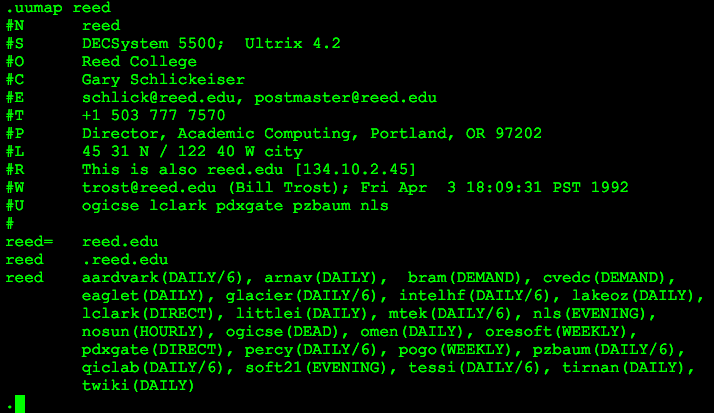
One of my first email addresses (in 1989) was tektronix!ogicse!reed!minar. I’m feeling old today and I’m guessing half my readers have never seen an email address like that. It was from the long long ago, in the time that was before the Internet, when UUCP was the main Unix mail system.

My unique email address was reed!minar. But there was no ubiquitous routing infrastructure for mail, no global addressing. Unix network email was store-and-forward based on scheduled phone calls and modem transfers via uucico. Each host only talked to a few other hosts. Reed talked to OGICSE regularly, so my address suggested mail be forwarded through there. Other mail hosts might or might not know how to get mail to OGI but they certainly knew how to get to Tektronix, so that sufficed as a global route. UUNET was a hub that knew how to talk to everyone; often addresses began uunet!.

The essential idea is that UUCP email addresses included not just the address but the route to that address. It’s a powerful idea. But modern Internet systems don’t do that. Instead we rely on global address lookup systems like DNS and global routing systems like BGP. (If anyone can think of a modern system that includes routes in names, please email me via SMTP)

UUCP users did build a routing system; pathalias. It relied on UUCP maps published to comp.mail.maps. Those maps were discontinued in December 2000. I haven’t found a modern view onto this data; it’d be fascinating to see the history of the growth of UUCPnet. telehack has a usable snapshot of the data, try uumap reed for instance.

How do you know your code works?

I’ve been doing some fiddly coding for the OpenAddresses project. It reminds me of one of my favorite engineering interview questions. “How do you know your code works?”

The arrogant candidate says “I’m smart so I know my code is good”. That’s certainly a bad sign, although sometimes they’re right. Slightly wiser responses are “I run it and look closely” or “I trace the code and make sure it works like I expect”. Better, but too manual. The truly enlightened say “I have an automated test suite” and then you’re off to the real questions about how to test code properly.

I have a deep distrust of code. Software is organic, unpredictable, chaotically complex. It’s difficult enough to understand what the code you write now is likely to do right now with expected inputs. But hostile inputs, or a weird environment, or the same code a year from now, or the slightly modified open source contribution in some fork somewhere? Forget it. That’s why automated tests are so valuable. It’s a way to demonstrate the code is doing what you expect it to.

Writing good tests is hard, almost as hard as writing good code. Modern environments have a lot of testing tools you should learn. From language unit test frameworks to mock objects for servers to fuzz testing to various continuous integration systems for functional tests. GitHub projects have the miracle which is Travis CI, free no-fuss continuous build and test for any open source project. It’s amazing.

So until software correctness proofs become a real tool we can use in real production code, ask yourself how you know your code is going to work. If you’re honest, you probably don’t. But some testing will certainly help give you at least a little confidence.

Logging in to Astound “Pay my Bill”

I love the Internet service I get from Astound, but not so much their online account system. The billing login is pretty screwed up. Things to know:

  • The billing credentials are separate from your “Internet Account Manager” credentials.
  • Username and password will both be forced to lowercase.
  • The password recovery system will mail you your password in plaintext.
  • Parts of the online system ask for a registration password. That password is “astound”.
  • Astound formats account numbers in three fields, like 005 0123456 01. The form presents two boxes: try 005 012345601

Astound cable internet in SF

Astound is a good ISP. I started getting Internet from them a few months ago, upgrading from a $50 6Mbps DSL link to a $70 100Mbps cable link. And it’s like I can see through time. The difference in usability is astonishing. Equally importantly, Astound has been entirely reliable and trouble-free.

The key thing is Astound is not Comcast. Comcast is an evil company with a long history of breaking TCP/IP in various ways that harm customers. Astound just provides pure, sweet, clean bits. Installation requires they bring their own coaxial from the pole to your house. They also offer phone and TV packages. The customer experience is a bit squirrely, I wouldn’t count on them for email hosting or tech support. But the basic Internet service is terrific.

I’d previously been a very happy Sonic DSL customer. They are also a terrific independent ISP with fantastic service. Unfortunately DSL is limited by the technology, the best they could deliver to my house is 12Mbps and that would have been significantly more expensive than Astound. Sonic is now working on fiber-to-the-house, including San Francisco, which should be terrific if they can do it.

We’re very lucky in SF to have a competitive ISP market. We have two DSL providers, two cable providers, and a surprisingly robust fixed wireless provider in MonkeyBrains. Most of the urban US only has two options and large parts of the rural US don’t even have that. The Sonic CEO’s 2011 blog post about broadband duopoly is fantastic background for how we got to have such crummy service in the US.

Ancestry.com; researching uncertain data

Ancestry.com is a good web site. It’s a tool for researching and maintaining family history, genealogy. It’s also a remarkably sophisticated database, data repository, and user interface with a lot of lessons for people who design webapps. I’m particularly fascinated that their target market is older people, your grandma who’s not so good with computers but has gotten interested in family history. But in no way is Ancestry dumbed down.

The web UI is great. The primary view is a visual family tree, a refocusable graph view that’s not much like a web page but works great in the browser. You then click through on a name to get to a person’s profile page that’s more like a normal document view. From there you do extra research, add information, etc.

The facts and sources tab on a person’s profile is my favorite part of Ancestry. They don’t just track a fact like “Born on 29 May 1917”, they also track the source of that fact, like “birth certificate” or “census record”. With a link right to a scan of the source document with the relevant information highlighted. Most people’s genealogy is full of bad data. (No, you’re probably not related to that 16th century king.) Ancestry provides a model for establishing the veracity of the data you record. Crowdsourced databases like OpenStreetMap and Wikipedia would benefit from more explicit attribution.

Ancestry is particularly useful because they have a fantastic collection of American genealogical records. The census records are the ones I use most frequently. Meticulously transcribed images of 100+ year old handwritten pages, completely searchable on fields like name, address, age, etc. They’ve collected all sorts of other data too: immigration records, social registers, railroad payrolls.. All this diverse hand written data, presented in a uniform computer search interface. They even proactively find hints for your family members for you to review and add to your data.

The app has some problems. Most of their data collections are only useful for researching Americans. Grassroots genealogists complain about Ancestry being too commercial and proprietary (see GEDCOM). Some people snark about the site being so grounded in Mormonism, although that criticism seems unfair to me. I’ve enjoyed doing a bit of family research in Ancestry. Mostly I’m impressed with the usability of the web app given how complex the data is.